
Connectors
Workday HCM Connector
Connectors in Bloo
Updated 2026-08-17
Overview
Workday Human Capital Management (HCM) is a cloud-based system that helps businesses manage their people. It is a suite of HR solutions that can help businesses streamline processes, improve productivity, and engage their employees. The Workday HCM connector utilises the User Activity Logging REST API to retrieve log entries that contain information about Workday user activities.
Prerequisites
- Client ID – Workday API client ID
- Client Secret – Workday API client secret
- Refresh Token – Workday API refresh token
- Tenant Details – The tenant name and tenant hostname
Create Integration User and OAuth Token
The following steps describe how to generate the necessary key values:
Run Create Integration System User task and create user ISU – REST.
Run Register API Client for Integrations task and create client RESTAPI. Please refer to admin guide for Scope field: Select the functional areas to which your OAuth 2.0 client requires access. Select the functional areas for domains of any custom objects to which you might require access. Use caution to expose only those functional areas that you specifically require access to. If your OAuth 2.0 client requires access to core Workday domains that aren't in any functional areas, select the Include Workday Owned Scope check.
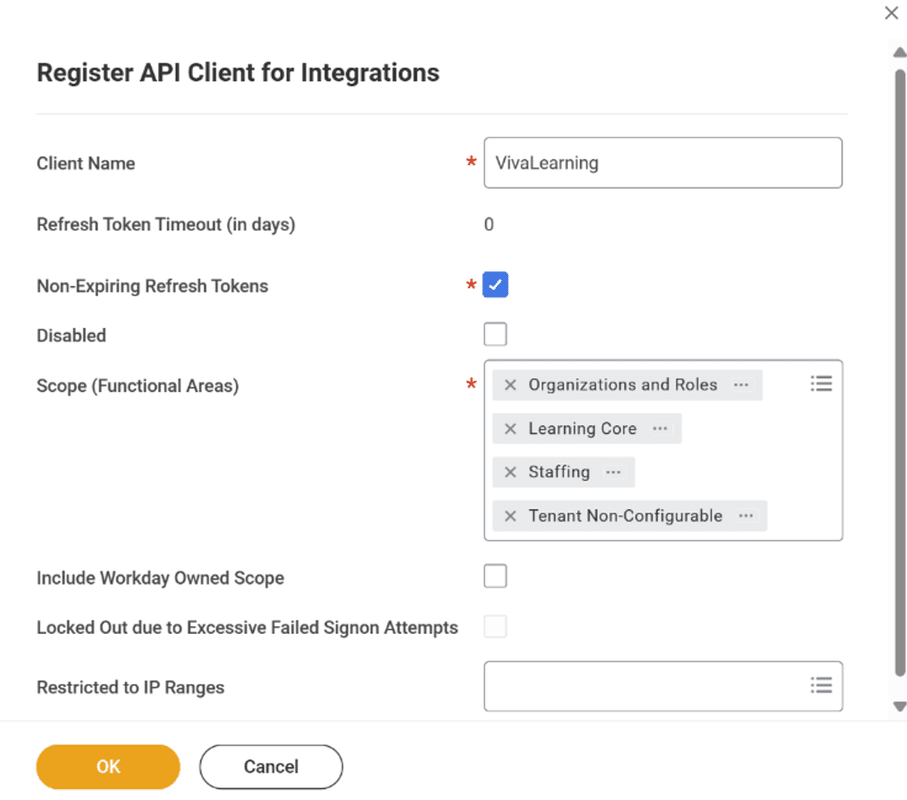
| ⚠ Make sure to save the Client Secret value as it is invisible from here on. |
- From View API Clients report, note the Token Endpoint and Workday REST API Endpoint from the top of the page.
ℹ Note: The Workday REST API Endpoint follows this format: https://<Tenant Hostname>/ccx/api/v1/<Tenant Name>. For example, in https://wd2-impl-services1.workday.com/ccx/api/v1/yourtenant_abc, the Tenant Hostname is wd2-impl-services1.workday.com and the Tenant Name is yourtenant_abc. |
- Open SoapUI application to generate an access token using the created API client. Click REST Project with URI of the token endpoint. Update the Method to POST and change the media type to Text/XML. Then fill the querystring as follows (replace the parameters with values from your tenant):
grant_type=refresh_token&refresh_token=<Refresh Token>&client_id=<Client ID>&client_secret=<Client Secret>| ℹ The access token is generated when you submit the request. |
Access the Create Security Group task. Set the type as Integration System Security Group (Unconstrained) and specify a name (e.g. ISSG XX RESTAPI_SIEM_TCS).
Access the Edit Integration System Security Group (Unconstrained) task for the group you just created. Under Integration System Users, specify the user created in Step 1.
Access the View Domain task for the domain System Auditing. Select Domain → Edit Security Policy Permissions from the related actions menu. Add the security group you created to both tables.
Access the Activate Pending Security Policy Changes task and activate the changes you made.
Enable User Activity Logging
The User Activity Logging REST API enables retrieval of log entries about Workday user activities. Before submitting API requests, enable logging in the tenant:
Access the Edit Tenant Setup – System task.
Select the Enable User Activity Logging option.
Configure the Workday HCM Connector in Bloo
All connector configuration is done from the Datasource page in Bloo.
| Field Name | Description |
|---|---|
| Connector Name | Enter a name for the connector. |
| Tenant Name | Enter the Workday tenant name. |
| Tenant Hostname | Enter the Workday tenant hostname |
| Client ID | Enter the Workday API client ID. |
| Client Secret | Enter the Workday API client secret. |
| Refresh Token | Enter the Workday API refresh token. |
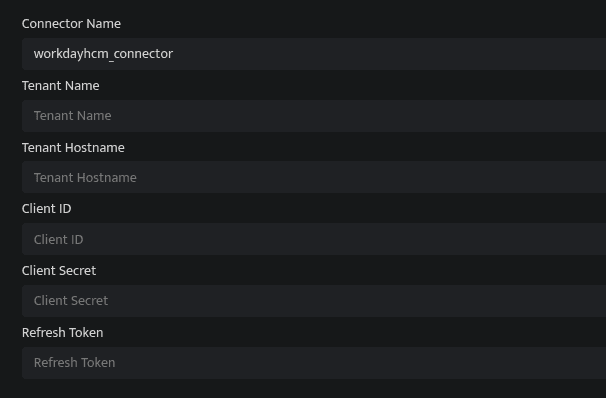
Click Save after entering all the required details.
Bloo will validate the configuration automatically.
Navigate to Collection Status and confirm the connector is listed with a status of Active. This signifies the connector is configured successfully and data is ready to ingest.
| ✓ When the connector appears in Collection Status with status Active, it is configured successfully and data is ready to ingest. |
Related Links
Bloo — Collection Status | Bloo — Connector Validation | Workday — User Activity Logging REST API | Bloo — Troubleshooting Connector Validations
Related
Was this page helpful?