
Connectors
Haltdos Connector
Connectors in Bloo
Updated 2026-08-17
Overview
Haltdos integrates with Bloo using the Haltdos Connector. The connector fetches various types of WAF events triggered for a given Stack and Zone.
Prerequisites
- Stack ID
- Resource ID
- API Token
How to Create a Stack
- To create a new stack, contact [email protected].
- Once the stack has been issued, you can view it in the Haltdos console.
To access your stack:
Log in to your Haltdos account.
Click on the username at the top right side and click on My Stack in the drop-down menu.
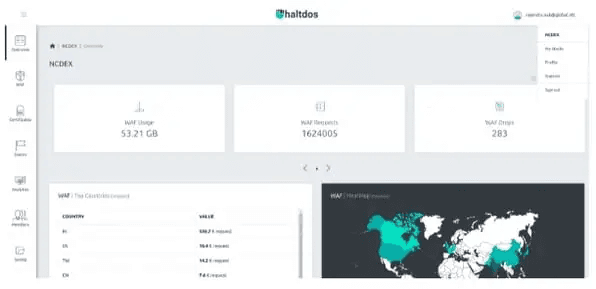
How to Get the Stack ID and Resource ID
- To get the Stack ID and Resource ID, contact [email protected].
How to Get the API Token
- Click on the username at the top right side and click on Profile in the drop-down menu.
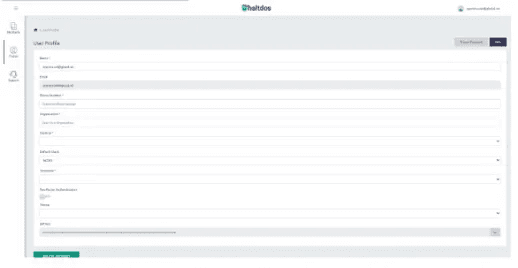
- Find the API Token and save it.
Configure the Haltdos Connector in Bloo
All connector configuration is done from the Datasource page in Bloo.
| Field | Description |
|---|---|
| Connector Name | Enter a name for the connector. |
| Stack ID | Enter your Haltdos Stack ID. |
| Resource ID | Enter your Haltdos Resource ID. |
| API Token | Enter the API Token obtained from the Haltdos console. |
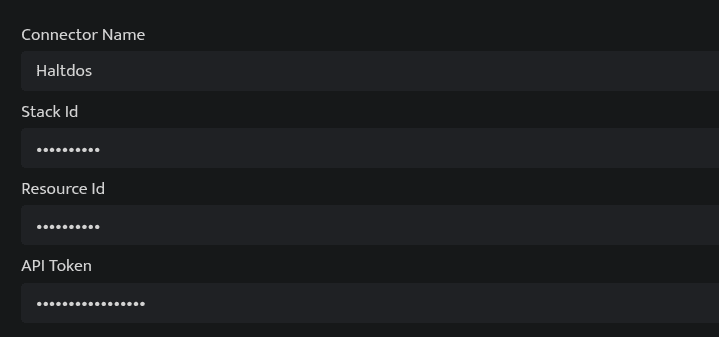
Click Save after entering all the required details.
Bloo will validate the configuration automatically.
Navigate to Collection Status and confirm the connector is listed with a status of Active. This signifies the connector is configured successfully and data is ready to ingest.
✓ When the connector appears in Collection Status with status Active, it is configured successfully and data is ready to ingest.
Related Links
Bloo — Collection Status | Bloo — Connector Validation | Haltdos Documentation
Related
Was this page helpful?