
Connectors
Network Traffic Analysis Connector
Connectors in Bloo
Updated 2026-08-17
Overview
Network traffic analysis (NTA) is a method of monitoring network availability and activity to identify anomalies, including security and operational issues. Common use cases for NTA include:
- Collecting a real-time and historical record of what's happening on your network.
- Troubleshooting a slow network.
- Improving internal visibility and eliminating blind spots.
The NTA Connector is used to gain an insight into all the traffic flowing through the setup network and fetch logs for different protocols, connections, etc. while listening on a particular network interface of the host system on which it is deployed. These include all HTTP sessions with their requested URIs, key headers, MIME types, and server responses; DNS requests with replies; SSL certificates; key content of SMTP sessions; and much more.
By default, the Syslog traffic and the Connection traffic on the host system where the connector is deployed is filtered out to reduce noise in the log collection. This helps to capture events for critical protocols for network security monitoring.
Benefits of NTA
- Improved visibility into devices connecting to your network (e.g. IoT devices, healthcare visitors).
- Meet compliance requirements.
- Troubleshoot operational and security issues.
- Respond to investigations faster with rich detail and additional network context.
Note NTA by itself does not pull logs from any other host systems. It ingests the logs received on a NIC card on Adapter. For example: you can configure a dedicated and separate NIC as NTA for capturing span traffic on Adapter.
Configure the NTA Connector in Bloo
All connector configuration is done from the Datasource page in Bloo.
- Follow the initial configuration steps in Connector Configurations.
- Click the edit icon and enter the following details:
| Field Name | Description |
|---|---|
| Connector Name | Enter a name for the connector. |
| Enable Connection Logging | Enable connection logs generated on host system. |
| Interface to Monitor | Network Interface on host to monitor network traffic. |
| Hosts to Filter | List of Hosts to filter network traffic to and from particular hosts. |
| Number of Consumers | Number of consumer processes to run for the network traffic log consumption. |
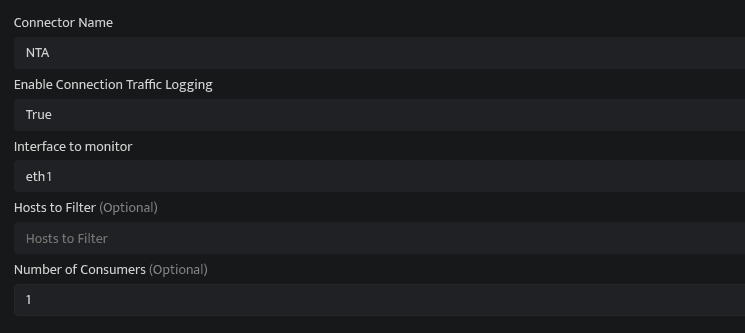
- Enter the above details and click Save.
- Bloo will validate the configuration automatically.
- Navigate to Collection Status and confirm the connector is listed with a status of Active. This signifies the connector is configured successfully and data is ready to ingest.
Confirmed When the connector appears in Collection Status with status Active, it is configured successfully and data is ready to ingest.
Related Links
Bloo — Collection Status | Bloo — Connector Validation | Bloo — Connector Configurations
Related
Was this page helpful?