
How-to guides
View Enrichment
This page will help you understand the step by step procedure to view the details of an enrichment.
Updated 2026-08-14
This page will help you understand the step by step procedure to view the details of an enrichment.
How to view Enrichments?
- Hover on the System icon on the left navigation bar of the Home screen and select Enrichment, the following page will be displayed.
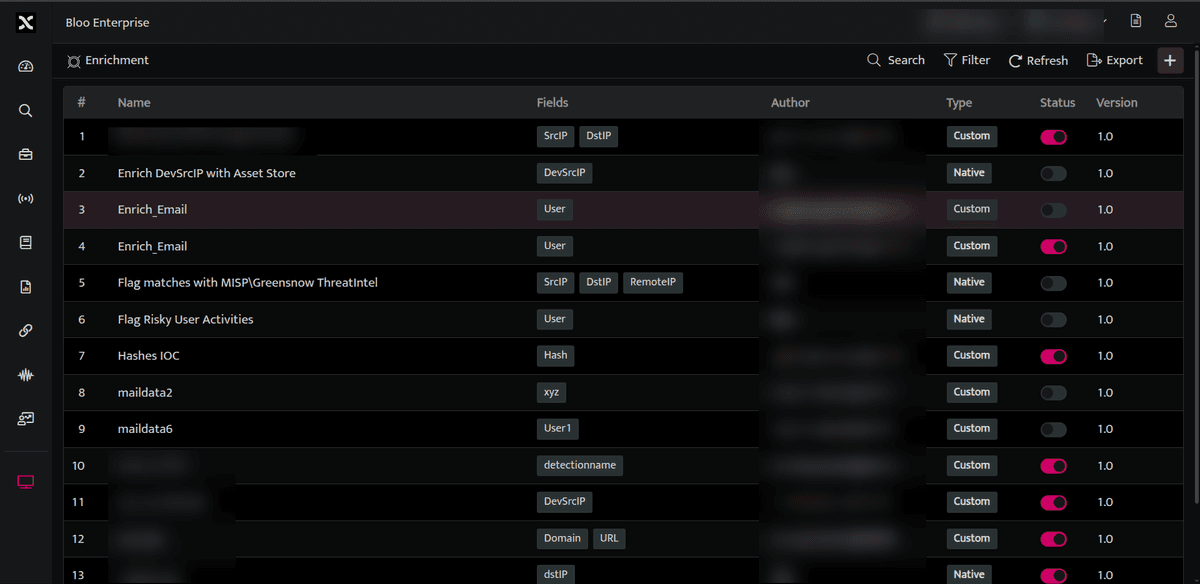
The above page displays the following details.
| Field | Description |
|---|---|
| Name | Name of the enrichment bucket |
| Field | Fields that would be enriched based on the bucket |
| Author | The email address of the user who created this enrichment bucket |
| Type | The type of enrichment, whether it is a custom / native enrichment. Custom: A customised enrichment created as per particular requirement. Native: An enrichment in its native format. |
| Status | The bucket is active / inactive |
| Version | Displays the version number of the enrichment bucket. |
Related
Was this page helpful?