
Connectors
Webhook
Automation Guide for Bloo
Updated 2026-08-17
1. Overview
Webhook provides you with a simple interface to integrate Bloo with various third-party applications' webhooks and APIs. The Webhook plugin has a handy feature which allows you to use $Variables for substitution in the configuration. Check the Webhook example for Slack to understand its use case.
2. Pre-requisites
You need to provide the following data depending on the third-party webhook or API you intend to use:
- URL
- Headers
- Payload
3. Configuration
- Follow the initial configuration steps in How to Configure Automation? in the Bloo Knowledge Base.
- Click the edit icon to add details.
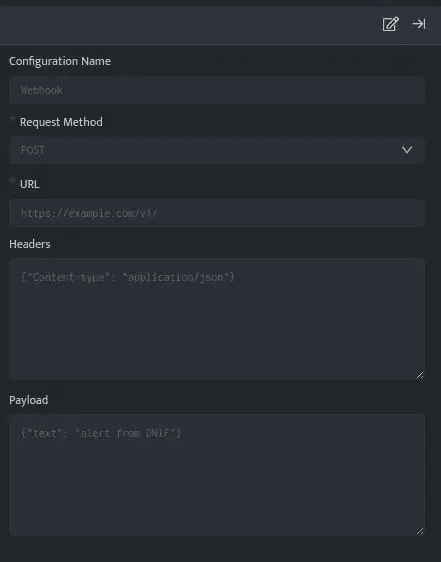
| Field | Description |
|---|---|
| Configuration Name | Name for the configuration. |
| Request Method | Select the request method from the drop-down (e.g., POST, GET). |
| URL | URL for the webhook or API. |
| Headers | Appropriate headers for the webhook or API in JSON format. |
| Payload | Appropriate payload for the webhook or API in JSON, Text, or XML format. |
Variable substitution is supported in the configuration viz; URL, Headers and Payload.
- Enter the above details and click Save.
Note: To associate a webhook automation configuration with the Investigate panel, it must provide exactly one substitution parameter — either $User or $Host.
4. Examples
Listed below are a few Webhook integration examples. These examples will help you quickly get started with the configuration process by demonstrating practical use cases:
- Slack
- Microsoft Teams Channel
- ClickSend
- PagerDuty
- JiraServiceDesk
- ServiceNow
- New Relic
- Opsgenie
- TrendMicro
5. Related Links
Related
Was this page helpful?