
Connectors
PICO Legacy Connector
Connectors in Bloo
Updated 2026-08-17
Overview
PICO Connector is used to receive logs from one or multiple PICO at a remote location. The PICO Connector is configured and running by default on port 7426 TCP when the Adapter is onboarded into the Bloo tenants.
PICO Legacy Connector is used to maintain backward compatibility with PICO v6.
Prerequisites
Ensure that the port where PICO is forwarding logs is open and is not occupied by some other service to enable forwarding of log events.
Configure the PICO Legacy Connector in Bloo
All connector configuration is done from the Datasource page in Bloo.
| Field Name | Description |
|---|---|
| Connector Name | Enter a name for the connector. |
| Listener Port | Enter the port number at which you want to start the connector. |
| Number of Processes | Number of processes to run for the connector. |
Warning Ensure the Listener Port entered here matches the port on which your PICO is configured to forward logs. If the port is already in use by another service, the connector will not start correctly.
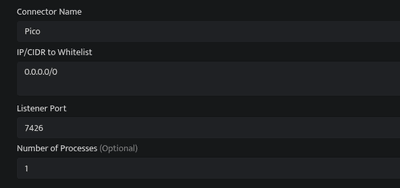
Click Save after entering all the required details.
Bloo will validate the configuration automatically.
Navigate to Collection Status and confirm the connector is listed with a status of Active. This signifies the connector is configured successfully and data is ready to ingest.
Confirmed When the connector appears in Collection Status with status Active, it is configured successfully and data is ready to ingest.
Related Links
Bloo — Collection Status | Bloo — Connector Validation | Bloo — PICO Troubleshooting | Bloo — Troubleshooting Connector Validations
Related
Was this page helpful?