
How-to guides
Search and Filter Cases
Searching and filtering cases allow users to quickly locate and focus on specific cases by applying relevant filters
Updated 2026-08-17
Searching and filtering cases allow users to quickly locate and focus on specific cases by applying relevant filters
Search Cases by name
- On the left navigation bar, Click the Cases icon to view the following page.
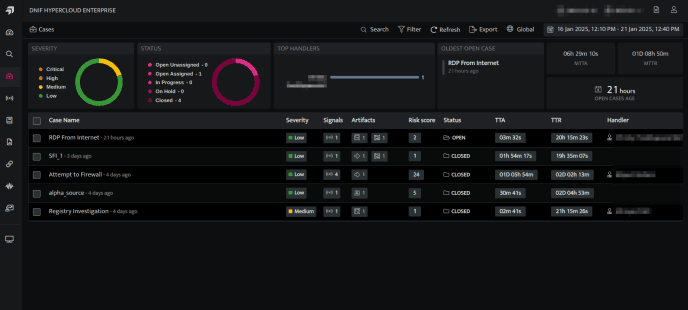
- Users can search for existing Cases by the Case name using the Search

Filter Cases
- On the left navigation bar, Click the Cases icon to view the following page.
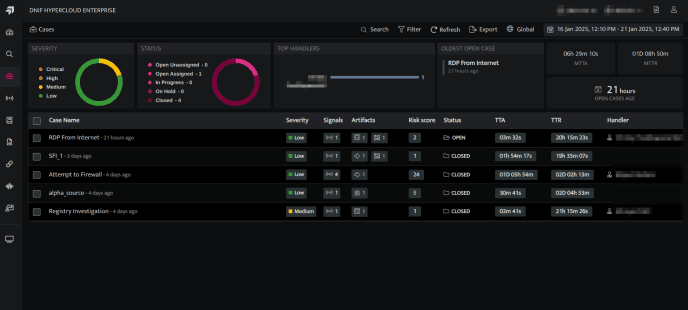
- Click the Filters icon to apply Filters.
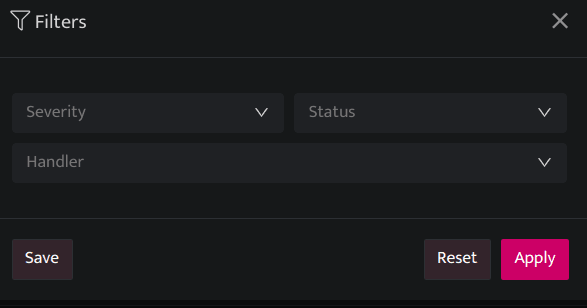
| Fields | Description |
|---|---|
| Severity | Users can filter the Case by Severity(low, medium, high, critical) |
| Status | Users can filter the Case by Status(Open, In-Progress, On-Hold and Close) |
| Handler | Users can filter the Case by the Handler name. |
| Apply | Click to apply the filter |
| Reset | Click to reset the filter |
| Save | Click to save the filter |
- Click the Date Time picker to filter cases by duration.
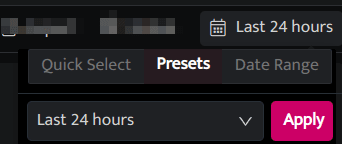
- Users can select the following time ranges as per their requirements.
- Quick Select: In this category, you can enter any number and set to retrieve the data for that many minutes/hours or days.
- Presets: Lists all the available preset options.
- Last 5 minutes: Displays signals raised during the last 5 minutes.
- Last 30 minutes: Displays signals raised during the last 30 minutes.
- Last 1 hour: Displays signals raised during the last 1 hour.
- Last 24 hours (default value): Displays signals raised during the last 24 hours.
- Last 7 days: Displays signals raised during the last 7 days.
- Last 30 days: Displays signals raised during the last 30 days.
- Today: Displays signals raised today.
- Yesterday: Displays signals raised yesterday.
- Previous Month: Displays signals raised in the previous month.
- Date Range: Select a custom date and time range from the calendar.
- Apply: Click to apply filter.
Related
Was this page helpful?