
Reference
How to view Workbooks?
How to view the folder-wise list of existing workbooks in a tenant.
Updated 2026-08-17
How to view Workbooks?
Hover on the Workbooks icon on the left navigation bar, it will display the folder-wise view of existing workbooks in the tenant (previously known as cluster).
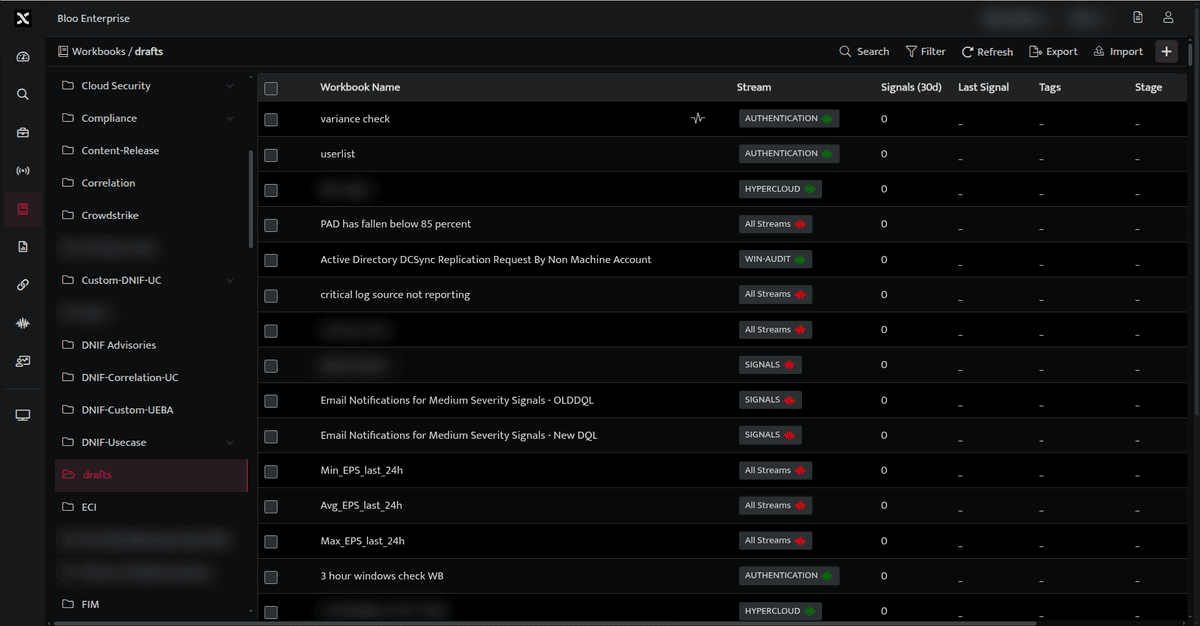
The following fields appear in the workbook list:
| Field | Description |
|---|---|
| Workbook Name | Displays the name of the workbook. |
| Stream | Displays the stream(s) associated with the workbook. The green indicator  shows that there is data in the stream(s). The red indicator shows that there is data in the stream(s). The red indicator  shows that there is no data in the stream(s) shows that there is no data in the stream(s) |
| Signal(30d) | Displays the total number of signals raised in the last 30 days |
| Last Signal | Displays the time when the last signal was raised |
| Tags | Displays the labels assigned to the workbook |
| Stage | Displays the current environment of the workbook (test, beta, dev, prod) |
| Version | Displays the current version number of the workbook |
| Updated | Displays when the workbook was modified |
 |
Used to search for an existing workbook |
 |
Used to filter existing workbooks based on the following: Detection Tactic, Detection Technique, Detection Severity, Detection Score, Enabled, Schedule, Source Stream, Tags, Stage |
 |
Used to refresh and display the updated workbook list |
 |
Used to export an existing workbook in the following format. PDF, XLSX, CSV, ZIP, Select Fields |
 |
Used to import workbook |
 |
Used to create a new workbook |
 |
Indicated the workbook is streamed |
 |
Click this to delete the specific workbook |
 |
Indicates that the workbook is scheduled |
Related
Was this page helpful?