
Reference
Duration
The duration pipe lets you specify the start and end timestamp for retrieving events.
Updated 2026-08-17
Duration
The duration lets you specify the start and end timestamp for retrieving events
The following table lists all the valid duration names and values.
| Duration name | Value |
|---|---|
| Month | M (uppercase) |
| day | d (lowercase) |
| week | w (lowercase) |
| hour | h (lowercase) |
| minute | m (lowercase) |
On the Search page, by default, we have a duration of five minutes (based on the time you opened the search page) which can be modified using the GUI. However, this can be overridden using the two options below:
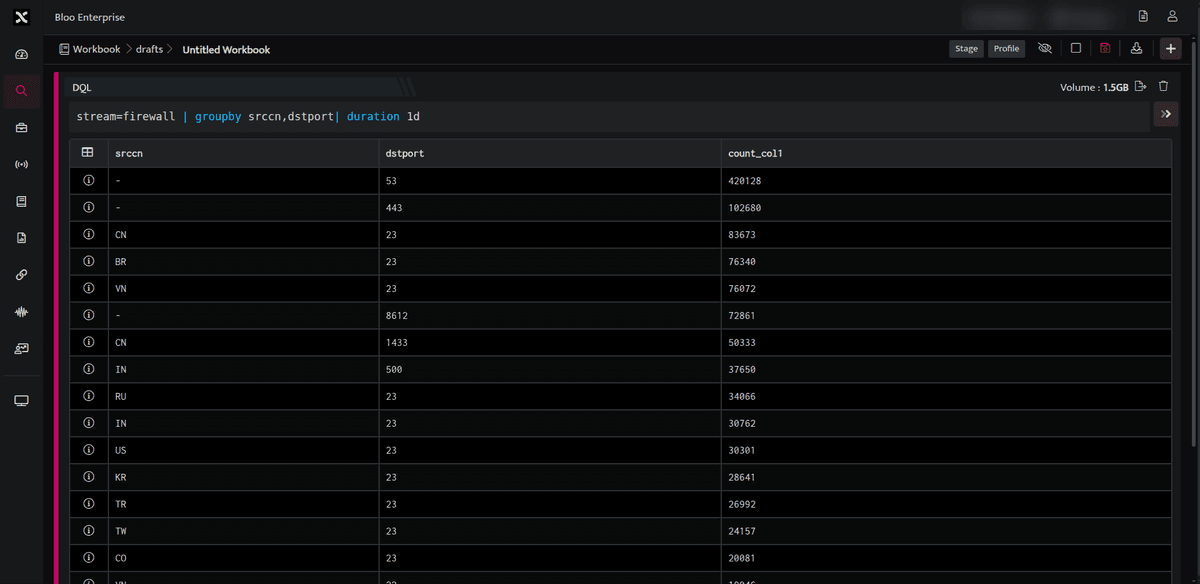
stream=firewall | groupby srccn,dstport| duration 1dHere,
- Stream is Firewall
- Groupby function allows to organize similar data into groups i.e. groupby source country.
- Duration field helps you to retrieve records for the specified duration
The above query should retrieve all fields for each event where the stream is a firewall, retrieve all records for one day (i.e. specified duration) and group it as per the destination port and source country as shown below:
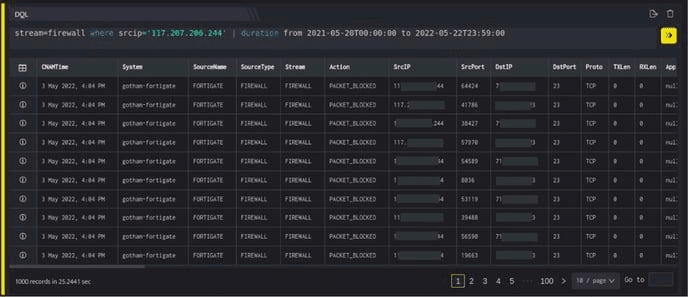
stream=firewall where srcip='10.35.38.1' | duration from 2021-05-20T00:00:00 to 2022-05-22T23:59:00In the second example, Duration from field specifies the start date and time and end date and time for which the records should be retrieved.
Related
Was this page helpful?