
Connectors
Snyk Connector
Connectors in Bloo
Updated 2026-08-17
Overview
Snyk Connector uses the pull method to fetch audit logs using the Snyk REST API. Bloo can collect, normalize, and monitor Snyk audit logs to help you identify abnormal activity within your Snyk account in real time.
⚠ A latency of up to 24 hours is possible due to Snyk Audit and Group log pagination. To avoid duplicate or lost data, Bloo pulls Snyk logs once a day.
Prerequisites
- API Token
- Organization ID
- Group ID
⚠ Snyk Audit Logs are available only with Snyk Enterprise plans. Free and Team plan users do not have access to audit logs.
ℹ Note: A user with the Snyk Group Administrator and Organization Administration role is necessary.
Generate an API Token
- Log in to your Snyk account.
- Go to Account Settings → General.
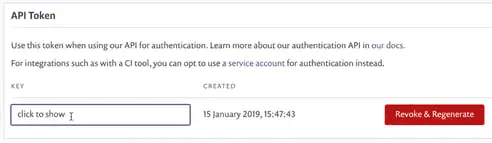
- Locate the Auth Token section. In the KEY field, click click to show, then select and copy the value in that field. Store this in a secure location, as you will need it in the next steps.
Get Organization ID and Group ID
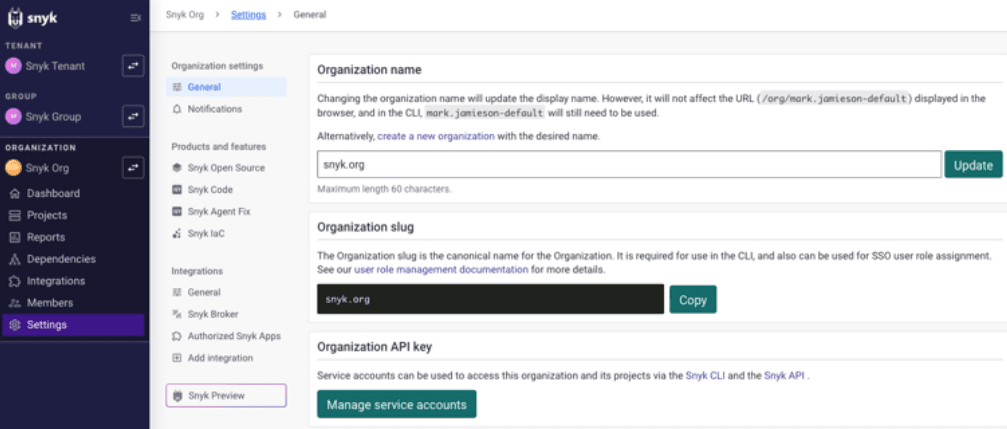
- Go to Organization Settings → General.
- In the Organization ID field, click Copy.
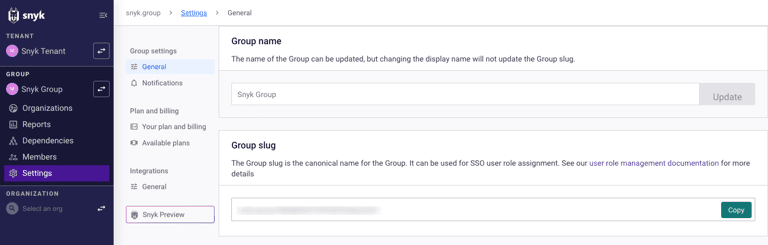
- Go to Group Settings → General.
- In the Group ID field, click Copy.
Configure the Snyk Connector in Bloo
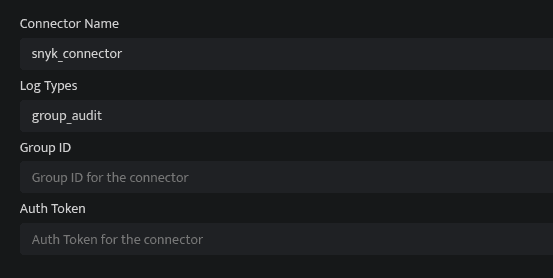
All connector configuration is done from the Datasource page in Bloo.
| Field | Description |
|---|---|
| Connector Name | Enter a name for the connector. |
| Log Types | Select the log type from which you want to fetch the logs. |
| Group ID | Enter the Group ID. (Optional according to the selected log type). |
| Authentication Token | Enter the Authentication token. |
- Click Save after entering all the required details.
- Bloo will validate the configuration automatically.
- Navigate to Collection Status and confirm the connector is listed with a status of Active. This signifies the connector is configured successfully and data is ready to ingest.
✓ When the connector appears in Collection Status with status Active, it is configured successfully and data is ready to ingest.
Related Links
Bloo — Collection Status | Bloo — Connector Validation | Snyk — Authentication for API | Snyk Account | Bloo — Troubleshooting Connector Validations
Related
Was this page helpful?