
Connectors
JiraServiceDesk
Jiraservicedesk
Updated 2026-08-16
Automation Guide for Bloo
1. Overview
JiraServiceDesk integration helps you to create Jira issues in Jira Service Management (formerly known as Jira Service Desk) from alerts.
2. Configuration
- In the Configuration Box, enter the Configuration Name to uniquely identify this configuration.
- Identify the content of headers and payload that you need to provide in the Configuration Box. Refer to the official Atlassian API documentation in the Related Links section for both Jira Server/Data Center and Jira Cloud API references.
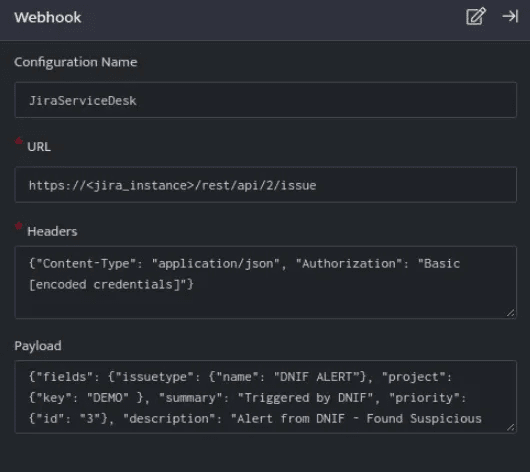
Below is an example of how you can leverage this integration to create an issue on Jira Service Management:
Payload
{ "fields": { "project": { "key": "DEMO" }, "issuetype": { "name": "Bloo ALERT" }, "summary": "Triggered by Bloo", "priority": { "id": "3" }, "description": "Alert from Bloo - Found Suspicious Remote Desktop Activity on host DstIP" }}JiraServiceDesk creates an issue on Jira Service Management based on the values given in the payload.
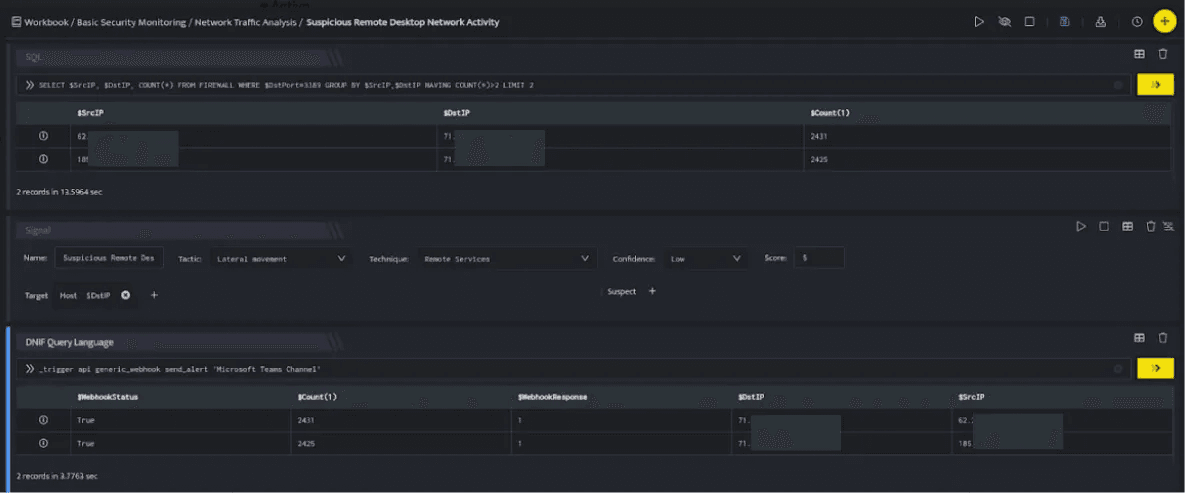
In the above figure, a workbook named Suspicious Remote Desktop Network Activity is executed which contains the following blocks:
- SQL Block: Displays two suspicious Destination IPs on execution of the workbook.
- Signal Block: This will raise a signal on detecting the suspicious IPs.
- DQL Block with _trigger query: Using Webhook integration for JiraServiceDesk, an issue will be created on Jira Service Management based on the values given in the payload.
| Note: Payload Field StructureIn the payload above, project, issuetype, summary, priority, and description are all direct fields under the 'fields' object.Ensure each field is at this level and not nested inside another field. An incorrect structure will cause the API call to fail and the issue will not be created in Jira.Replace 'DEMO' with your actual Jira project key, and 'Bloo ALERT' with a valid issue type name in your Jira project. |
3. Related Links
Related
Was this page helpful?