
How-to guides
How to Add a Connector?
Connector
Updated 2026-08-17
This section helps you to add connectors such as TLS, AWS, or Box based on your requirement.
- Login to Bloo Console using valid credentials.
- Hover on the Administration icon on the left sidebar of the Home screen, from the option displayed select Manage Components, the following screen will be displayed.
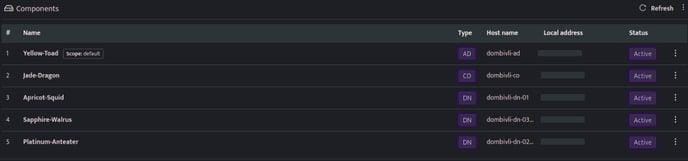
- Click the Component name against the Adapter component, health page will be displayed, the connectors list is displayed at the bottom of the page.

- Click the plus icon in yellow to add new connectors, Select the required connector, enter the connector configurations and save the details.
Introduced in v9.1.1 UNET sync is a process that is running on core and it automatically syncs your connectors every 30 minutes.
Related
Was this page helpful?