
Connectors
Tenable Security Center Connector
Connectors in Bloo
Updated 2026-08-17
Overview
Tenable Security Center (Tenable.sc) is an on-premises vulnerability management platform that enables organizations to identify, analyze, and manage vulnerabilities across their network. Bloo integrates with Tenable Security Center to collect and monitor vulnerability data in real time.
Prerequisites
- Access Key
- Secret Key
- Host — the IP address or hostname of your Tenable Security Center server
Note Required user role: Administrator or organizational user with appropriate permissions.
Generate API Keys
Log in to your Tenable Security Center account.
Click Users → Users. The Users page appears.
Right-click the row for the user for whom you want to generate an API key. The actions menu appears.
— or —
Select the check box for the user. The available actions appear at the top of the table.
Click API Keys → Generate API Key. A confirmation window appears.
Click Generate. The Your API Key window appears, displaying the Access Key and Secret Key.
Save both the Access Key and Secret Key in a safe location.
Warning You cannot view API Secret Keys in the Tenable Security Center interface after their initial generation. If you lose your Secret Key, you must generate new API keys.
Configure the Tenable Security Center Connector in Bloo
All connector configuration is done from the Datasource page in Bloo.
| Field Name | Description |
|---|---|
| Connector Name | Enter a name for the connector. |
| Host | Enter the IP address or hostname of your Tenable Security Center server. |
| Access Key | Enter the Access Key generated above. |
| Secret Key | Enter the Secret Key generated above. |
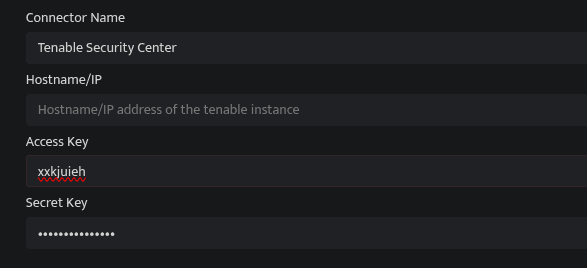
Click Save after entering all the required details.
Bloo will validate the configuration automatically.
Navigate to Collection Status and confirm the connector is listed with a status of Active. This signifies the connector is configured successfully and data is ready to ingest.
Confirmed When the connector appears in Collection Status with status Active, it is configured successfully and data is ready to ingest.
Related Links
Bloo — Collection Status | Bloo — Connector Validation | Tenable — Generate API Keys | Bloo — Troubleshooting Connector Validations
Related
Was this page helpful?