
Connectors
Tenable Vulnerability Management Connector
Connectors in Bloo
Updated 2026-08-17
Overview
Tenable Vulnerability Management allows security and audit teams to share multiple Tenable Nessus, Tenable Nessus Agent, and Tenable Nessus Network Monitor scanners, scan schedules, scan policies, and scan results among an unlimited set of users or groups. Tenable connector fetches Export Vulnerabilities through the Tenable REST API.
Prerequisites
- Tenable Vulnerability Management account
- Access Key
- Secret Key
Generate API Keys
Log in to your Tenable account at cloud.tenable.com.
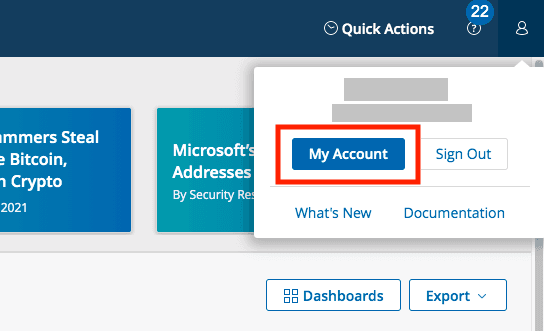
Click the user profile icon in the upper right corner and go to My Account.
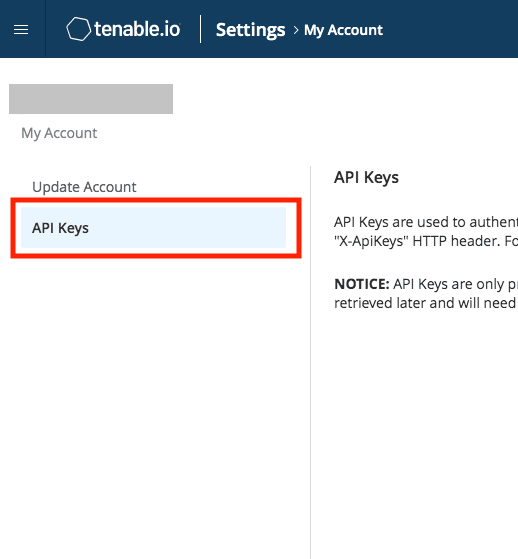
- Click the API Keys tab.
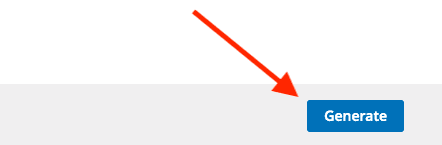
- Click Generate. A warning appears that existing keys will be replaced — click Generate to confirm.
- Copy both the Access Key and Secret Key and store them in a secure location.
Warning Copy both keys immediately — Tenable displays them only once. After you close or navigate away from this page, the keys cannot be retrieved. If you lose them, you will need to generate new keys, which will invalidate any existing integrations using the old keys.
Configure the Tenable Vulnerability Management Connector in Bloo
All connector configuration is done from the Datasource page in Bloo.
| Field Name | Description |
|---|---|
| Connector Name | Enter a name for the connector. |
| Access Key | Enter the Tenable API Access Key. |
| Secret Key | Enter the Tenable API Secret Key. |
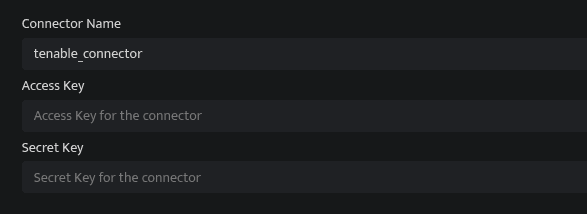
Select the Vulnerability Management product.
Click Save after entering all the required details.
Bloo will validate the configuration automatically.
Navigate to Collection Status and confirm the connector is listed with a status of Active. This signifies the connector is configured successfully and data is ready to ingest.
Confirmed When the connector appears in Collection Status with status Active, it is configured successfully and data is ready to ingest.
Related Links
Bloo — Collection Status | Bloo — Connector Validation | Tenable — Generate API Keys | Tenable Vulnerability Management | Bloo — Troubleshooting Connector Validations
Related
Was this page helpful?