
How-to guides
How to Configure Connectors? (Legacy console)
How to configure a connector instance from the Manage Components screen in the legacy console.
Updated 2026-08-17
How to Configure Connectors? (Legacy console)
Configure a connector instance to directly ingest logs into Bloo
- Login to Bloo Console using valid credentials.
- Hover on the Administration icon on the left sidebar of the Home screen, from the option displayed select Manage Components, the following screen will be displayed.
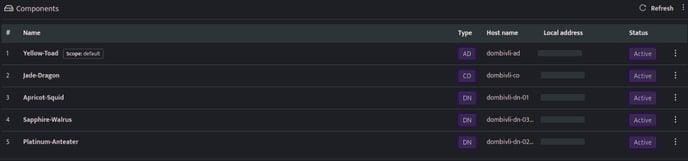
- Click the Component name against the Adapter or PICO component, health page will be displayed, the connectors list is displayed at the bottom of the page.

By default, Syslog Connector and PICO connector will be automatically added while onboarding Adapter.
- Connectors can be managed using the following icons displayed on each row of the connector.
| Icon | Description |
|---|---|
 |
Indicates that the connector is up and running |
 |
Indicates that the particular connector is stopped |
 |
Click this to restart the connector |
Related
Was this page helpful?