
Connectors
Okta Connector
Connectors in Bloo
Updated 2026-08-17
Overview
Okta Connector pulls system events that are related to your organization in order to provide an audit trail that can be used to understand platform activity and to diagnose problems.
Prerequisites
- Okta organisation URL
- API token (preferably from a service account)
Create an Authentication Token
- Log in to your Okta account, move to the Security section on the left navigation bar and then click on API.
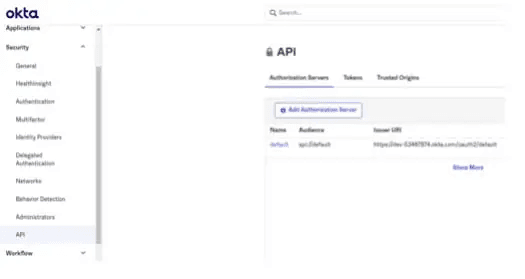
- Go to the Tokens tab and create the API token.
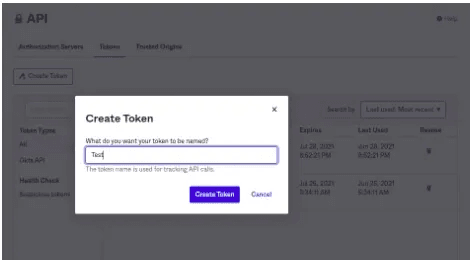
- Store the token securely for future reference.
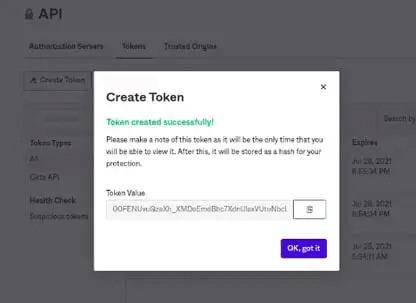
Warning Store your API token securely immediately after creation — it will not be shown again. API tokens are valid for 30 days and automatically renew each time they are used. If a token is inactive for more than 30 days, it is revoked and cannot be used again — you will need to generate a new token and update the connector configuration in Bloo. Tokens issued by deactivated users are also rejected. Use a service account to avoid service interruptions.
Configure the Okta Connector in Bloo
All connector configuration is done from the Datasource page in Bloo.
| Field | Description |
|---|---|
| Connector Name | Enter a name for the connector. |
| Organisation URL | Enter your Okta organisation URL. |
| API Token | Enter the API token. |
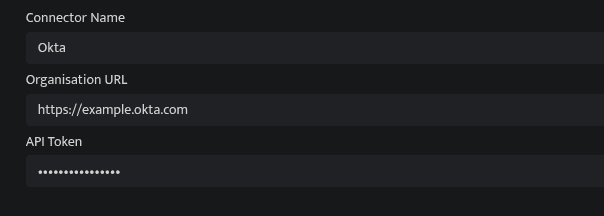
- Click Save after entering all the required details.
- Bloo will validate the configuration automatically.
- Navigate to Collection Status and confirm the connector is listed with a status of Active. This signifies the connector is configured successfully and data is ready to ingest.
Confirmed When the connector appears in Collection Status with status Active, it is configured successfully and data is ready to ingest.
Related Links
Bloo — Collection Status | Bloo — Connector Validation | Okta — Manage API Tokens | Bloo — Troubleshooting Connector Validations
Related
Was this page helpful?