
Connectors
Prisma Alerts Connector
Connectors in Bloo
Updated 2026-08-17
Overview
Prisma Cloud is the industry's most comprehensive cloud native security platform (CNSP), with the industry's broadest security and compliance coverage for users, applications, data, and the entire cloud native technology stack throughout the development lifecycle and across hybrid and multi-cloud environments.
The Prisma Alerts Connector fetches the alerts generated by Prisma Cloud when it detects a violation in a policy that is included in an active alert rule.
Reference: Prisma Cloud Alerts API
Prerequisites
Connectivity with Prisma Cloud API using valid credentials.
Required credentials:
- Username
- Password
- CustomerName
Note CustomerName is required only if you are a multi-tenant user and the body parameters of your login call include a username and password instead of an access key ID and secret key, then you will also need to provide the customerName. Otherwise it is not required. Reference to create credentials: Prisma Cloud — Create Access Keys
Configure the Prisma Alerts Connector in Bloo
All connector configuration is done from the Datasource page in Bloo.
| Field Name | Description |
|---|---|
| Connector Name | Enter a connector name. |
| Prisma URI | Enter Prisma Cloud API URI. Note: Use the API base URL, not the console login URL (e.g. https://api.prismacloud.io). Find your API URL in Prisma Cloud → Settings → Profile → API Endpoint. |
| Prisma Username | Enter Username/access key ID to access the API. |
| Prisma Password | Enter Password/secret key to access the API. |
| Prisma CustomerName | Enter CustomerName if Prisma login requires it, else keep blank. |
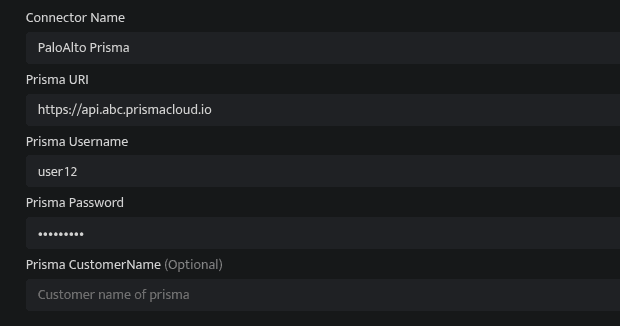
Click Save after entering all the required details.
Bloo will validate the configuration automatically.
Navigate to Collection Status and confirm the connector is listed with a status of Active. This signifies the connector is configured successfully and data is ready to ingest.
Confirmed When the connector appears in Collection Status with status Active, it is configured successfully and data is ready to ingest.
Related Links
Bloo — Collection Status | Bloo — Connector Validation | Prisma Cloud — Alerts API | Prisma Cloud — Create Access Keys | Bloo — Troubleshooting Connector Validations
Related
Was this page helpful?