
Connectors
Asset Store
Asset store
Updated 2026-08-16
Automation Guide for Bloo
1. Overview
Asset Store integration is used to lookup on custom event stores uploaded to Bloo for various Hosts in an organization.
2. Prerequisites
- The custom event store must contain a column named Host in the event store data.
3. Configuration
Follow the initial configuration steps in How to Configure Automation? — refer to the Bloo Knowledge Base.
Click the edit icon to add details.
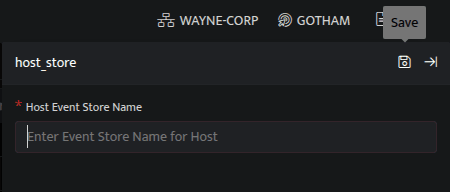
| Field | Description |
|---|---|
| Host Event Store Name | Enter valid Event Store Name for Host |
- Enter the above details and click Save.
4. Lookup Integrated with Asset Store
Retrieve Host Details
The Host for which you want to retrieve details from the event store.
Function name: get_host_info
Input
The HostDetails is a custom event store created to demonstrate this example.
Download sample file: host_details.csv
Run a Search.
The Search query retrieves the DevSrcIP field for each event in the HostDetails (custom) eventstore.

Output
_lookup host_store get_host_info DevSrcIPIn the pipelined query function, the _lookup directive calls the get_host_info function of the host_store plugin. DevSrcIP is passed as a parameter to the function. This output contains details about the Device such as the Asset name, Asset Owner, Asset Group and so on. The output is as shown below:

The Lookup call returns output based on the available data in the event store.
5. Related Links
Related
Was this page helpful?