
Connectors
VirusTotal
Automation Guide for Bloo
Updated 2026-08-17
1. Overview
VirusTotal's API lets you upload and scan files, submit and scan URLs, access finished scan reports and make automatic comments on URLs and samples without the need of using the HTML website interface.
1.1 Real-time Updates
Malware signatures are updated frequently by VirusTotal as they are distributed by antivirus companies. This ensures that the service uses the latest signature sets. As soon as a given contributor blacklists a URL it is immediately reflected in user-facing verdicts.
1.2 Detailed Results
VirusTotal not only tells you whether a given antivirus solution detected a submitted file as malicious, but also displays each engine's detection label (e.g., I-Worm.Allaple.gen). The same is true for URL scanners, most of which will discriminate between malware sites, phishing sites, suspicious sites, etc. Some engines will provide additional information, stating explicitly whether a given URL belongs to a particular botnet, which brand is targeted by a given phishing site, and so on.
2. Pre-requisites
- Create an account on VirusTotal to obtain an API key. Sign up at: https://www.virustotal.com/gui/join-us
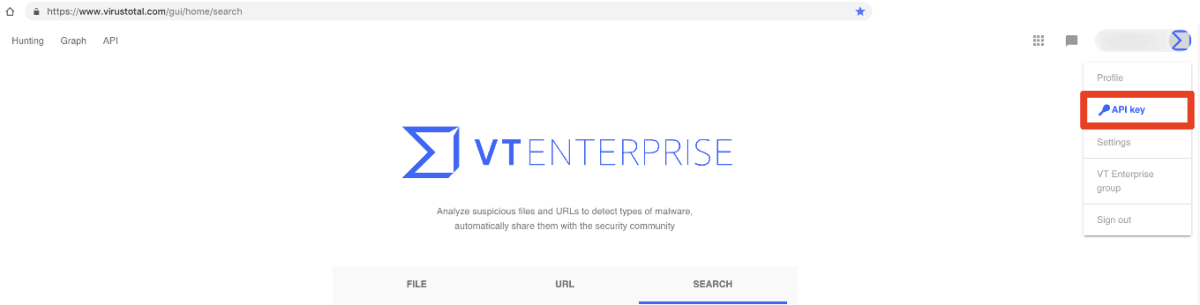
- Obtain your API key by signing in to your account. You will find your public API key in the corresponding menu item under your username.
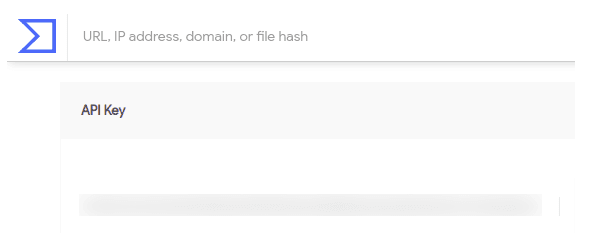
The API key is visible as shown below:
| Important: API Key Usage RestrictionsThe VirusTotal Public API (free) has the following limits and restrictions confirmed from official VirusTotal documentation (docs.virustotal.com):- Rate limit: 4 requests per minute- Daily limit: 500 requests per day- The Public API must NOT be used in commercial products or services.If you are using Bloo in a commercial context, you will require a VirusTotal Premium API key. The Premium API has no rate or daily limits and is governed by a Service Level Agreement (SLA).To check your current API key quota usage, visit your API key page at virustotal.com under your username menu. |
3. Configuration
Follow the initial configuration steps in How to Configure Automation? in the Bloo Knowledge Base.
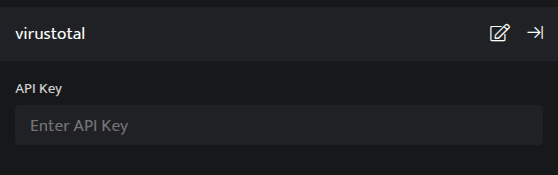
Click the edit icon to add details.
| Field | Description |
|---|---|
| API Key | Enter your valid VirusTotal API key. |
- Enter the above details and click Save.
| Note: API VersionBloo's VirusTotal integration uses API v2. VirusTotal has released API v3 as the current recommended version.Per official VirusTotal documentation: "API version 3 is now the default and encouraged way to programmatically interact with VirusTotal. It greatly improves API version 2, which, for the time being, will not be deprecated. While older API endpoints are still available and will not be deprecated, we encourage you to migrate your workloads to this new version."Your existing API key works with both v2 and v3. Bloo's current integration continues to function with no changes required.Source: docs.virustotal.com/reference/overview |
4. Lookups Integrated with VirusTotal
4.1 Retrieve URL Scan Reports
The URL for which you want to retrieve the most recent report.
Function name: get_url_report
Input
A URL for which VirusTotal will retrieve the most recent report. You may also specify a scan_id (sha256-timestamp as returned by the URL submission API) to access a specific report.
_retrieve query UrldetailsThe Urldetails is a custom event store created to demonstrate this example. The _retrieve directive fetches the Url field for each event in the Urldetails (custom) event store. The output is as shown below:

Output
_lookup virustotal get_url_report UrlIn the pipelined query function, the _lookup directive calls the get_url_report function of the VirusTotal plugin. Url is passed as a parameter to the function. This report contains details about the URL such as its owner, country, network, reputation, and full scan details. The output is as shown below:

The Lookup call returns output in the following structure for available data:
| Field | Type | Description |
|---|---|---|
| SrcUrl | text | Source URL for lookup |
| Owner | text | Domain Owner |
| Country | text | URL Country |
| Network | text | Network of URL |
| FullDetails | text | Details of the URL |
| Reputation | Number | Reputation of Domain |
| Status | text | Status of the request |
4.2 Retrieve Domain Reports
The domain for which you want to retrieve the report.
Function name: get_domain_report
Input
A domain name.
_retrieve query DomainDetailsThe DomainDetails is a custom event store created to demonstrate this example. The _retrieve directive fetches the Domain field for each event in the DomainDetails (custom) event store. The output is as shown below:

Output
_lookup virustotal get_domain_report DomainIn the pipelined query function, the _lookup directive calls the get_domain_report function of the VirusTotal plugin. Domain is passed as a parameter to the function. This report contains details about the domain, the source domain, reputation of the domain and so on. The output is as shown below:

The Lookup call returns output in the following structure for available data:
| Field | Type | Description |
|---|---|---|
| SrcDomain | text | Source Domain |
| FullDetails | text | Details of the Domain |
| Reputation | Number | Reputation of Domain |
| Status | text | Status of the request |
4.3 Retrieve IP Address Details
Retrieve an IP address report.
Function name: get_ip_report
Input
A valid IPv4 address in dotted quad notation. For the time being, only IPv4 addresses are supported.
_fetch SrcIP from event where Stream=FIREWALL limit 1 >> _lookup virustotal get_ip_report SrcIPThe _fetch directive retrieves SrcIP (source IP address) for each event. The result set is limited to the latest event. The output is as shown below:

Output
In the pipelined query function, the _lookup directive calls the get_ip_report function of the VirusTotal plugin. SrcIP is passed as a parameter to the function. This report contains details about the IP address such as the owner of the IP Address, Network, country to which it belongs and so on. The output is as shown below:

The Lookup call returns output in the following structure for available data:
| Field | Type | Description |
|---|---|---|
| SrcIP | text | Source IP Address |
| Owner | text | Owner of IP Address |
| Network | text | Network of IP Address |
| Country | text | IP Address Country |
| FullDetails | text | Details of the IP |
| Reputation | Number | Domain Reputation |
| Status | text | Status of the request |
4.4 Retrieve File Scan Reports (MD5 / SHA-1 / SHA-256)
File report of MD5/SHA-1/SHA-256 hash for which you want to retrieve the most recent antivirus report.
Function name: get_file_report
Input
A md5/sha1/sha256 hash will retrieve the most recent report on a given sample.
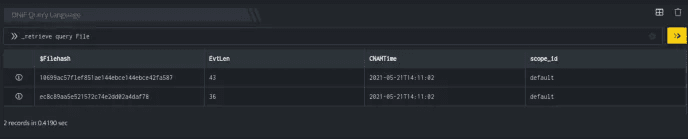
_retrieve query FileThe File is a custom event store created to demonstrate this example. The _retrieve directive fetches the Filehash field for each event in the File (custom) event store. The output is as shown below:
Output
_lookup virustotal get_file_report FilehashIn the pipelined query function, the _lookup directive calls the get_file_report function of the VirusTotal plugin. Filehash is passed as a parameter to the function. This report contains details of the Filehash, File Sha256 Hash, MD5 Sum of the File, and so on. The output is as shown below:

The Lookup call returns output in the following structure for available data:
| Field | Type | Description |
|---|---|---|
| FileHash | text | File Hash (MD5 or SHA-256) |
| Extension | text | Extension of File |
| Reputation | text | Reputation of File |
| MD5 | text | MD5 Sum of the File |
| SHA256 | text | File SHA-256 Hash |
| SHA1 | text | File SHA-1 Hash |
| FullDetails | text | Details of the FileHash |
| Status | text | Status of the request |
5. Related Links
Related
Was this page helpful?