
Connectors
PagerDuty
PagerDuty
Updated 2026-08-16
Automation Guide for Bloo
1. Overview
PagerDuty webhook connections allow you to send alert results as a PagerDuty notification. You can learn more about PagerDuty incident creation in the Create an Incident — PagerDuty API Reference.
2. Configuration
The webhook configuration requires the following fields:
- Configuration Name
- Request Method
- URL
- Headers
- Payload
Here is a detailed explanation of each configuration field:
Configuration Name: This field specifies the name you want to give to the webhook configuration.
Request Method: The HTTP method used to create an incident in PagerDuty. As per PagerDuty's documentation, the POST method is required for this purpose.
URL: The PagerDuty REST API endpoint to which the request is sent:
| https://api.pagerduty.com/incidents |
NoteIn the configurations mentioned below, please replace '<>' with the actual required value. |
Headers: The headers needed for the HTTP request, including the authorization token and content type:
{ "Accept": "application/json", "Authorization": "Token token=<token>", "Content-Type": "application/json", "From": "<user_mail_id>"}You can find the token by logging into PagerDuty. Alternatively, refer to the Create an Incident API Reference — once the page loads, you will find the token details in the Authorization section.
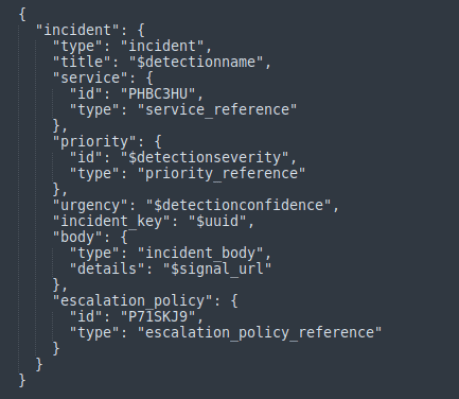
Payload: The JSON payload containing the incident details:
{ "incident": { "type": "incident", "title": "detectionname", "service": { "id": "<service id>", "type": "service_reference" }, "priority": { "id": "severity", "type": "priority_reference" }, "urgency": "detectionconfidence", "incident_key": "uuid", "body": { "type": "incident_body", "details": "signal_url" }, "escalation_policy": { "id": "<escalation policy id>", "type": "escalation_policy_reference" } }}In the payload above, you will find the service ID at the link below:
List Services — PagerDuty API Reference
Additionally, here is the reference link to find the escalation policy ID to mention in the payload:
List Escalation Policies — PagerDuty API Reference
Sample Payload Configuration:
3. Workbook Details
3.1 DQL Block
stream=signals where detectionseverity="High" or detectionseverity="Medium" or detectionseverity="Low"| duration 5m| select *, lower(detectionconfidence) as detectionconfidence| limit 100| NoteYou can modify the DQL block query to suit your needs. |
3.2 Code Block
def transform(inward_array): outward_array = [] for log in inward_array: temp = {} for key, value in log.items(): temp[key] = value ioc = log["detectionscore"] if ioc in [1, 2, 3, 4]: temp["severity"] = "<P4 priority id>" elif ioc in [5, 6]: temp["severity"] = "<P3 priority id>" elif ioc in [7, 8]: temp["severity"] = "<P2 priority id>" elif ioc in [9, 10]: temp["severity"] = "<P1 priority id>" outward_array.append(temp) return outward_arrayPlease refer to the link below to include the Priority ID in the code block:
List Priorities — PagerDuty API Reference
3.3 DQL Block with Trigger Query
Using Webhook integration for PagerDuty, an alert will be sent to the PagerDuty account:
_trigger api generic_webhook send_alert '<Pagerduty_Webhook_name>'By following the above documentation, you can integrate Bloo with PagerDuty to automatically create detailed and relevant incidents based on detected signals.
4. Related Links
Related
Was this page helpful?