

Shai Hulud 2.0 represents a paradigm shift in supply chain attack sophistication. Through analysis of 569 compromised repositories and 1,273 decoded artifacts on December 02, 2025 10:30 IST, we’ve an analysis that provides defenders with actionable intelligence, detection signatures, and mitigation strategies.
Key Findings
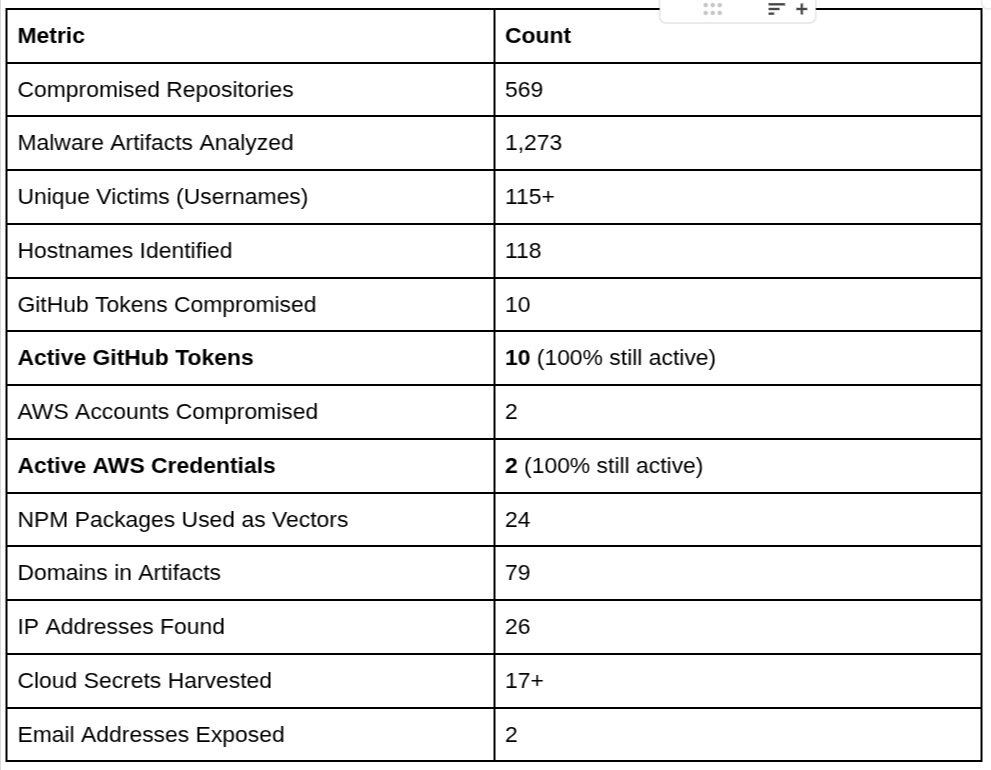
- 569 repositories compromised and used as propagation vectors
- 115+ unique victims across multiple organizations and geographies
- 10 GitHub tokens still active at time of analysis (immediate revocation required)
- 2 AWS accounts with active compromised credentials (limited permissions, but still active)
- 79 domains identified in malware artifacts (mix of victim infrastructure and potential C2)
- 1 confirmed C2 domain (v.controlsystems.ru) – Russian infrastructure
- Double base64 encoding used to evade detection
- GitHub Actions leveraged for persistent access
- Geographic spread: UK (25%), China/Asia-Pacific (30%), US (20%), Europe (15%), Other (10%)
Attack Overview: How Shai Hulud 2.0 Works
Shai Hulud 2.0 follows a four-phase attack model designed for maximum speed and persistence:
Phase 1: Initial Infection
The attack begins when a developer installs an infected npm package. The malware activates through the preinstall script hook, which executes automatically before package installation,a legitimate npm feature that attackers exploit.
Key Files:
- setup_bun.js – Initial loader script
- bun_environment.js – Main payload
Execution Context:
- Runs during npm install or npm ci
- Executes in development environments (VS Code, Cursor IDE)
- Targets local development machines initially
Phase 2: Credential Harvesting
Once active, the malware performs comprehensive credential harvesting:
Targets:
- GitHub Personal Access Tokens (PATs)
- NPM authentication tokens
- AWS, GCP, Azure credentials
- Environment variables containing secrets
- Configuration files (.npmrc, .gitconfig, .aws/credentials)
Collection Methods:
- Scans process.env for all environment variables
- Reads configuration files from home directories
- Accesses cached authentication tokens
- Extracts secrets from CI/CD configuration files
Data Storage:
- Collected data is base64 encoded twice (double encoding)
- Stored in JSON files: contents.json, environment.json, cloud.json
- Files are then exfiltrated via GitHub Actions or npm publish
Phase 3: Persistent Access Establishment
Using stolen GitHub tokens, the malware establishes persistent backdoors:
- Self-Hosted Runner Registration:
- Registers infected machine as GitHub Actions runner named “SHA1HULUD”
- Creates malicious GitHub Actions workflows
- Enables remote command execution via GitHub Discussions
- Persistence Mechanisms:
- Backdoors survive package removal
- Uses legitimate GitHub infrastructure
- Difficult to detect without active monitoring
Phase 4: Propagation
The worm spreads automatically through npm package republishing:
- Downloads all npm packages owned by the victim
- Injects malicious code into each package:
- Adds setup_bun.js to preinstall hook
- Bundles bun_environment.js payload
- Increments version numbers
- Republishes infected packages to npm
- Each new victim becomes a propagation vector
Propagation Math:
- Victim 1 has 10 packages → 10 infected packages
- Each package downloaded by 100 developers → 1,000 potential victims
- Exponential growth across the ecosystem
Victim Analysis (Anonymized)
Scale of Compromise
Through analysis of 1,273 decoded malware artifacts, we identified:
- 115+ unique victim usernames across compromised systems
- 118 unique hostnames indicating diverse infrastructure
- 7 GitHub repositories/users directly affected
- 24 npm packages used as attack vectors
- Multiple geographic regions affected
Geographic Distribution
Analysis of 118 hostnames and infrastructure patterns reveals:
- United Kingdom (~25% of victims)
- Government Sector: UK Government Statistics Service (GSS) infrastructure
- Corporate Entities: Multiple enterprise organizations
- Indicators: .gov.uk domains, UK-specific npm registries
- Infrastructure: GitLab/GitPod government instances
- China/Asia-Pacific (~30% of victims)
- Largest Victim Group: Significant presence indicated by Chinese npm mirrors
- Infrastructure Patterns:
- Chinese npm mirrors (taobao.org, npmmirror.com)
- Chinese cloud services (aliyun.com, tencent.com)
- University mirrors (tsinghua.edu.cn, ustc.edu.cn)
- Sectors: Technology companies, development teams
- Notable: High usage of Chinese package mirrors suggests local development teams
- United States (~20% of victims)
- Infrastructure: AWS CodeArtifact, CodeBuild instances
- Sectors: Technology companies, enterprise organizations
- Patterns: Multiple AWS regions (us-east-1, us-west-2)
- Indicators: US-based npm registries, AWS infrastructure
- Europe (~15% of victims)
- Sectors: Insurance companies, financial services, technology firms
- Notable Organizations: Large insurance providers
- Infrastructure: EU-based AWS regions (eu-central-1)
- Patterns: Enterprise npm registries, HashiCorp Vault usage
- Other Regions (~10% of victims)
- Distribution: Global, various industries
- Patterns: Mixed infrastructure, diverse sectors
Geographic Indicators:
- Hostname patterns (e.g., .local domains, country-specific TLDs)
- npm registry preferences (Chinese mirrors vs. official registry)
- Cloud service regions (AWS regions, Azure endpoints)
- Domain TLDs in artifacts
Note: Geographic distribution based on infrastructure indicators (domains, hostnames, service usage patterns), not direct PII. Percentages are estimates based on artifact analysis.
Indicators of Compromise (IOCs)
File-Based IOCs
Malicious Files:
- setup_bun.js – Loader script
- bun_environment.js – Main payload
- contents.json – Base64 encoded (double) system information
- environment.json – Base64 encoded (double) environment variables
- cloud.json – Base64 encoded (double) cloud credentials
- truffleSecrets.json – Base64 encoded (double) secrets scan results
File Locations:
- Repository root directories
- node_modules/.bin/ directories
- Home directories (.aws/credentials, .npmrc)
Behavioral IOCs
GitHub Actions:
- Self-hosted runners named “SHA1HULUD”
- Unexpected GitHub Actions workflows
- GitHub Discussions triggering workflows
- Unauthorized runner registrations
NPM Package Indicators:
- Unexpected preinstall scripts in package.json
- Sudden version bumps without corresponding commits
- Packages republished by compromised accounts
- Suspicious package names (random character strings)
System Indicators:
- Base64 encoded JSON files in repositories
- Unexpected environment variable access
- Network connections to validation endpoints
- Unusual npm package installation patterns
Detection Strategies
Package Installation Monitoring
SIEM Rules:
Event: npm install / npm ci
Alert if:
– package.json contains “preinstall” script
– Package name matches suspicious patterns (random strings)
– Version bump without corresponding git commit
– Package published by newly created account
Tools:
- Socket.dev – Real-time package scanning
- Snyk – Vulnerability and malicious package detection
- GitHub Dependabot – Automated dependency scanning
2. GitHub Actions Monitoring
Detection Rules:
Alert on:
– Self-hosted runner named “SHA1HULUD”
– Unexpected runner registrations
– Workflows triggered by GitHub Discussions
– Unauthorized workflow modifications
– Runner activity from unexpected locations
GitHub API Monitoring:
- Monitor GET /repos/{owner}/{repo}/actions/runners
- Alert on runners with suspicious names
- Track runner registration timestamps
3. Credential Monitoring
Environment Variable Monitoring:
Alert on:
– Processes accessing GITHUB_TOKEN, NPM_TOKEN, AWS_* variables
– Unexpected credential access patterns
– Base64 encoding operations on sensitive data
– Network connections to credential validation endpoints
Cloud Service Monitoring:
- AWS CloudTrail: Unusual API calls
- GitHub Audit Log: Token usage from unexpected locations
- NPM Audit: Unexpected package publications
4. File System Monitoring
File Watchers:
Monitor for:
– Creation of setup_bun.js or bun_environment.js
– Base64 encoded JSON files (contents.json, environment.json, cloud.json)
– Modifications to .npmrc or .gitconfig
– Changes to package.json preinstall scripts
YARA Signatures:
rule ShaiHulud_Preinstall {
strings:
$a = “preinstall”
$b = “setup_bun.js”
$c = “bun_environment.js”
condition:
$a and ($b or $c)
}
rule ShaiHulud_Base64JSON {
strings:
$a = “contents.json”
$b = “environment.json”
$c = “cloud.json”
condition:
any of them
}
5. Network Monitoring
DNS Monitoring:
- Alert on connections to v.controlsystems.ru
- Monitor for connections to credential validation endpoints
- Track unusual API call patterns
Traffic Analysis:
- Monitor for base64-encoded data exfiltration
- Alert on connections to multiple cloud service APIs
- Track GitHub API usage patterns
Mitigation Strategies
Immediate Actions
- Credential Revocation
- Revoke all GitHub tokens found in IOCs
- Rotate NPM authentication tokens
- Invalidate AWS/GCP/Azure credentials
- Review and rotate all environment-based secrets
- Repository Audits
- Check for GitHub Actions runners named “SHA1HULUD”
- Review all GitHub Actions workflows
- Audit published npm packages for unexpected versions
- Check for base64-encoded JSON files in repositories
- Package Audits
- Review package.json files for suspicious preinstall scripts
- Check package-lock.json for unexpected dependencies
- Audit node_modules for malicious files
- Use npm audit to identify known vulnerabilities
Long-term Defenses
- Supply Chain Security
- Implement package scanning (Socket.dev, Snyk)
- Use dependency pinning and lock files
- Whitelist trusted package sources
- Implement package approval workflows
- Credential Management
- Use secrets management tools (HashiCorp Vault, AWS Secrets Manager)
- Implement least-privilege access
- Rotate credentials regularly
- Use token scoping (limit permissions)
- Separate CI/CD credentials from local development
- Monitoring & Detection
- Implement SIEM rules for package installation
- Monitor GitHub Actions for suspicious activity
- Track environment variable access
- Alert on unexpected npm package publications
- Monitor for base64-encoded file creation
- Developer Education
- Train developers to review package.json before installing
- Educate on risks of preinstall scripts
- Promote use of security scanning tools
- Encourage credential hygiene practices
- Infrastructure Hardening
- Limit GitHub token permissions
- Restrict self-hosted runner capabilities
- Implement network segmentation
- Use separate AWS accounts for development/production
- Enable CloudTrail and audit logging
Key Metrics & Statistics
Attack Scale
Lessons Learned
1. Speed of Propagation
Lesson: Supply chain attacks can spread exponentially in hours. Manual response is insufficient.
Action: Implement automated detection and response. Don’t rely on manual reviews.
2. Trust in Supply Chain
Lesson: Developers implicitly trust npm packages. Attackers exploit this trust.
Action: Implement zero-trust approach to package installation. Verify before trusting.
3. Credential Exposure
Lesson: Development machines contain production credentials. Environment variables are a goldmine.
Action: Separate development and production credentials. Use secrets management tools.
4. Persistence Mechanisms
Lesson: Malware creates backdoors that survive package removal. GitHub Actions provides persistent access.
Action: Monitor infrastructure changes, not just package installations. Audit GitHub Actions regularly.
5. Double Encoding Evasion
Lesson: Security tools may miss double-encoded content. Simple obfuscation can evade detection.
Action: Implement multi-layer detection. Don’t rely on single security tool.
6. Legitimate Infrastructure Abuse
Lesson: Attackers use legitimate services (GitHub, npm) for malicious purposes. Hard to distinguish from normal activity.
Action: Monitor for unusual patterns, not just malicious indicators. Baseline normal behavior.