

This is a two-part blog series where I share my journey of turning a Windows machine into a publicly exposed honeypot designed to lure, log, and learn from real-world attackers.
- Part 1: Behind the Screens of a Trap Machine.I will walk you through setting up a Windows EC2 instance on AWS. This setup includes open services like SSH, RDP, HTTP(S), FTP, and Telnet. We will explore how each fake service was designed to look vulnerable while being safely monitored. All logs were forwarded to DNIF SIEM for real-time visibility.
- Part 2: The Day I Became a Digital Beekeeper.This part dives into what happened once the trap went live. From Chile brute-force bots to SQL injection attempts from Vietnam, I break down the attacks, examine behaviors, and gather useful threat intelligence. Real tools. Real techniques. Real learning.
Whether you’re a red teamer, defender, or just curious about cybersecurity, this series gives you a close-up look at the reality of life on the edge of the internet.
Part 1: Building a Windows Honeypot – Behind the Screens of a Trap Machine
Prelude: Why Build a Honeypot, Anyway?
It started with a simple idea: What if we could watch attackers in their natural habitat? Honeypots aren’t new. Still, running a high-interaction Windows honeypot on a public IP with real-looking services brings a thrilling risk.
I wasn’t just pretending to be in danger; I wanted to attract attention.
“The moment you expose a service to the internet, someone, somewhere, is trying to break into it.”
Overview: What We Built
We designed a honeypot hosted on Windows EC2 on AWS, publicly exposed to gather real-world attack telemetry. Here’s a quick summary of what went live:
22Fake SSHSimulate remote access and log brute-force attempts.80HTTP HR PortalMimic an internal HR login system.443HTTPS Fake CorpSimulate a secure corporate intranet site.3389RDPCommon brute-force target.21FTPOften used for data exfiltration attempts.23TelnetEmulate outdated access protocols.445SMBSMB trap mimicking EternalBlue vulnerabilitiesEach service was custom-coded or wrapped using Python modules to create a believable experience. The attacker should feel like they’ve hit an exposed internal server in a misconfigured corporate network.
Hosting Architecture: The Danger Zone
- Platform: AWS EC2 (Windows 10 Pro)
- Security Groups: 0.0.0.0/0 allowed on all major ports
- Isolation: No VPC peering, no outbound connections
- Monitoring: Log files + Windows Event Forwarding + DNIF SIEM
This machine was intentionally vulnerable. It had no updates, no firewalls, weak passwords, and fake credentials in plaintext files.
Inside the Services: A Quick Tour
1. ssh_service.py – The Troll Tunnel
Using Python’s paramiko, we created a fake SSH server. Attackers were able to connect and issue commands, but every response was rigged.
ssh root@172.16.xx.xx -p 22

root@172.16.xx.xx's password:

Permission denied, please try again.

root@172.16.xx.xx's password:

C:\Users\root> ls

'ls' is not recognized as an internal or external command,

operable program or batch file.

C:\Users\root> dir

 Directory of C:\Users\root

04/22/2025  10:00 AM    <DIR>          Documents

04/22/2025  10:00 AM    <DIR>          Downloads

04/22/2025  10:00 AM             265 notes.txt

C:\Users\root>
Behavior:
- Logs IP, attempted credentials, commands
- Accepts weak passwords (admin:admin), then drops into a fake shell
- Mimics real command responses before sarcastically shutting them down
Below is how the logs would be logged at our honeypot end.
[2025-06-05 12:02:11] [+] New SSH connection from 172.16.xxx.xxx

[2025-06-05 12:02:14] [AUTH] Attempt from 172.16.xxx.xxx - Username: root, Password: test

[2025-06-05 12:02:15] [AUTH] Attempt from 172.16.xxx.xxx - Username: root, Password: test

[2025-06-05 12:02:18] [AUTH] Attempt from 172.16.xxx.xxx - Username: root, Password: test3

[2025-06-05 12:02:18] [AUTH] root exceeded max login attempts from 172.16.xxx.xxx

[2025-06-05 12:02:22] [AUTH] Attempt from 172.16.xxx.xxx - Username: root, Password: test

[2025-06-05 12:02:22] [AUTH] root exceeded max login attempts from 172.16.xxx.xxx

[2025-06-05 12:02:26] [AUTH] Attempt from 172.16.xxx.xxx - Username: root, Password: toor

[2025-06-05 12:02:28] [COMMAND] root@172.16.xxx.xxx: dir
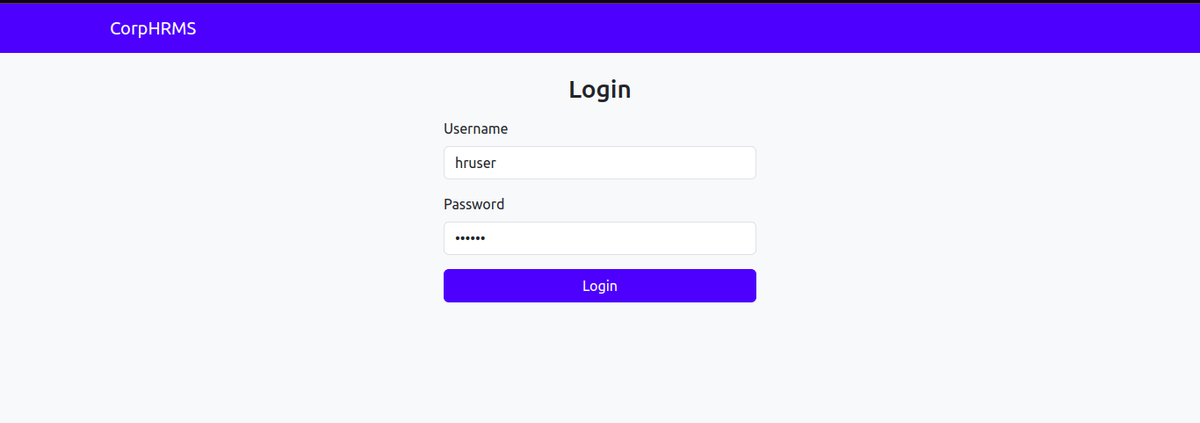
2. hrms.py – The HR Portal Trap (Port 80)
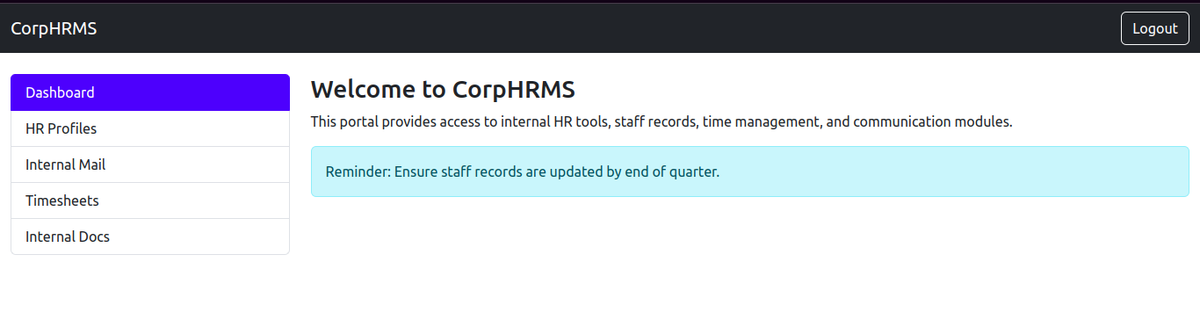
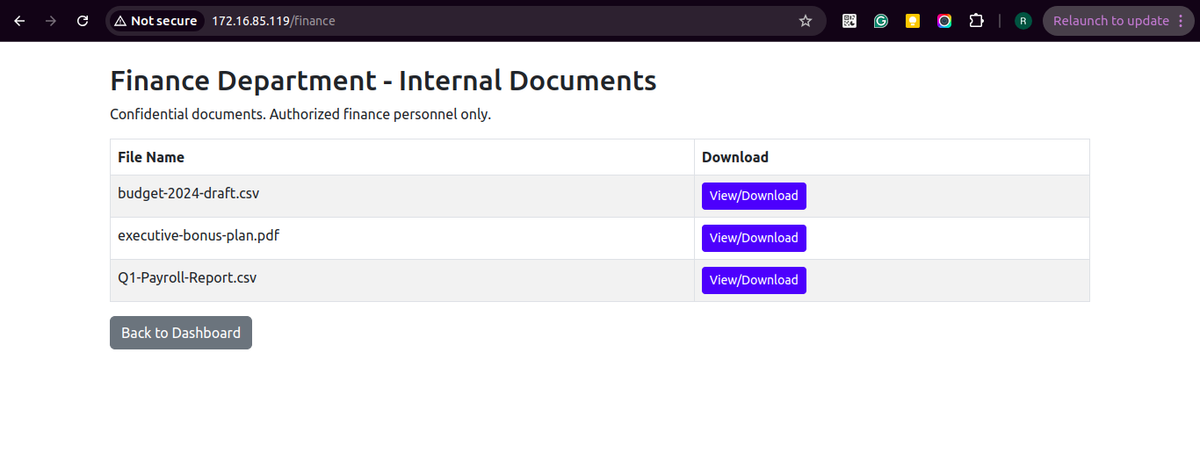
Mimics a vulnerable HRMS portal with fake credentials and SQL injection-vulnerable parameters. Attracts both bots and human attackers:
- Login form with fake user accounts
- Password reset button that always “fails”
- SQLi-prone GET parameters (e.g., employee?id=105 OR 1=1)
What it lures: Script kiddies, bots, or more advanced attackers who scan for open web ports and look for login pages.
Below is how the page would look to the attacker:
3. https_service.py – Fake Corporate Dashboard (Port 443)
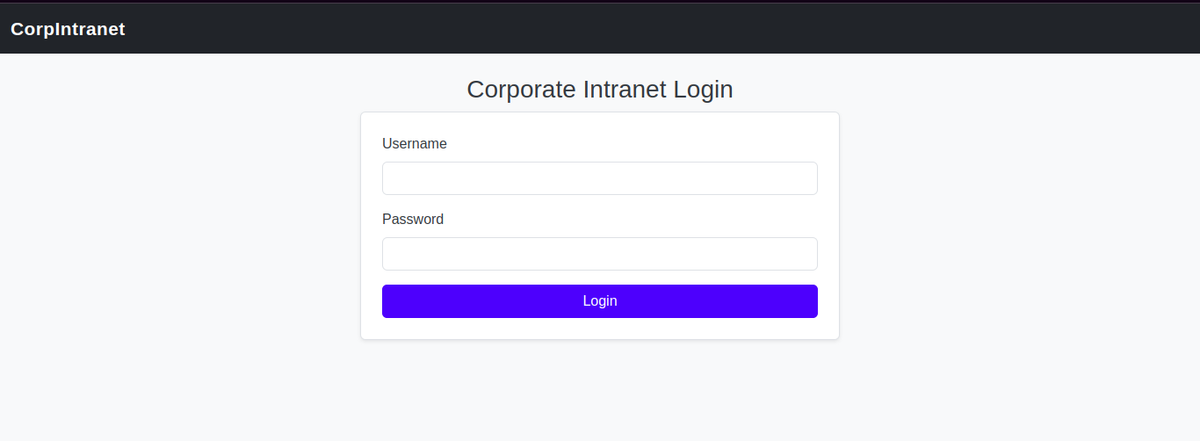
This site mimics a corporate finance dashboard, hosted via HTTPS.
- Login form with TLS
- Routes like /admin, /payroll, /upload
- Triggers fake file upload responses or access denied
Below is how the page would look to the attacker:
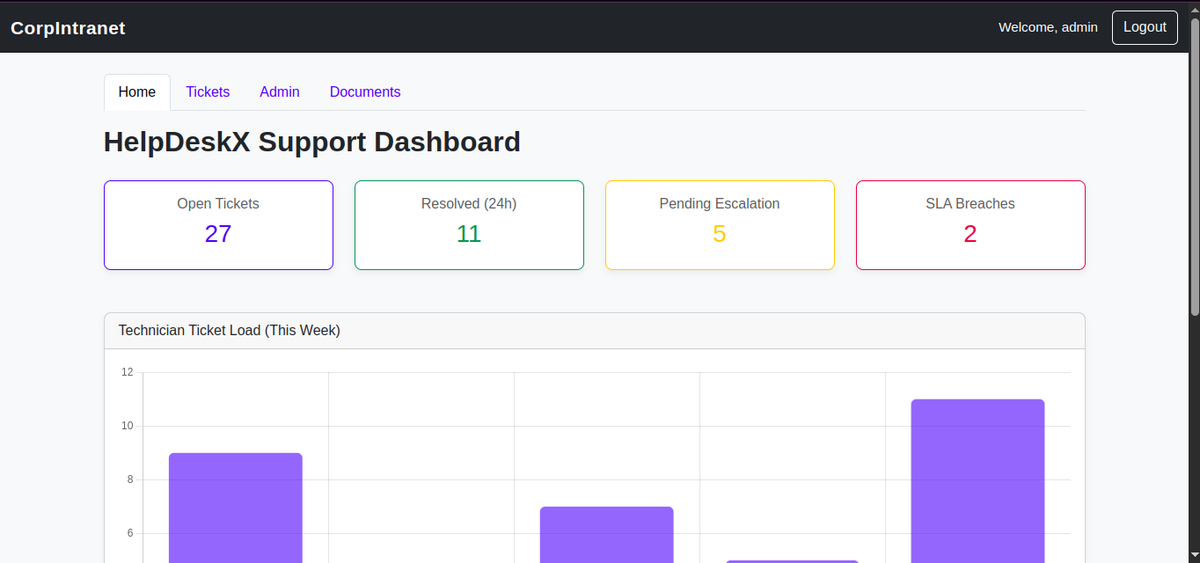
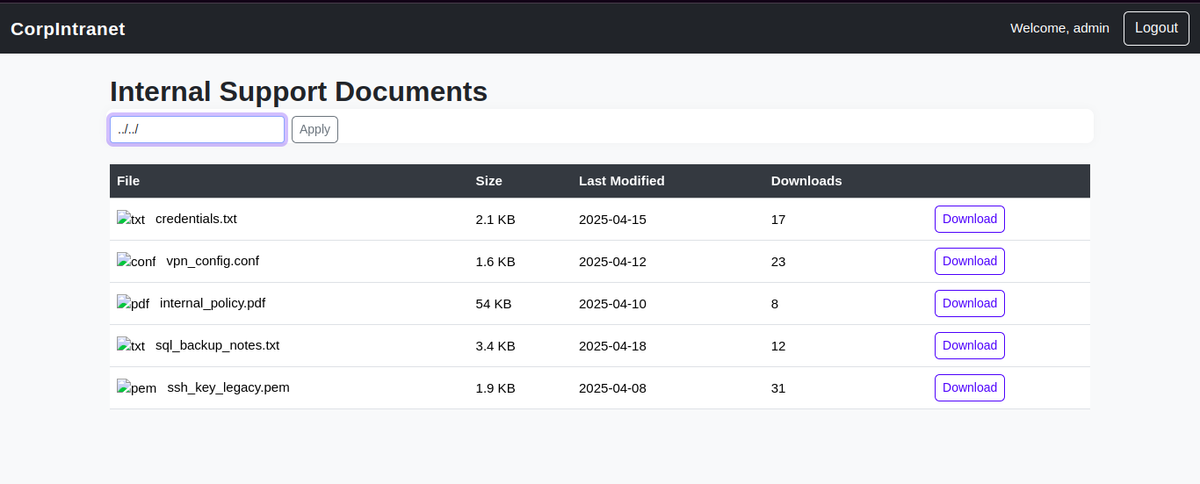
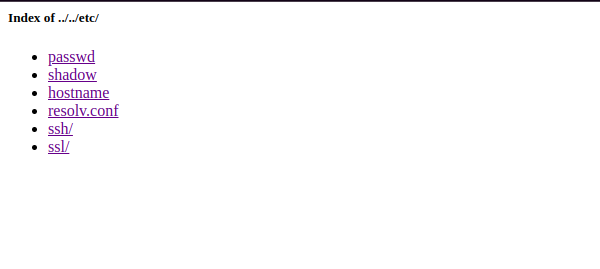
Behavior:
- Logs IP, attempted credentials
- Accepts weak passwords (admin: admin), then drops into a fake website
- Mimics a real website with vulnerabilities like SQLi, Directory traversal, etc.
Below is how the logs would be logged at our honeypot end.
172.16.xxx.xxx - - [05/Jun/2025 12:20:40] "GET /documents HTTP/1.1" 302 -

172.16.xxx.xxx - - [05/Jun/2025 12:20:40] "GET / HTTP/1.1" 200 -

172.16.xxx.xxx - - [05/Jun/2025 12:21:11] "GET /static/css/style.css HTTP/1.1" 200 -

172.16.xxx.xxx - - [05/Jun/2025 12:21:11] "GET /static/bootstrap/js/bootstrap.bundle.min.js HTTP/1.1" 200 -

172.16.xxx.xxx - - [05/Jun/2025 12:21:11] "GET /static/bootstrap/css/bootstrap.min.css HTTP/1.1" 200 -

172.16.xxx.xxx - - [05/Jun/2025 12:21:12] "GET /favicon.ico HTTP/1.1" 404 -

172.16.xxx.xxx - - [05/Jun/2025 12:24:30] "POST / HTTP/1.1" 302 -

172.16.xxx.xxx - - [05/Jun/2025 12:24:31] "GET /dashboard HTTP/1.1" 200 -

172.16.xxx.xxx - - [05/Jun/2025 12:24:32] "GET /static/bootstrap/css/bootstrap.min.css HTTP/1.1" 200 -

172.16.xxx.xxx - - [05/Jun/2025 12:24:32] "GET /static/css/style.css HTTP/1.1" 200 -

172.16.xxx.xxx - - [05/Jun/2025 12:24:32] "GET /static/bootstrap/js/chart.3.9.1.min.js HTTP/1.1" 200 -

172.16.xxx.xxx - - [05/Jun/2025 12:24:32] "GET /static/bootstrap/js/bootstrap.bundle.min.js HTTP/1.1" 304 -

172.16.xxx.xxx - - [05/Jun/2025 12:24:47] "GET /documents HTTP/1.1" 200 -

172.16.xxx.xxx - - [05/Jun/2025 12:24:48] "GET /static/css/style.css HTTP/1.1" 304 -

172.16.xxx.xxx - - [05/Jun/2025 12:24:48] "GET /static/bootstrap/css/bootstrap.min.css HTTP/1.1" 304 -

172.16.xxx.xxx - - [05/Jun/2025 12:24:48] "GET /static/bootstrap/js/bootstrap.bundle.min.js HTTP/1.1" 304 -

172.16.xxx.xxx - - [05/Jun/2025 12:24:48] "GET /static/img/txt_icon.png HTTP/1.1" 404 -

172.16.xxx.xxx - - [05/Jun/2025 12:24:48] "GET /static/img/conf_icon.png HTTP/1.1" 404 -

172.16.xxx.xxx - - [05/Jun/2025 12:24:48] "GET /static/img/pdf_icon.png HTTP/1.1" 404 -

172.16.xxx.xxx - - [05/Jun/2025 12:24:48] "GET /static/img/key_icon.png HTTP/1.1" 404 -

172.16.xxx.xxx - - [05/Jun/2025 12:25:00] "GET /documents?file=../../ HTTP/1.1" 200 -

172.16.xxx.xxx - - [05/Jun/2025 12:25:14] "GET /documents?file=../../home/ HTTP/1.1" 403 -

172.16.xxx.xxx - - [05/Jun/2025 12:25:18] "GET /documents?file=../../opt/ HTTP/1.1" 403 -

[ACCESS] 2025-06-05 12:24:47.174564 - IP: 172.16.xxx.xxx - User: admin - Visited: /documents?file=

<150>Jun 05 12:24:47 DESKTOP-testhost Apache[22940]: 172.16.xxx.xxx - - [05/Jun/2025:12:24:47 +0000] "GET /documents HTTP/1.1" 200 3657 "https://172.16.xx.xx/dashboard" "Mozilla/5.0 (X11; Linux x86_64) AppleWebKit/537.36 (KHTML, like Gecko) Chrome/135.0.0.0 Safari/537.36"

<150>Jun 05 12:24:48 DESKTOP-testhost Apache[22940]: 172.16.xxx.xxx - - [05/Jun/2025:12:24:48 +0000] "GET /static/css/style.css HTTP/1.1" 304 1252 "https://172.16.xx.xx/documents" "Mozilla/5.0 (X11; Linux x86_64) AppleWebKit/537.36 (KHTML, like Gecko) Chrome/135.0.0.0 Safari/537.36"

<150>Jun 05 12:24:48 DESKTOP-testhost Apache[22940]: 172.16.xxx.xxx - - [05/Jun/2025:12:24:48 +0000] "GET /static/bootstrap/css/bootstrap.min.css HTTP/1.1" 304 231913 "https://172.16.xx.xx/documents" "Mozilla/5.0 (X11; Linux x86_64) AppleWebKit/537.36 (KHTML, like Gecko) Chrome/135.0.0.0 Safari/537.36"

<150>Jun 05 12:24:48 DESKTOP-testhost Apache[22940]: 172.16.xxx.xxx - - [05/Jun/2025:12:24:48 +0000] "GET /static/bootstrap/js/bootstrap.bundle.min.js HTTP/1.1" 304 80721 "https://172.16.xx.xx/documents" "Mozilla/5.0 (X11; Linux x86_64) AppleWebKit/537.36 (KHTML, like Gecko) Chrome/135.0.0.0 Safari/537.36"

<150>Jun 05 12:24:48 DESKTOP-testhost Apache[22940]: 172.16.xxx.xxx - - [05/Jun/2025:12:24:48 +0000] "GET /static/img/txt_icon.png HTTP/1.1" 404 207 "https://172.16.xx.xx/documents" "Mozilla/5.0 (X11; Linux x86_64) AppleWebKit/537.36 (KHTML, like Gecko) Chrome/135.0.0.0 Safari/537.36"

<150>Jun 05 12:24:48 DESKTOP-testhost Apache[22940]: 172.16.xxx.xxx - - [05/Jun/2025:12:24:48 +0000] "GET /static/img/conf_icon.png HTTP/1.1" 404 207 "https://172.16.xx.xx/documents" "Mozilla/5.0 (X11; Linux x86_64) AppleWebKit/537.36 (KHTML, like Gecko) Chrome/135.0.0.0 Safari/537.36"

<150>Jun 05 12:24:48 DESKTOP-testhost Apache[22940]: 172.16.xxx.xxx - - [05/Jun/2025:12:24:48 +0000] "GET /static/img/pdf_icon.png HTTP/1.1" 404 207 "https://172.16.xx.xx/documents" "Mozilla/5.0 (X11; Linux x86_64) AppleWebKit/537.36 (KHTML, like Gecko) Chrome/135.0.0.0 Safari/537.36"

<150>Jun 05 12:24:48 DESKTOP-testhost Apache[22940]: 172.16.xxx.xxx - - [05/Jun/2025:12:24:48 +0000] "GET /static/img/key_icon.png HTTP/1.1" 404 207 "https://172.16.xx.xx/documents" "Mozilla/5.0 (X11; Linux x86_64) AppleWebKit/537.36 (KHTML, like Gecko) Chrome/135.0.0.0 Safari/537.36"

[ACCESS] 2025-06-05 12:25:00.219532 - IP: 172.16.xxx.xxx - User: admin - Visited: /documents?file=../../

[ALERT] 2025-06-05 12:25:00.248810 - IP: 172.16.xxx.xxx - User: admin - Directory traversal via /documents: ../../

<150>Jun 05 12:25:00 DESKTOP-testhost Apache[22940]: 172.16.xxx.xxx - - [05/Jun/2025:12:25:00 +0000] "GET /documents?file=..%2F..%2F HTTP/1.1" 200 413 "https://172.16.xx.xx/documents" "Mozilla/5.0 (X11; Linux x86_64) AppleWebKit/537.36 (KHTML, like Gecko) Chrome/135.0.0.0 Safari/537.36"

[ACCESS] 2025-06-05 12:25:14.054258 - IP: 172.16.xxx.xxx - User: admin - Visited: /documents?file=../../home/

[ALERT] 2025-06-05 12:25:14.083551 - IP: 172.16.xxx.xxx - User: admin - Directory traversal via /documents: ../../home/

<150>Jun 05 12:25:14 DESKTOP-testhost Apache[22940]: 172.16.xxx.xxx - - [05/Jun/2025:12:25:14 +0000] "GET /documents?file=../../home/ HTTP/1.1" 403 67 "https://172.16.xx.xx/documents?file=..%2F..%2F" "Mozilla/5.0 (X11; Linux x86_64) AppleWebKit/537.36 (KHTML, like Gecko) Chrome/135.0.0.0 Safari/537.36"

[ACCESS] 2025-06-05 12:25:18.065491 - IP: 172.16.xxx.xxx - User: admin - Visited: /documents?file=../../opt/

[ALERT] 2025-06-05 12:25:18.094786 - IP: 172.16.xxx.xxx - User: admin - Directory traversal via /documents: ../../opt/

<150>Jun 05 12:25:18 DESKTOP-testhost Apache[22940]: 172.16.xxx.xxx - - [05/Jun/2025:12:25:18 +0000] "GET /documents?file=../../opt/ HTTP/1.1" 403 66 "https://172.16.xx.xx/documents?file=..%2F..%2F" "Mozilla/5.0 (X11; Linux x86_64) AppleWebKit/537.36 (KHTML, like Gecko) Chrome/135.0.0.0 Safari/537.36"
Key difference from HRMS:
- HTTPS makes it feel secure
- More high-value illusion (appears privileged)
- Built to entice credential stuffing attacks
4. rdp_listener.ps1 – RDP Honeyport
Real RDP port (3389) is exposed, but backed with a PowerShell listener that logs handshake attempts and failed auth.
5. ftp_service.py – Data Exfil Lure
Pretends to be an FTP server with shared folders named:
- Backups
- Config
ftp 172.16.xx.xx 21

Connected to 172.16.xx.xx.

220 220 Welcome to enterprise FTP service.

Name (172.16.xx.xx:testuser@testmac.network): root

331 Username ok, send password.

Password:

230 Login successful.

Remote system type is UNIX.

Using binary mode to transfer files.

ftp> ls

200 Active data connection established.

125 Data connection already open. Transfer starting.

drwxrwxrwx   1 owner    group           0 Apr 21 09:00 Backups

drwxrwxrwx   1 owner    group           0 Apr 21 09:00 Configs

drwxrwxrwx   1 owner    group           0 Apr 21 09:00 Documents

drwxrwxrwx   1 owner    group           0 Apr 24 11:20 Logs

-rw-rw-rw-   1 owner    group          18 Apr 17 06:28 README.txt

drwxrwxrwx   1 owner    group           0 Apr 21 09:00 Secrets

226 Transfer complete.

ftp>
Attackers can list files but downloading always fails. Every interaction is logged.
Behavior:
- Logs IP, attempted credentials, commands
- Accepts weak passwords (admin:admin), then drops into a fake shell
- Mimics real command responses before sarcastically shutting them down
Below is how the logs would be logged at our honeypot end.
[FTP] Connection from 172.16.xxx.xxx:47212

[I 2025-06-05 12:15:08] 172.16.xxx.xxx:60894-[] FTP session opened (connect)

[FTP] Connection from 172.16.xxx.xxx:60894

[I 2025-06-05 12:15:09] 172.16.xxx.xxx:47212-[] USER 'toor' failed login.

[I 2025-06-05 12:15:09] 172.16.xxx.xxx:47212-[] FTP session closed (disconnect).

[I 2025-06-05 12:15:11] 172.16.xxx.xxx:60894-[root] USER 'root' logged in.
6. telnet_fake.py – Legacy Admin Login
Old-school login prompt that just echoes back text. Most bots immediately attempt default passwords.
Logging Format
Each service logs with this unified format:
[TIMESTAMP] IP:PORT - ACTION - SERVICE_NAME - DETAILS
Example:
[2025-05-10 14:22:33] 91.230.210.45:22 - LOGIN_FAILED - ssh_service - user: adminLogs are stored locally, forwarded to Windows Event Log, and parsed into DNIF.